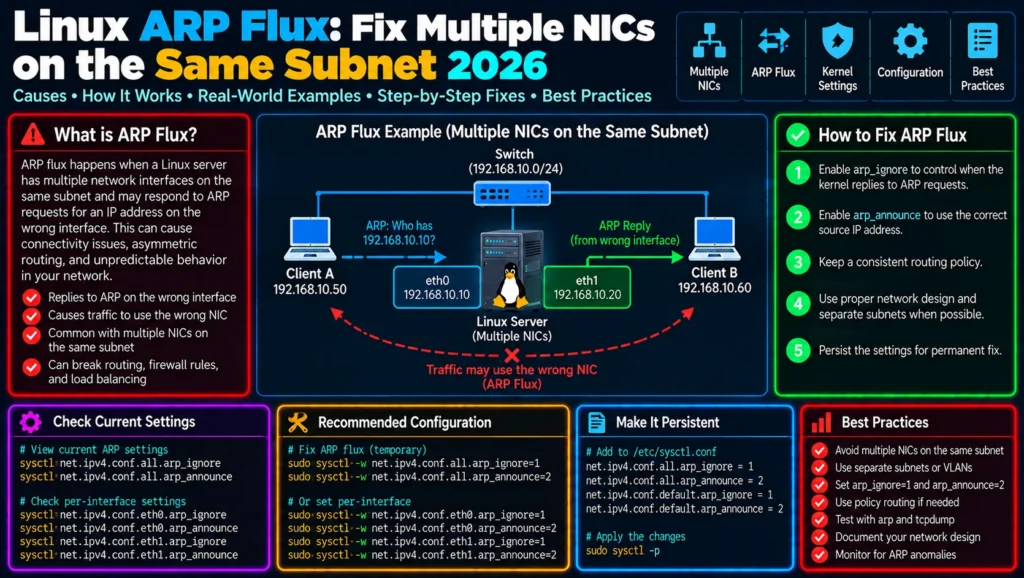
Linux ARP Flux Explained: Fix Multiple NICs on the Same Subnet
A Linux server with two network interfaces on the same subnet can produce one of the most confusing networking problems an administrator will encounter.
Both interfaces are up. Both IP addresses are correct. The routing table appears normal. Ping may work. Yet traffic unexpectedly arrives through the wrong NIC, neighboring machines associate an IP address with the wrong MAC address, connectivity moves between interfaces, or packet captures show ARP replies coming from an interface you did not expect.
This behavior is commonly associated with ARP flux.
It is especially relevant on multi-homed Linux servers where multiple interfaces share the same Layer 2 broadcast domain.
The important detail is that Linux does not necessarily treat an IPv4 address as belonging exclusively to one physical interface. The Linux kernel documentation explains that, by default, the kernel can answer ARP requests using addresses configured on other interfaces because IP addresses are effectively owned by the host rather than strictly by individual interfaces.
That default is often useful.
In specialized multi-NIC architectures, however, it can produce surprising results.
This guide explains Linux ARP flux, how to diagnose it, how arp_filter, arp_ignore, and arp_announce work, how policy routing interacts with ARP behavior, and how to avoid replacing one network problem with another.
What Is Linux ARP Flux?
Consider a server with two physical interfaces connected to the same Layer 2 network:
                     Switch
                  /          \
                 /            \
             enp1s0          enp2s0
                |               |
        192.168.50.10     192.168.50.20
                 \             /
                  Linux Server
Both addresses belong to:
192.168.50.0/24You might naturally expect:
192.168.50.10 → MAC address of enp1s0
192.168.50.20 → MAC address of enp2s0
and expect each interface to answer ARP only for its own IP.
Linux does not necessarily behave that way by default.
The kernel’s <a href=”https://docs.kernel.org/networking/ip-sysctl.html” target=”_blank” rel=”noopener”>official IP sysctl documentation</a> explains that with the default arp_filter=0, Linux may respond to an ARP request with an address associated with another interface. The documentation notes that IP addresses are considered properties of the complete host rather than strictly of a particular interface.
That design has advantages, but it can create problems in more complex multi-interface environments.
If you first need to understand why Linux selected an unexpected network interface at the routing layer, read CorgiNetwork’s <a href=”https://corginetwork.com/linux-traffic-uses-wrong-interface/“>Linux Traffic Uses the Wrong Interface</a> troubleshooting guide before changing ARP settings.
ARP Comes Before Normal IP Communication on Ethernet
Suppose another machine wants to communicate with:
192.168.50.10Before it can send the Ethernet frame, it needs the destination MAC address.
Conceptually:
Host A

Who has 192.168.50.10?
        |
        | ARP Request
        v
      Switch
        |
        v
Linux Server
The server returns an ARP reply containing a MAC address.
Host A then stores the mapping in its neighbor/ARP cache:
192.168.50.10 → aa:bb:cc:dd:ee:01IP routing and Layer 2 neighbor discovery are therefore related but distinct processes.
For the larger TCP/IP architecture behind this behavior, see CorgiNetwork’s <a href=”https://corginetwork.com/tcp-ip-explained-a-complete-guide-to-tcp-ip-model/“>TCP/IP Explained</a> guide.
Why Does Linux Answer ARP This Way?
The behavior can initially seem incorrect.
If an address was configured on enp1s0, why would another interface become involved?
Because Linux uses what is sometimes described as a weak host model in this area: the host owns its local IP addresses, rather than enforcing a simple one-address-one-interface assumption for every ARP decision.
The Linux kernel documentation explicitly explains the reasoning behind default arp_filter=0: responding for local addresses across interfaces can improve the chance of successful communication in ordinary environments. It also notes that complex configurations such as load balancing may require more control.
This distinction matters.
The default behavior is not necessarily a Linux bug.
Your topology may simply require stricter ARP behavior.
A Practical ARP Flux Scenario
Imagine:
Linux Server

enp1s0
IP:  192.168.50.10
MAC: AA:AA:AA:AA:AA:10

enp2s0
IP:  192.168.50.20
MAC: BB:BB:BB:BB:BB:20
Both interfaces connect to the same switch and subnet.
A neighboring host asks:
Who has 192.168.50.10?You expect:
Reply from AA:AA:AA:AA:AA:10But under Linux’s default ARP behavior, the situation can be less strictly tied to the interface than you expect.
This can result in neighboring systems learning mappings that do not correspond to your intended interface separation.
Potential symptoms include:
- traffic arriving on an unexpected NIC;
- unstable neighbor entries;
- monitoring systems reporting traffic on the wrong interface;
- firewall rules tied to interfaces behaving unexpectedly;
- load-balancing designs producing uneven traffic;
- packet captures appearing inconsistent with the intended topology.
The Linux kernel’s own Ethernet driver documentation warns that multiple interfaces sharing the same Ethernet broadcast network can produce unbalanced receive traffic because of default ARP behavior.
First: Prove You Actually Have an ARP Problem
Do not modify sysctl values merely because two interfaces exist.
Start by examining the system.
Check Interfaces
ip -br linkThen:
ip -br addrExample:
enp1s0   UP   192.168.50.10/24
enp2s0   UP   192.168.50.20/24
If both interfaces are in the same subnet, continue.
Inspect the Neighbor Table
Run:
ip neighExample:
192.168.50.1 dev enp1s0 lladdr 00:11:22:33:44:55 REACHABLEThe neighbor table is one of the most useful tools for diagnosing Ethernet-level reachability.
You can also monitor it dynamically:
ip monitor neighThen generate traffic and observe changes.
For a broader set of networking diagnostic commands, CorgiNetwork’s <a href=”https://corginetwork.com/linux-network-tools-guide/“>Linux Network Tools Guide</a> provides a practical command-line reference.
Use arping to Test ARP Directly
ping tests IP/ICMP connectivity.
For ARP troubleshooting, use arping.
For example:
arping -I enp1s0 192.168.50.1The arping manual documents -I as the option used to specify the interface from which ARP requests should be sent.
You can also perform duplicate-address detection:
arping -D -I enp1s0 192.168.50.10This can help detect whether another machine is responding for an address you believe belongs only to your server.
External reference: <a href=”https://man7.org/linux/man-pages/man8/arping.8.html” target=”_blank” rel=”noopener”>Linux arping manual</a>.
Capture ARP Packets with tcpdump
Packet capture provides stronger evidence than assumptions.
Run:
sudo tcpdump -eni enp1s0 arpThen on the second interface:
sudo tcpdump -eni enp2s0 arpOr capture both:
sudo tcpdump -eni any arpYou may see traffic similar to:
ARP, Request who-has 192.168.50.10 tell 192.168.50.100followed by a reply.
The important questions are:
Which interface received the request?

Which interface sent the reply?

Which MAC address was advertised?
For deeper packet analysis, CorgiNetwork’s <a href=”https://corginetwork.com/wireshark-explained/“>Wireshark Explained</a> guide complements tcpdump by showing how packet-level troubleshooting works visually.
Check the Current ARP sysctl Values
Start with:
sysctl net.ipv4.conf.all.arp_filterThen:
sysctl net.ipv4.conf.all.arp_ignore
sysctl net.ipv4.conf.all.arp_announce
Also inspect each interface:
sysctl net.ipv4.conf.enp1s0.arp_filter
sysctl net.ipv4.conf.enp2s0.arp_filter
and:
sysctl net.ipv4.conf.enp1s0.arp_ignore
sysctl net.ipv4.conf.enp2s0.arp_ignore
Do not assume the global setting tells the entire story.
Linux exposes networking sysctls at multiple scopes.
Understanding arp_filter
The first parameter worth understanding is:
net.ipv4.conf.*.arp_filterThe kernel documents two basic states.
0 = default behavior
1 = ARP responses influenced by routing
With arp_filter=1, Linux can control which interface responds according to whether the kernel would route traffic from the ARP’d address through that interface.
There is an important consequence:
arp_filter depends on routing behavior.
The official kernel documentation explicitly notes that source-based routing is required for this mechanism to work correctly in multi-interface configurations.
That connects this article directly to policy routing.
If your server needs:
Source IP A → NIC A → Gateway A
Source IP B → NIC B → Gateway B
read CorgiNetwork’s <a href=”https://corginetwork.com/netplan-multiple-default-routes-policy-routing/“>Netplan Multiple Default Routes and Policy Routing Guide</a>.
ARP filtering cannot compensate for an incoherent routing design.
Temporarily Testing arp_filter
For diagnostic testing, an administrator may evaluate:
sudo sysctl -w net.ipv4.conf.all.arp_filter=1and appropriate per-interface settings.
But do not blindly copy this into production.
First capture ARP behavior before the change.
Then apply the test.
Then capture again.
The goal is to demonstrate:
Before
↓
Unexpected interface answers


Configuration change
↓


After
↓
Expected interface answers
If nothing changes, you may not have diagnosed the correct problem.
Understanding arp_ignore
arp_ignore controls when Linux should answer an incoming ARP request for a local IPv4 address.
The default is:
arp_ignore = 0The kernel documentation states that mode 0 permits replies for any local target IP address configured on any interface.
That is important in a multi-interface environment.
A commonly investigated stricter value is:
arp_ignore = 1With this behavior, the target IP must be a local address configured on the interface receiving the ARP request.
Conceptually:
ARP request arrives on enp1s0
             |
             v
Is target IP configured on enp1s0?
        /           \
      YES            NO
       |              |
       v              v
   May reply       Don't reply
This provides much stronger interface-specific behavior.
The kernel supports additional arp_ignore levels as well, so production tuning should be based on the official <a href=”https://docs.kernel.org/networking/ip-sysctl.html” target=”_blank” rel=”noopener”>Linux IP sysctl documentation</a>, not arbitrary tuning guides.
Understanding arp_announce
arp_ignore controls responses.
arp_announce addresses another side of the problem: which local source address Linux announces when sending ARP requests.
The default:
arp_announce = 0allows Linux to use local addresses more freely.
The kernel defines increasingly restrictive behavior for higher values.
For example, mode 1 tries to avoid using local addresses that are not part of the target’s subnet on that interface, while mode 2 selects the best local address for the target.
This becomes useful when you want to prevent an interface from advertising an inappropriate source IP during ARP resolution.
arp_ignore and arp_announce Solve Different Problems
It is easy to confuse them.
Think of them this way:
arp_ignore
     ↓
Should I ANSWER this ARP request?


arp_announce
     ↓
Which source IP should I ANNOUNCE
when I generate an ARP request?
Meanwhile:
arp_filter
     ↓
Should routing information influence
which interface answers?
These settings are related but not interchangeable.
A Common ARP Flux Tuning Pattern
In some multi-homed designs, administrators use settings along the lines of:
net.ipv4.conf.all.arp_ignore=1
net.ipv4.conf.all.arp_announce=2
with corresponding interface/default configuration as required by the topology.
But this should not be treated as a universal copy-and-paste fix.
Why?
Because your server may be:
- acting as a router;
- running a load balancer;
- using VRRP;
- hosting a floating IP;
- using bonding;
- running Kubernetes;
- using policy routing;
- connected to different VLANs;
- deliberately accepting traffic for an address through another interface.
Changing ARP behavior without understanding those requirements can break legitimate connectivity.
Persisting sysctl Configuration Correctly
A command such as:
sudo sysctl -w net.ipv4.conf.all.arp_ignore=1changes runtime state.
It does not by itself describe a maintainable production configuration.
Modern Linux systems can load sysctl configuration from files under:
/etc/sysctl.d/For example:
/etc/sysctl.d/90-multinic-arp.confThe sysctl.d manual documents how these files are used to apply kernel parameters during boot.
External reference: <a href=”https://man7.org/linux/man-pages/man5/sysctl.d.5.html” target=”_blank” rel=”noopener”>sysctl.d(5)</a>.
A production change should also include comments explaining why the non-default behavior exists.
Future administrators should not encounter:
arp_ignore=1three years later with no idea why it was added.
ARP Filtering and Policy Routing Must Agree
This is one of the most important concepts in the article.
Suppose:
enp1s0 → 192.168.50.10
enp2s0 → 192.168.50.20
You want:
192.168.50.10
      ↓
enp1s0
and:
192.168.50.20
      ↓
enp2s0
ARP configuration alone does not necessarily establish that routing behavior.
Linux policy routing can select routes based on source addresses.
The ip rule manual explains that the Routing Policy Database can select routes using fields including the source address, destination address, incoming interface and packet mark.
Check:
ip ruleThen:
ip route show table allAnd finally test each source:
ip route get 192.168.50.100 from 192.168.50.10and:
ip route get 192.168.50.100 from 192.168.50.20If both lookups select the same interface when your architecture requires separate paths, fix routing before trying to force ARP behavior.
For the complete diagnostic methodology, use CorgiNetwork’s <a href=”https://corginetwork.com/linux-traffic-uses-wrong-interface/“>Linux Traffic Uses the Wrong Interface</a> guide.
ARP Flux vs Reverse Path Filtering
These two issues are often confused.
They are not the same.
ARP Flux
Concerned primarily with:
IP address
    ↕
MAC address
    ↕
Interface
and ARP request/reply behavior.
Reverse Path Filtering
Concerned with validating whether the source of an incoming IP packet is reachable according to the kernel’s routing information.
Check it with:
sysctl net.ipv4.conf.all.rp_filterThe kernel defines:
0 = disabled
1 = strict
2 = loose
and notes that loose mode is relevant when asymmetric or otherwise complicated routing is required.
Do not disable rp_filter because you believe you have ARP flux.
Diagnose each mechanism independently.
ARP Flux vs Asymmetric Routing
These problems can also coexist.
Suppose an ARP request causes traffic for:
192.168.50.10to arrive through enp2s0.
Linux then selects its preferred default route through:
enp1s0You can now have:
Request
   ↓
enp2s0
   ↓
Linux
   ↓
enp1s0
   ↓
Response
ARP behavior affected where traffic arrived.
Routing affected where the reply left.
This is why packet captures are essential.
Do not label every multi-interface failure “ARP flux” simply because ARP is present.
Verify the Routing Path
Use:
ip route get DESTINATIONand, more importantly:
ip route get DESTINATION from SOURCEFor example:
ip route get 192.168.50.100 from 192.168.50.10Compare:
ip route get 192.168.50.100 from 192.168.50.20If the wrong interface is already selected here, the problem is primarily routing-related.
If routing looks correct but ARP replies advertise unexpected MAC addresses, investigate ARP behavior more deeply.
Verify Neighbor Resolution
After changing ARP-related behavior, inspect:
ip neighYou may need to clear a stale neighbor entry during controlled testing:
sudo ip neigh flush dev enp1s0Be careful on remote production systems.
Clearing neighbor information can temporarily interrupt active communication while entries are relearned.
Testing from another host is often even more valuable.
On that host:
ip neigh show 192.168.50.10Then:
ip neigh show 192.168.50.20Confirm that the MAC mappings correspond to the architecture you intended.
Verify with tcpdump
Capture interface one:
sudo tcpdump -eni enp1s0 arpCapture interface two:
sudo tcpdump -eni enp2s0 arpThen from another machine:
arping 192.168.50.10Observe which interface responds.
Repeat:
arping 192.168.50.20This provides direct evidence of the change.
Test the Application Layer Too
Even if ARP behavior is correct, the application may still fail.
Test TCP:
nc -vz 192.168.50.10 443Then:
nc -vz 192.168.50.20 443CorgiNetwork’s <a href=”https://corginetwork.com/netcat-explained/“>Netcat Explained</a> guide shows how to use nc for direct TCP/UDP connectivity testing.
For HTTP:
curl -v http://192.168.50.10/and:
curl -v http://192.168.50.20/Correct ARP does not guarantee that:
- the service listens on both addresses;
- the firewall permits both interfaces;
- routing is symmetric;
- the application is correctly bound.
Check Listening Addresses
Run:
ss -lntpSuppose the application shows:
LISTEN 0 511 192.168.50.10:443but you are testing:
192.168.50.20:443That is an application-binding issue, not an ARP problem.
Likewise:
0.0.0.0:443typically indicates a different listening scope from an application explicitly bound to one address.
Always troubleshoot layer by layer.
Check Firewall Rules
Run:
sudo nft list rulesetor inspect the firewall framework your system actually uses.
Rules may explicitly reference:
iifname "enp1s0"or:
iifname "enp2s0"Therefore, changing which interface receives traffic can change whether the firewall accepts it.
CorgiNetwork’s <a href=”https://corginetwork.com/firewalls-explained/“>Firewalls Explained</a> provides the broader context for interface-, protocol-, and state-aware filtering.
Same Subnet vs Separate VLANs
Before applying complex sysctl tuning, ask whether both interfaces genuinely need to occupy the same Layer 2 domain.
Instead of:
NIC A ─┐
       ├── Same switch / same VLAN
NIC B ─┘
you may be able to design:
NIC A → VLAN 10
NIC B → VLAN 20
Separating broadcast domains can produce a cleaner architecture.
Linux kernel Ethernet-driver documentation itself lists separating interfaces into different broadcast domains/VLANs as an alternative to ARP filtering in relevant multi-interface configurations.
Sometimes the best solution is not another sysctl.
It is a better network design.
What About Bonding?
If the actual goal is redundancy or aggregated interfaces, two independently addressed NICs on the same subnet may not be the architecture you really need.
Linux bonding can combine multiple physical interfaces into one logical interface for use cases including redundancy and load distribution.
Conceptually:
enp1s0 ─┐
        ├── bond0 → 192.168.50.10
enp2s0 ─┘
This differs fundamentally from:
enp1s0 → 192.168.50.10
enp2s0 → 192.168.50.20
The Linux kernel maintains dedicated <a href=”https://docs.kernel.org/networking/bonding.html” target=”_blank” rel=”noopener”>Ethernet Bonding documentation</a> for these configurations.
Choose the architecture based on the actual requirement rather than forcing independent interfaces to emulate bonding behavior.
A Practical ARP Flux Troubleshooting Workflow
Use this sequence.
Step 1 — Confirm interface addresses
ip -br addrStep 2 — Confirm both interfaces really share a subnet
Example:
192.168.50.10/24
192.168.50.20/24
Step 3 — Inspect routing
ip routeStep 4 — Inspect policy rules
ip ruleStep 5 — Inspect all routing tables
ip route show table allStep 6 — Inspect ARP-related sysctls
sysctl net.ipv4.conf.all.arp_filter
sysctl net.ipv4.conf.all.arp_ignore
sysctl net.ipv4.conf.all.arp_announce
Step 7 — Inspect neighbors
ip neighStep 8 — Capture ARP
sudo tcpdump -eni any arpStep 9 — Test from another machine
arping SERVER_IPStep 10 — Verify route selection
ip route get DESTINATION from SOURCEStep 11 — Test TCP
nc -vz SERVER_IP PORTStep 12 — Check firewall/application bindings
sudo nft list ruleset
ss -lntp
This workflow separates Layer 2, Layer 3, firewall and application problems instead of treating them as one mysterious connectivity failure.
Common Mistake: Changing Three sysctls at Once
Suppose you change:
arp_filter
arp_ignore
arp_announce
simultaneously.
Connectivity improves.
Which parameter fixed the problem?
You do not know.
A better troubleshooting process is:
Observe
   ↓
Form hypothesis
   ↓
Change one relevant variable
   ↓
Measure
   ↓
Compare
Production networking should be evidence-driven.
Common Mistake: Copying arp_ignore=1 and arp_announce=2 Everywhere
These values appear frequently in online tutorials.
That does not make them universally correct.
A server participating in:
- VRRP;
- HA clustering;
- floating IPs;
- proxy ARP;
- load balancing;
- container networking
may require different behavior.
Always understand the topology first.
Common Mistake: Ignoring Policy Routing
Remember the kernel documentation’s warning around arp_filter: source-based routing is relevant when using it to control multi-interface ARP behavior.
If routing says:
192.168.50.10 → enp2s0while your ARP design assumes:
192.168.50.10 → enp1s0the system’s layers disagree.
Fix the architecture rather than stacking sysctl workarounds on top of incorrect routes.
Common Mistake: Confusing ARP with DNS
ARP resolves:
IPv4 address → MAC addresson a local Layer 2 network.
DNS resolves something fundamentally different:
Hostname → IP addressIf:
ping 192.168.50.10behaves incorrectly, DNS is probably irrelevant to that specific test.
For the distinction, CorgiNetwork’s <a href=”https://corginetwork.com/dns-explained/“>DNS Explained</a> guide covers name resolution separately.
Common Mistake: Testing Only from the Server
ARP flux is often easiest to observe from a neighboring machine.
On another Linux host:
ip neighor:
arping 192.168.50.10may reveal the problem immediately.
Troubleshooting only from the affected server can hide what other machines have learned about its addresses.
Production Checklist
Before declaring the issue resolved, verify:
✓ Each NIC has the intended IP address
✓ Routing matches the intended source/interface path
✓ Policy-routing rules are correct
✓ ARP replies come from the intended interface
✓ Neighboring hosts learn the expected MAC addresses
✓ rp_filter behavior is understood
✓ Firewall rules work with the actual incoming interface
✓ Applications listen on the required addresses
✓ Changes survive reboot
✓ Configuration is documented
Then repeat packet capture after reboot.
Do not assume persistent sysctl or networking configuration loaded successfully.
Frequently Asked Questions
What is ARP flux in Linux?
ARP flux generally describes unexpected ARP behavior on multi-interface Linux systems where a host may respond to ARP requests for an address through an interface other than the one an administrator associates with that address.
The underlying behavior follows Linux’s host-level treatment of local IP addresses and configurable ARP policies.
Why does Linux answer ARP on the wrong interface?
By default, Linux can respond to ARP requests for local addresses configured on other interfaces. The kernel documentation explains that local IP addresses belong to the complete host rather than being strictly owned by individual interfaces.
What does arp_filter=1 do?
It allows routing information to influence which interface responds to ARP requests. The kernel documentation specifically notes that source-based routing is needed for this behavior to work as intended in multi-interface configurations.
What does arp_ignore=1 do?
It makes ARP response behavior more restrictive by requiring the requested local target address to be configured on the interface receiving the request. The kernel documents several additional levels for more specialized behavior.
What does arp_announce=2 do?
It applies stricter source-address selection when generating ARP requests, attempting to use the most appropriate local address for the target according to the kernel’s documented selection rules.
Is ARP flux the same as asymmetric routing?
No.
ARP determines local IPv4-to-MAC neighbor resolution, while routing determines the IP packet’s network path.
The two can interact, but they should be diagnosed separately.
Is rp_filter the same as arp_filter?
No.
rp_filter performs reverse-path source validation for IP packets.
arp_filter influences ARP response behavior.
Their similar names make them easy to confuse.
Should I disable reverse path filtering?
Not automatically.
The Linux kernel documents strict, loose and disabled modes and specifically discusses loose mode for asymmetric or complicated routing. Select behavior based on the architecture rather than disabling validation simply because connectivity fails.
How can I see which MAC address another machine learns?
On another Linux machine, run:
ip neigh show SERVER_IPYou can also use:
arping SERVER_IPand packet capture to observe ARP exchanges directly.
Conclusion
Linux ARP flux is a good example of why advanced networking problems cannot be solved by looking at only one command.
A server can have:
Correct IP addresses
        +
Correct routes
        +
Working interfaces
and still exhibit unexpected behavior because neighboring machines are learning an interface/MAC relationship different from the architecture you intended.
The correct troubleshooting sequence is therefore:
Interfaces
    ↓
Addresses
    ↓
Routing
    ↓
Policy routing
    ↓
ARP behavior
    ↓
Neighbor tables
    ↓
Firewall
    ↓
Application
Use:
ip -br addr
ip route
ip rule
ip route get
ip neigh
arping
tcpdump
to determine what the system actually does before modifying kernel parameters.
If the underlying problem is that packets are leaving through an unexpected NIC, continue with CorgiNetwork’s <a href=”https://corginetwork.com/linux-traffic-uses-wrong-interface/“>Linux Traffic Uses the Wrong Interface: Complete Troubleshooting Guide</a>.
If the server requires separate gateways for different source addresses, use the <a href=”https://corginetwork.com/netplan-multiple-default-routes-policy-routing/“>Netplan Multiple Default Routes and Policy Routing Guide</a>.
For the command-line tools used throughout the investigation, see <a href=”https://corginetwork.com/linux-network-tools-guide/“>Linux Network Tools Guide</a>, and for packet-level verification continue with <a href=”https://corginetwork.com/wireshark-explained/“>Wireshark Explained</a>.
Together, these articles form a practical Linux multi-homing troubleshooting cluster covering routing decisions, policy routing, multiple gateways, wrong-interface traffic, ARP behavior and packet-level diagnosis.
One Comment