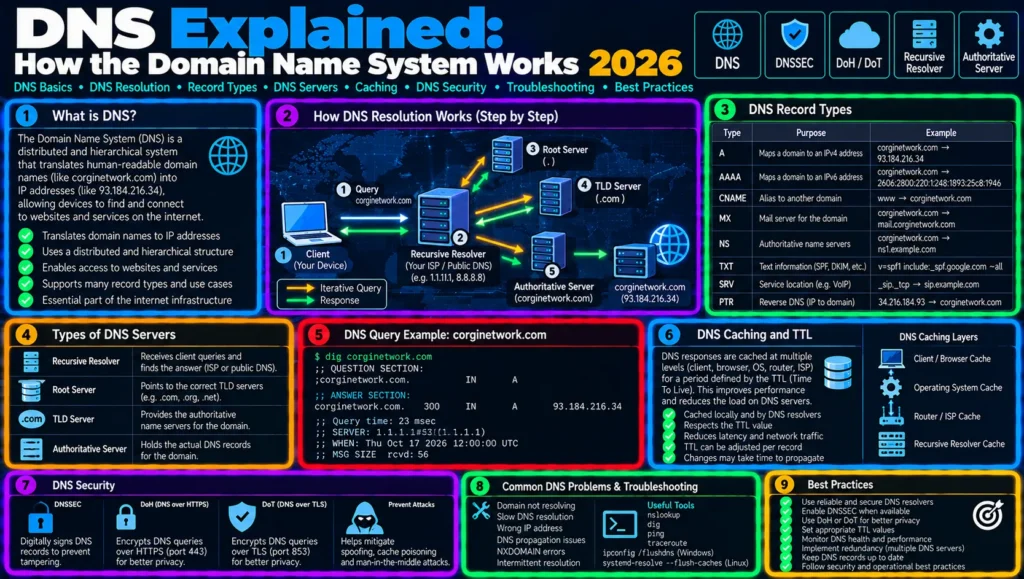
DNS Explained
The Domain Name System (DNS) is a fundamental part of modern networking and Internet infrastructure. Whenever a user visits a website, connects to an application, sends an email, or accesses a service by hostname, DNS may be involved in locating the destination.
DNS is commonly described as the system that translates domain names into IP addresses. That description is correct, but incomplete. DNS is a distributed, hierarchical naming system that supports service discovery, email routing, delegation, caching, and several important security mechanisms.
Understanding DNS is essential for network administrators, system administrators, cybersecurity professionals, cloud engineers, and anyone responsible for maintaining reliable IT infrastructure.
This guide explains the architecture of DNS, the roles of its main components, common record types, caching, DNS security, and practical troubleshooting. It also links to dedicated CorgiNetwork guides for topics that require deeper technical coverage.
1. What Is DNS?
DNS stands for Domain Name System.
It allows applications and users to work with recognizable names instead of having to remember numerical network addresses.
For example, a user can enter:
www.example.comA DNS lookup may return an IPv4 address such as:
192.0.2.10The address above belongs to a documentation-only address range and is used here as an example, not as a real website destination.
DNS does more than resolve website names. It can also provide information about:
- IPv4 and IPv6 addresses
- Mail servers responsible for a domain
- Authoritative nameservers
- Hostname aliases
- Service locations
- Reverse DNS mappings
- Email authentication policies
- Certificate Authority authorization
DNS is therefore a naming and service-location system, not simply a website-to-IP converter.
To understand how DNS fits into the wider communication process, see our Computer Networking Explained guide and TCP/IP Explained.
2. Understanding the DNS Hierarchy
DNS uses a distributed hierarchy. No single DNS server needs to store the complete information for every domain on the Internet.
A simplified DNS namespace looks like this:
.
└── com
    └── example.com
        ├── www
        ├── mail
        └── api
The hierarchy has several important levels.
DNS root
The root is at the top of the DNS namespace. Root servers provide referrals that help resolvers find the nameservers responsible for Top-Level Domains.
Top-Level Domains (TLDs)
TLDs appear at the end of domain names. Examples include:
.com.org.net.uk.fr.ma
Registered domains
A registered domain is located beneath a TLD. For example, example.com is beneath .com.
Subdomains and hostnames
A domain can contain additional names, such as:
www.example.com
mail.example.com
api.example.com
This hierarchy allows responsibility for different parts of the namespace to be delegated to different DNS operators.
The root-zone infrastructure and delegation information are coordinated through IANA’s Root Zone Management.
3. The Main Components of DNS
Several components work together when an application needs to resolve a domain name.
Stub Resolver
A stub resolver is the DNS client component used by an operating system or application.
When a user opens a website, the application requests the address associated with its hostname. The stub resolver may check available local information and then send a query to a configured recursive resolver.
Recursive DNS Resolver
A recursive resolver receives DNS queries from clients and attempts to return a final answer.
It may obtain the answer from its cache. If the answer is not available or has expired, it can contact other DNS servers to continue the lookup.
Recursive resolvers may be operated by:
- Internet Service Providers
- Organizations and enterprise networks
- Public DNS providers
- Home routers
- VPN providers
- Cloud infrastructure providers
Root DNS Servers
Root servers provide referrals toward the nameservers responsible for the requested TLD.
There are 13 named root-server identities, commonly identified by letters A through M. This does not mean that the global root-server system consists of only 13 physical machines. The infrastructure is distributed across many locations and instances.
TLD DNS Servers
TLD nameservers provide delegation information for domains registered beneath their TLD.
For example, a .com TLD server can refer a resolver to the authoritative nameservers for example.com.
Authoritative DNS Servers
An authoritative DNS server provides the DNS records for the zone it serves.
It is the authoritative source for that zone’s published DNS data. It does not normally need to perform the complete recursive lookup process for every query.
Recursive vs. Authoritative DNS
| Feature | Recursive Resolver | Authoritative Server |
|---|---|---|
| Main purpose | Finds DNS answers | Publishes zone data |
| Queries other DNS servers | Yes, when needed | Not for normal authoritative answers |
| Caches responses | Usually | Not as a recursive resolver |
| Source of authoritative zone data | No | Yes |
| Common role | ISP or public resolver | Domain DNS provider |
These roles may be provided by separate services, although some DNS software can perform more than one role when configured to do so.
4. How a DNS Lookup Works
Consider a user opening:
www.example.comThe application needs to obtain an address before it can normally establish a connection to the destination hostname.
A simplified lookup process is:
Application
    |
    v
Operating System / Stub Resolver
    |
    v
Recursive DNS Resolver
    |
    +---- Cache lookup
    |
    +---- Root DNS server
    |
    +---- TLD nameserver
    |
    +---- Authoritative DNS server
    |
    v
DNS response
    |
    v
Application connects to destination
The process generally follows these steps:
- The application requests the address for the hostname.
- The operating system or stub resolver checks available local information.
- The request is sent to a configured recursive resolver.
- The recursive resolver checks its cache.
- If necessary, it follows referrals from the root and TLD infrastructure.
- It queries the authoritative nameserver for the requested record.
- The resolver returns the answer and may cache it according to its applicable caching rules.
Actual resolution can be shorter because of caching, local policies, forwarding, or other resolver behavior.
For a detailed explanation of the request and response sequence, including root, TLD, and authoritative queries, read How DNS Resolution Works.
5. Common DNS Record Types
DNS records store information associated with names in a DNS zone.
The following are some commonly used record types:
| Record | Purpose |
|---|---|
| A | Maps a hostname to an IPv4 address |
| AAAA | Maps a hostname to an IPv6 address |
| CNAME | Creates an alias to another hostname |
| MX | Identifies mail servers for a domain |
| TXT | Stores text data used by verification and other services |
| NS | Identifies nameservers for a zone |
| SOA | Contains administrative information about a DNS zone |
| PTR | Supports reverse DNS lookups |
| SRV | Identifies hosts and ports for specified services |
| CAA | Specifies which Certificate Authorities are authorized to issue certificates for a domain |
For example, an A record can be represented as:
www.example.com. 3600 IN A 192.0.2.10The value 3600 is the record’s TTL in seconds.
A CNAME record points to another hostname rather than directly to an IP address:
www.example.com. IN CNAME example.com.A standard CNAME record also has restrictions on which other record types can coexist at the same owner name.
DNS record configuration depends on the authoritative DNS provider and the requirements of the service using the records.
For field-by-field explanations and configuration examples, see DNS Record Types Explained.
6. DNS Zones and Delegation
A DNS zone is an administratively managed portion of the DNS namespace.
A zone contains records and delegation information for the names it is responsible for serving.
For example, a DNS zone for example.com might contain:
example.com.       IN  A      192.0.2.10
www.example.com.   IN  CNAME  example.com.
example.com.       IN  MX     10 mail.example.com.
example.com.       IN  NS     ns1.example.net.
example.com.       IN  NS     ns2.example.net.
A zone file may also contain an SOA record and other records required by the domain’s services.
Delegation allows responsibility for a child zone to be assigned to different authoritative nameservers. This is one of the reasons DNS can scale across a very large global namespace.
A domain’s registrar, DNS hosting provider, and web hosting provider may be different companies. The registrar manages domain registration and delegation settings, while the authoritative DNS provider publishes the zone records.
Changing a website’s hosting provider does not necessarily require changing the domain registrar.
7. DNS Caching and TTL
DNS caching reduces repeated queries and improves response time.
When a recursive resolver receives a response, it can store the result for the period allowed by the record’s TTL and applicable DNS rules.
For example:
example.com. 3600 IN A 192.0.2.10A TTL of 3600 seconds represents one hour.
Caching can occur at several layers, including:
- Operating system DNS caches
- Browser or application caches
- Recursive DNS resolvers
- Intermediate DNS infrastructure
When a DNS record changes, users may continue receiving an older answer while a resolver or client still has a valid cached response.
This is one reason DNS changes do not necessarily become visible everywhere immediately.
Negative responses can also be cached under DNS negative-caching rules. This means that caching is not limited to successful record lookups.
The TTL is not a single global propagation timer. Different records and resolvers can have different cache states.
For detailed examples of TTL behavior, negative caching, and stale DNS responses, see DNS Caching and TTL Explained.
8. DNS Transport: UDP, TCP, DoT, and DoH
Traditional DNS commonly uses UDP or TCP on port 53.
DNS over UDP
UDP is commonly used for ordinary DNS queries because it has low transport overhead.
DNS over TCP
TCP is also an important DNS transport. It is used for zone transfers and may be used for regular DNS queries and responses, including cases where response size or network conditions require it.
DNS implementations and networks must not assume that DNS always uses UDP. Blocking TCP port 53 can cause legitimate DNS operations to fail.
See RFC 7766 for DNS over TCP implementation requirements.
DNS over TLS (DoT)
DNS over TLS protects DNS traffic between the client and resolver using TLS.
It is commonly associated with TCP port 853.
The specification is documented in RFC 7858.
DNS over HTTPS (DoH)
DNS over HTTPS carries DNS queries and responses over HTTPS.
It can use the same HTTPS infrastructure commonly used by web applications, typically over port 443.
The protocol is specified in RFC 8484.
DoT and DoH protect the DNS communication channel between endpoints. They do not replace DNSSEC and do not automatically prove that every returned DNS record is authentic.
9. DNSSEC: Protecting DNS Data Integrity
Traditional DNS responses are not inherently protected by cryptographic signatures.
An attacker who can successfully interfere with a DNS response may attempt to provide false information to a resolver or client.
DNS Security Extensions (DNSSEC) add cryptographic signatures to DNS data. A validating resolver can use these signatures and the chain of trust to verify that signed DNS data is authentic and has not been modified.
Important DNSSEC record types include:
- DNSKEY
- RRSIG
- DS
- NSEC or NSEC3
DNSSEC protects DNS data integrity and origin authentication through validation. It does not encrypt ordinary DNS queries and does not hide the domain names being requested.
DoH and DoT address privacy and protection of the transport channel, while DNSSEC addresses authentication and integrity of signed DNS data. These technologies solve different problems.
For a deeper technical explanation of the DNSSEC chain of trust, read DNSSEC Explained.
For failures involving SERVFAIL responses, DS records, DNSKEY mismatches, or expired signatures, see DNSSEC Troubleshooting.
10. DNS in Real Network Environments
DNS supports more than public website access. It is also important in enterprise networks, cloud infrastructure, and internal applications.
Internal and Split-Horizon DNS
Organizations may use internal DNS zones to resolve private hostnames.
For example:
fileserver.corp.example
database.corp.example
monitoring.corp.example
Split-horizon DNS can return different DNS answers depending on the network or resolver making the request.
An internal client may receive a private address, while an external client receives a public address or a different response.
This is useful for internal services, but it requires careful DNS and network security design.
DNS and Email
Email delivery depends on several DNS records and authentication mechanisms.
Common examples include:
- MX records for mail delivery
- SPF information published in TXT records
- DKIM public keys published in DNS
- DMARC policies published under
_dmarc - PTR records for reverse DNS in environments where reverse identity is relevant
A domain can have a working website while its email configuration is incorrect.
For reliable email delivery, DNS records must be consistent with the mail provider’s configuration.
Anycast DNS
Some DNS providers use anycast routing to advertise the same IP address from multiple network locations.
Routing directs clients toward an available instance according to the network’s routing decisions.
Anycast can improve resilience and response performance, but it does not remove the need for correct DNS records, reliable authoritative servers, and monitoring.
DNS-Based Service Discovery
Some applications use SRV records or other DNS mechanisms to discover services.
This can be useful in enterprise networks and distributed systems where applications need to locate services by name rather than depend on fixed server addresses.
11. Example: DNS Architecture for a Public Website
A typical public website may depend on several different DNS record types.
For example, a simplified domain configuration might include:
example.com.       IN  A      192.0.2.10
www.example.com.   IN  CNAME  example.com.
example.com.       IN  MX     10 mail.example.com.
example.com.       IN  TXT    "v=spf1 ..."
_dmarc.example.com. IN TXT   "v=DMARC1; p=..."
These are illustrative records only. The actual values and syntax must come from the website host, mail provider, and DNS provider.
The responsibilities are different:
- The registrar manages the registered domain and its delegation.
- The authoritative DNS provider hosts the DNS zone.
- The web hosting or cloud provider supplies the destination for website traffic.
- The email provider supplies the mail-server configuration and authentication records.
- The recursive resolver answers queries from users and applications.
A reliable setup should use the DNS provider’s required nameserver configuration, maintain valid records, avoid unnecessary duplicates, and monitor changes to critical records.
DNS configuration should be tested after migrations, hosting changes, mail-provider changes, and security-policy updates.
12. DNS Troubleshooting Methodology
DNS problems can look similar to application, routing, firewall, or server failures.
A structured investigation helps identify the actual cause instead of changing records without evidence.
Step 1: Identify the affected hostname and record type
Determine:
- Which hostname fails?
- Is the problem with an A, AAAA, MX, or another record?
- Does the issue affect one client or several clients?
- Does it happen on an internal network, external network, or both?
- Is the returned answer incorrect, missing, or delayed?
Testing the exact hostname and record type makes the investigation more reliable.
Step 2: Query the configured resolver
On Linux, use:
dig www.example.com ATo check MX records:
dig example.com MXOn Windows, use:
nslookup www.example.comTo inspect an A record with PowerShell:
Resolve-DnsName www.example.com -Type AStep 3: Compare resolver responses
A resolver-specific query can help determine whether the problem is limited to one recursive resolver.
For example:
dig @1.1.1.1 example.com AYou can compare the result with the resolver configured on the affected device.
However, public resolvers are not necessarily suitable for testing private corporate zones. Split-horizon DNS and internal naming policies may produce intentionally different answers.
Step 4: Check authoritative DNS
Identify the domain’s authoritative nameservers and query the relevant server directly.
A typical query is:
dig @ns1.example.net www.example.com A +norecurseReplace the nameserver and hostname with the real values for the domain.
An authoritative response can help distinguish incorrect zone data from a stale recursive cache or delegation problem.
Step 5: Check delegation and DNSSEC
If the authoritative server has the correct data but recursive resolvers return an error, investigate the delegation and validation path.
Check:
- Parent-zone NS delegation
- Required glue records where applicable
- Authoritative nameserver availability
- DS and DNSKEY consistency
- RRSIG validity and expiration
- Resolver validation errors
For detailed DNSSEC failures, use the dedicated DNSSEC Troubleshooting guide.
Step 6: Consider caching and TTL
If authoritative DNS returns the new record but a recursive resolver returns an older answer, investigate caching.
Check the remaining TTL and compare responses from different resolvers.
Flushing a local DNS cache can help when the stale entry is on the affected device, but it does not clear caches on public recursive resolvers across the Internet.
Step 7: Separate DNS resolution from connectivity
A successful DNS response does not guarantee that the destination application is reachable.
After obtaining the IP address, check:
- Routing
- Firewall policy
- TCP connectivity
- Service availability
- TLS certificate behavior
- Application configuration
For example, a browser can fail to load a website even when DNS resolution is correct.
Our guides to Firewalls Explained and Network Security Basics provide additional context for investigating network access problems.
13. Useful DNS Commands on Linux and Windows
The following commands are useful during routine DNS investigations.
Linux
Query an A record:
dig example.com AQuery an AAAA record:
dig example.com AAAAQuery a specific resolver:
dig @1.1.1.1 example.com ATrace the DNS delegation path:
dig +trace example.comQuery a DNSSEC-enabled response:
dig example.com +dnssecCheck resolution through systemd-resolved:
resolvectl query example.comFor more networking and diagnostic utilities, see Linux Network Tools Guide.
Windows
Query a hostname:
nslookup example.comQuery an MX record:
nslookup -type=MX example.comUse PowerShell to query an A record:
Resolve-DnsName example.com -Type AInspect the local DNS client cache:
Get-DnsClientCacheDisplay the Windows DNS cache:
ipconfig /displaydnsClear the local DNS resolver cache when appropriate:
ipconfig /flushdnsFlushing the local cache does not change authoritative DNS records and does not clear the caches of external recursive resolvers.
14. DNS Security Risks and Best Practices
DNS is part of the infrastructure that applications and users rely on. Incorrect configuration or weak administration can affect availability, privacy, and security.
Common threats include:
- DNS cache poisoning: attempts to introduce false DNS data into a resolver’s cache.
- DNS spoofing: attempts to provide forged DNS responses.
- DNS amplification: abuse of DNS infrastructure in reflection-based denial-of-service attacks.
- DNS tunneling: misuse of DNS queries and responses to carry data through networks.
- DNS hijacking: unauthorized changes or manipulation of DNS resolution.
- Dangling DNS records: records that point to resources that no longer exist or are no longer controlled by the organization.
Recommended practices include:
- Use reliable authoritative DNS services with appropriate redundancy.
- Protect registrar and DNS-provider accounts with strong authentication.
- Limit access to DNS administration and record changes.
- Keep DNS zones documented and remove obsolete records.
- Review delegation and nameserver configuration after migrations.
- Use DNSSEC where the domain’s DNS provider and operational process support it correctly.
- Maintain correct SPF, DKIM, and DMARC records for email domains.
- Monitor critical DNS records and nameserver availability.
- Avoid exposing unnecessary internal hostnames in public DNS.
- Investigate unexpected DNS changes promptly.
DNS security should be part of the wider network security program, alongside firewall policies, identity management, endpoint protection, and monitoring.
15. Frequently Asked Questions
What does DNS stand for?
DNS stands for Domain Name System. It is the distributed naming system used to locate resources and services by name.
How does DNS work?
A client sends a DNS query to a resolver. The resolver may answer from its cache or query the DNS hierarchy, including root, TLD, and authoritative nameservers, to obtain the requested record.
What is the difference between a recursive resolver and an authoritative DNS server?
A recursive resolver finds answers for clients and can cache responses. An authoritative DNS server publishes the records for the zone it serves.
What is the difference between an A record and an AAAA record?
An A record maps a hostname to an IPv4 address. An AAAA record maps a hostname to an IPv6 address.
Why do DNS changes take time to appear?
Resolvers and clients may have cached older answers. The time before those answers expire depends on TTL values and applicable caching behavior. Delegation changes can also involve cached information.
Does DNS use UDP or TCP?
Traditional DNS uses both UDP and TCP, commonly on port 53. TCP is required for certain operations and can also be used for ordinary DNS queries and responses.
Does DNSSEC encrypt DNS queries?
No. DNSSEC provides cryptographic authentication and integrity for signed DNS data. It does not encrypt ordinary DNS queries.
What is the difference between DNS over HTTPS and DNS over TLS?
Both can protect DNS traffic between a client and resolver. DoH carries DNS messages over HTTPS, while DoT carries them over TLS. They use different transport approaches and deployment models.
Can a website fail even when DNS works?
Yes. DNS may return the correct address while the destination server, routing path, firewall, TLS configuration, or application is unavailable.
What is split-horizon DNS?
Split-horizon DNS provides different DNS answers depending on the client or network making the request. It is often used to separate internal and public name resolution.
Conclusion
DNS is a core service that connects human-readable names with the network resources used by applications and infrastructure.
Understanding its hierarchy, recursive and authoritative roles, record types, caching behavior, transport protocols, and security mechanisms makes it easier to design and troubleshoot reliable networks.
For practical administration, DNS should be monitored and documented like other critical infrastructure services. Changes to records, delegation, DNSSEC, and email authentication should be tested carefully.
A strong understanding of DNS also provides a foundation for learning more advanced topics such as DNSSEC validation, DNS troubleshooting, Linux network administration, and cloud networking.
Further reading: How DNS Resolution Works · DNS Record Types Explained · DNS Caching and TTL Explained · DNSSEC Explained
References
- RFC 1034 – Domain Names: Concepts and Facilities
- RFC 1035 – Domain Names: Implementation and Specification
- RFC 2308 – Negative Caching of DNS Queries
- RFC 4033 – DNS Security Introduction and Requirements
- RFC 7766 – DNS Transport over TCP
- RFC 7858 – DNS over TLS
- RFC 8484 – DNS Queries over HTTPS
- IANA – Root Zone Management