Introduction
Border Gateway Protocol (BGP) is the routing protocol used to exchange network reachability information between autonomous systems. It is widely deployed by Internet service providers, enterprise networks, cloud providers, and large data centers.
However, exchanging routes without carefully controlling which prefixes are accepted and advertised can introduce routing problems and security risks.
For example:
- A customer may accidentally advertise prefixes that belong to another organization.
- An enterprise router may accept an unexpected default route from an upstream provider.
- A network may advertise internal or private prefixes to an external BGP neighbor.
- An incorrect routing policy may allow more-specific routes that redirect traffic unexpectedly.
- A route leak may cause traffic to follow an unintended path.
BGP route filtering solves these problems by controlling which routes a router accepts from its neighbors and which routes it advertises to them.
This guide explains how to configure BGP route filtering using prefix lists, route maps, AS-path filters, and BGP communities. It includes practical Cisco IOS and FRRouting (FRR) examples, verification commands, and troubleshooting techniques.
1. What Is BGP Route Filtering?
BGP route filtering is the process of applying routing policies to BGP updates exchanged between neighboring routers.
A BGP router can apply filtering in two main directions:
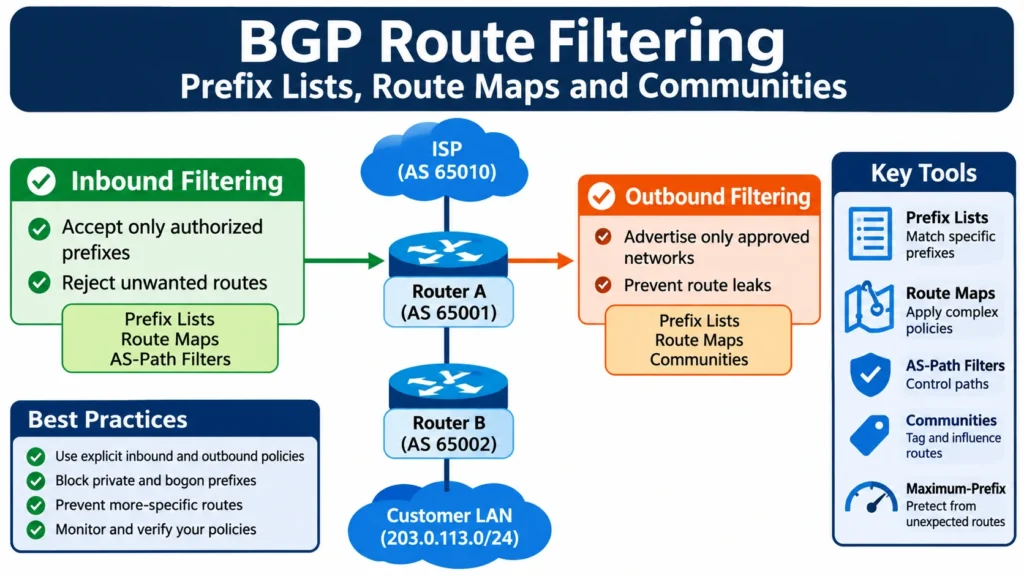
- Inbound filtering: Controls which routes are accepted from a BGP neighbor.
- Outbound filtering: Controls which routes are advertised to a BGP neighbor.
Consider this simplified topology:
                 ISP 1
               AS 65010
                   |
                   |
              192.0.2.1
                   |
              +---------+
              | Router A|
              | AS 65001|
              +---------+
                   |
              198.51.100.1
                   |
              +---------+
              | Router B|
              | AS 65002|
              +---------+
                   |
                   |
              Customer LAN
              203.0.113.0/24
Router A receives routes from ISP 1 and exchanges routing information with Router B.
Without appropriate policies, the routers may accept or advertise prefixes that are not intended for that relationship.
A route-filtering policy can ensure that:
- Only authorized customer prefixes are accepted.
- Only approved enterprise networks are advertised.
- Unwanted default routes are rejected.
- Specific AS paths are denied.
- Routes with particular BGP communities receive different treatment.
BGP filtering is not the same as firewall filtering. A firewall controls packets, while BGP policies control routing information before it influences forwarding decisions.
2. Inbound vs. Outbound BGP Filtering
Understanding the direction of a policy is essential before applying any configuration.
Inbound BGP Filtering
Inbound filtering is applied to routes received from a neighbor.
For example, an enterprise may receive routes from an ISP but only want to accept a default route.
ISP
 |
 | Advertises:
 | 0.0.0.0/0
 | 8.8.8.0/24
 | 203.0.113.0/24
 |
 v
Enterprise Router
 |
 | Inbound Policy:
 | Permit 0.0.0.0/0
 | Reject other prefixes
 |
 v
Routing Table
An inbound policy helps prevent unwanted routes from entering the local BGP decision process.
Outbound BGP Filtering
Outbound filtering controls which routes are advertised to a neighbor.
For example, a company owns the following networks:
10.10.10.0/24
10.10.20.0/24
10.10.30.0/24
The company wants to advertise only:
10.10.10.0/24
10.10.20.0/24
An outbound policy can permit those two prefixes and reject everything else.
Inbound vs. Outbound Comparison
| Feature | Inbound Filtering | Outbound Filtering |
|---|---|---|
| Direction | From neighbor to local router | From local router to neighbor |
| Main purpose | Control received routes | Control advertised routes |
| Common use | Reject unauthorized prefixes | Prevent unintended advertisements |
| Typical policy | neighbor ... in | neighbor ... out |
Both directions should be considered when designing an eBGP routing policy.
The IETF document RFC 8212 specifies that eBGP routes must not be imported or exported without explicit policies for implementations following the standard.
3. BGP Prefix Lists Explained
Prefix lists are among the most common tools for BGP route filtering.
They allow administrators to match network prefixes and their prefix lengths.
A prefix list can permit or deny specific networks, including more-specific routes.
Basic Prefix List Configuration
On Cisco IOS:
ip prefix-list CUSTOMER-IN permit 203.0.113.0/24This entry matches exactly:
203.0.113.0/24It does not automatically permit more-specific prefixes such as:
203.0.113.0/25
203.0.113.128/25
Using ge and le
The ge and le parameters allow matching a range of prefix lengths.
Example:
ip prefix-list CUSTOMER-IN permit 203.0.113.0/24 ge 24 le 28This permits matching prefixes within 203.0.113.0/24 with lengths from /24 through /28.
For example:
203.0.113.0/24
203.0.113.0/25
203.0.113.128/25
203.0.113.0/26
However, it does not permit a /29 or a prefix outside the specified network range.
Exact Prefix Matching
If you only want to permit a particular prefix length, use an exact prefix-list entry:
ip prefix-list CUSTOMER-ONLY permit 203.0.113.0/24This is often preferable when a customer is authorized to originate one specific network.
Understanding Implicit Deny
Cisco prefix lists have an implicit deny at the end.
For example:
ip prefix-list CUSTOMER-IN permit 203.0.113.0/24Only the specified prefix is permitted. Any unmatched prefix is denied.
This behavior is important because a restrictive prefix list can unintentionally block all routes if the permitted prefixes are incomplete.
For more information, see Cisco’s BGP configuration documentation.
4. Configure Inbound BGP Filtering with Prefix Lists
Suppose Router A receives routes from a customer using this BGP relationship:
Local AS: 65001
Customer AS: 65020
Customer Peer: 192.0.2.2
Authorized Prefix: 203.0.113.0/24
The objective is to accept only the customer’s authorized prefix.
Step 1: Create the Prefix List
ip prefix-list CUSTOMER-IN permit 203.0.113.0/24Because the prefix list has an implicit deny, other prefixes will not match a permitted entry.
Step 2: Apply the Prefix List to the Neighbor
router bgp 65001
 neighbor 192.0.2.2 remote-as 65020
 neighbor 192.0.2.2 prefix-list CUSTOMER-IN in
Step 3: Verify the Configuration
show ip prefix-list CUSTOMER-INCheck the neighbor configuration:
show running-config | section router bgpInspect received routes where supported:
show ip bgp neighbors 192.0.2.2 routesThe exact availability of received-route information depends on the platform and whether inbound soft-reconfiguration or an equivalent route-refresh mechanism is configured.
Important: Before applying a restrictive inbound policy to a production peer, identify all prefixes that the neighbor is expected to advertise. An incomplete allowlist can remove valid routes from the routing process.
5. Configure Outbound BGP Filtering with Prefix Lists
Outbound filtering prevents a router from advertising unauthorized networks to a neighbor.
Consider this example:
Local AS: 65001
ISP AS: 65010
ISP Peer: 192.0.2.1

Networks:
10.10.10.0/24
10.10.20.0/24
10.10.30.0/24
Assume only the first two networks are approved for advertisement.
Step 1: Create an Outbound Prefix List
ip prefix-list ISP-OUT permit 10.10.10.0/24
ip prefix-list ISP-OUT permit 10.10.20.0/24
Step 2: Apply the Policy
router bgp 65001
 neighbor 192.0.2.1 remote-as 65010
 neighbor 192.0.2.1 prefix-list ISP-OUT out
Step 3: Verify Advertised Routes
show ip bgp neighbors 192.0.2.1 advertised-routesThe intended advertisements are:
10.10.10.0/24
10.10.20.0/24
The third network should not be advertised through this neighbor.
Remember that a route must also be eligible for BGP advertisement. A prefix list does not originate routes by itself; it filters routes that BGP could otherwise advertise.
6. BGP Route Maps Explained
Route maps provide more flexible routing policies than prefix lists alone.
They can match routes based on several attributes and apply actions to those routes.
Common matching conditions include:
- IP prefixes.
- AS paths.
- BGP communities.
- Other routing attributes supported by the platform.
Common actions include:
- Permit or deny a route.
- Set local preference.
- Modify the MED attribute.
- Add or modify BGP communities.
- Change the next-hop attribute.
Route maps are evaluated in sequence order.
A route-map entry can contain matching conditions and actions. If a route matches a deny entry, it is rejected. If it matches a permit entry, it is accepted and any configured actions are applied.
If no route-map entry permits a route, the route is denied by the route map.
Example: Filter Routes Using a Route Map
Suppose the router should accept only:
203.0.113.0/24Create a prefix list:
ip prefix-list CUSTOMER-PREFIX permit 203.0.113.0/24Create a route map:
route-map CUSTOMER-IN permit 10
 match ip address prefix-list CUSTOMER-PREFIX
Apply it inbound:
router bgp 65001
 neighbor 192.0.2.2 route-map CUSTOMER-IN in
The route map permits routes matching the prefix list. Other routes do not match a permitting entry and are rejected.
Example: Set Local Preference
A route map can also modify BGP attributes.
For example, set local preference to 200 for routes matching a specific prefix:
ip prefix-list PREFERRED-ROUTE permit 203.0.113.0/24

route-map ISP-IN permit 10
 match ip address prefix-list PREFERRED-ROUTE
 set local-preference 200

route-map ISP-IN permit 20
Apply the route map:
router bgp 65001
 neighbor 192.0.2.1 route-map ISP-IN in
The first entry assigns local preference 200 to the matching route. The second entry permits other routes without changing their local preference.
Local preference is an attribute used within an AS to influence the preferred outbound path. It is not a substitute for an inbound prefix authorization policy.
7. BGP AS-Path Filtering
The AS_PATH attribute records the sequence of autonomous systems through which a BGP route has passed.
Administrators can use AS-path filters to match routes based on that sequence.
This is useful when:
- Rejecting routes that contain a particular AS.
- Accepting routes based on their origin or path.
- Applying different policies to customers, peers, and upstream providers.
Example: Deny Routes Containing a Specific AS
Assume AS 65020 must not appear in the AS_PATH of routes accepted from a particular peer.
On Cisco IOS:
ip as-path access-list 20 deny _65020_
ip as-path access-list 20 permit .*
Create a route map:
route-map ISP-IN permit 10
 match as-path 20
Apply it:
router bgp 65001
 neighbor 192.0.2.1 route-map ISP-IN in
The AS-path access list rejects paths containing AS 65020 and permits other paths.
The underscore in Cisco’s AS-path regular expressions represents an AS-path boundary. This helps avoid matching an AS number as part of an unrelated larger number.
Example: Match Locally Originated Routes
A commonly used AS-path expression is:
ip as-path access-list 10 permit ^$This matches an empty AS_PATH, which is commonly associated with locally originated BGP routes.
Use AS-path filters carefully. Their behavior depends on the path being evaluated, and they should not replace prefix authorization.
8. BGP Communities and Route Filtering
BGP communities are optional transitive path attributes that allow networks to tag routes with additional policy information.
A community can identify how a route should be treated by other routers.
For example:
65001:100
65001:200
65001:300
An organization may define an internal policy such as:
| Community | Example Policy |
|---|---|
| 65001:100 | Customer routes |
| 65001:200 | Preferred routes |
| 65001:300 | Routes requiring special handling |
These values are examples of locally defined policy conventions, not universal meanings.
Match Routes Using a Community
On Cisco IOS, a standard community list can be used with a route map:
ip community-list standard CUSTOMER-ROUTES permit 65001:100Create a route map:
route-map CUSTOMER-POLICY permit 10
 match community CUSTOMER-ROUTES
 set local-preference 200
Apply it to the appropriate neighbor:
router bgp 65001
 neighbor 192.0.2.2 route-map CUSTOMER-POLICY in
This policy matches routes carrying the specified community and assigns local preference 200.
Advertise Communities to a Neighbor
A router must be configured to send communities when the platform and neighbor configuration require it.
On Cisco IOS platforms supporting this syntax:
router bgp 65001
 neighbor 192.0.2.2 send-community
For standard, extended, or large communities, check the platform-specific syntax and ensure the appropriate community types are sent.
On FRRouting, an example is:
router bgp 65001
 address-family ipv4 unicast
  neighbor 192.0.2.2 send-community both
 exit-address-family
Well-Known Communities
Some communities have standardized meanings.
For example:
no-export: Prevents a route from being advertised outside the local AS or confederation boundary as defined by the community’s behavior.no-advertise: Prevents further advertisement of the route to any BGP peer.local-AS: Restricts propagation beyond the local AS or confederation context according to the applicable BGP behavior.
Do not confuse these well-known communities with locally defined values such as 65001:100.
For more details, consult the FRRouting BGP documentation.
9. Filter BGP Routes Using AS-Path and Prefix Policies Together
Using multiple filtering techniques provides more precise control than relying on one condition.
For example, an ISP may want to:
- Accept only the customer’s authorized prefixes.
- Reject routes containing an unauthorized AS.
- Assign a local preference to approved routes.
A Cisco IOS example:
ip prefix-list CUSTOMER-PREFIXES permit 203.0.113.0/24

ip as-path access-list 20 deny _65030_
ip as-path access-list 20 permit .*

route-map CUSTOMER-IN permit 10
 match ip address prefix-list CUSTOMER-PREFIXES
 match as-path 20
 set local-preference 200

router bgp 65001
 neighbor 192.0.2.2 remote-as 65020
 neighbor 192.0.2.2 route-map CUSTOMER-IN in
In this example, the route must satisfy both matching conditions in the route-map entry.
The policy permits the specified prefix only when the AS_PATH does not contain AS 65030.
If you need to permit additional authorized prefixes, add them to the prefix list after validating the authorization.
10. Prevent BGP Route Leaks and Bogon Advertisements
Incorrect BGP advertisements can expose internal routes or cause traffic to follow unintended paths.
A robust routing policy should account for more than just the prefixes expected from a neighbor.
Important checks include:
Reject Unauthorized Prefixes
Maintain an accurate list of prefixes that each customer or peer is authorized to originate.
Do not assume that a route is legitimate simply because it arrived through an established BGP session.
Filter Private and Special-Use Prefixes
Prefixes that are not globally routable should not normally be accepted as public Internet routes.
Examples include:
10.0.0.0/8
172.16.0.0/12
192.168.0.0/16
These are private IPv4 address ranges defined by RFC 1918.
Also consider other special-purpose address ranges, documentation prefixes, and reserved networks as appropriate.
Use the IANA IPv4 Special-Purpose Address Registry as a reference rather than relying on an incomplete hand-written list.
Reject Unexpected More-Specific Routes
A neighbor authorized to advertise a /24 should not automatically be allowed to advertise every more-specific prefix inside that range.
For example:
203.0.113.0/24
203.0.113.0/25
203.0.113.128/25
These are different route advertisements.
Use exact prefix matching or an explicitly approved prefix-length range.
Protect Against Accidental Default-Route Advertisements
A default route can redirect a large amount of traffic.
If a neighbor should not receive a default route, explicitly exclude it from the outbound policy.
The IETF BGP Operations and Security document (RFC 7454) provides operational recommendations for inbound and outbound filtering, including protection against inappropriate prefix announcements.
11. Configure Maximum-Prefix Protection
Prefix filtering controls which routes are accepted, but another important safeguard is limiting the number of prefixes received from a neighbor.
The BGP maximum-prefix feature can help protect a router if a peer unexpectedly sends a very large routing table.
On Cisco IOS, an example is:
router bgp 65001
 neighbor 192.0.2.2 maximum-prefix 100 80
This configures a maximum of 100 prefixes, with an 80 percent warning threshold.
The exact behavior and supported options vary by platform and software release. Some platforms also support actions such as restarting the session after a configured interval or treating the threshold as warning-only.
Before choosing a limit:
- Determine the expected number of prefixes.
- Allow for reasonable growth.
- Consider the address family.
- Monitor actual prefix counts.
- Understand the consequences of exceeding the configured limit.
Maximum-prefix protection is not a replacement for prefix filtering. It limits route volume but does not determine whether individual prefixes are authorized.
12. BGP Route Filtering Configuration with FRRouting
FRRouting (FRR) provides BGP functionality for Linux-based routers and network appliances.
Its configuration supports prefix lists, route maps, AS-path access lists, and BGP communities.
The following example shows how to accept one authorized customer prefix and apply an inbound policy.
Step 1: Configure the BGP Neighbor
router bgp 65001
 neighbor 192.0.2.2 remote-as 65020
Step 2: Create a Prefix List
ip prefix-list CUSTOMER-IN seq 10 permit 203.0.113.0/24Step 3: Apply the Prefix List Inbound
router bgp 65001
 address-family ipv4 unicast
  neighbor 192.0.2.2 prefix-list CUSTOMER-IN in
 exit-address-family
Step 4: Verify the Policy
show ip prefix-list
show bgp ipv4 unicast summary
show bgp ipv4 unicast neighbors 192.0.2.2
Example Using a Route Map
Create a prefix list:
ip prefix-list PREFERRED seq 10 permit 203.0.113.0/24Create a route map:
route-map CUSTOMER-IN permit 10
 match ip address prefix-list PREFERRED
 set local-preference 200
Apply it:
router bgp 65001
 address-family ipv4 unicast
  neighbor 192.0.2.2 route-map CUSTOMER-IN in
 exit-address-family
FRR supports additional matching and setting options. Check the documentation for the installed release before deploying configuration changes.
Official references:
13. Verify BGP Route Filtering
After configuring a policy, verify that it behaves as expected.
Do not assume that a successful configuration command means the intended routes are being accepted or advertised.
Check the BGP Summary
On Cisco IOS:
show ip bgp summaryOn FRRouting:
show bgp ipv4 unicast summaryCheck that the neighbor session is Established and inspect the received-prefix count.
Check the Prefix List
On Cisco:
show ip prefix-listThis displays configured prefix-list entries and their match counters where supported.
Check the Route Map
show route-mapReview the sequence entries, match conditions, and route-map counters.
Check Routes Received from a Neighbor
On Cisco platforms where the command is supported:
show ip bgp neighbors 192.0.2.2 routesThis helps identify routes accepted from the neighbor.
Check Routes Advertised to a Neighbor
show ip bgp neighbors 192.0.2.2 advertised-routesCompare the displayed advertisements with the intended outbound policy.
Inspect the BGP Routing Table
show ip bgpOn FRRouting:
show bgp ipv4 unicastVerify that expected routes are present and that unwanted routes are not being selected.
Some verification commands depend on platform capabilities and whether inbound route storage or soft-reconfiguration is enabled.
14. Troubleshoot Common BGP Filtering Problems
A BGP session can remain Established even when routing policies prevent the exchange of expected prefixes.
Use the following checks to identify the problem.
Problem 1: No Routes Received from a Neighbor
Possible causes:
- The neighbor is not advertising any routes.
- The inbound prefix list rejects all prefixes.
- A route map has no matching permit entry.
- The neighbor is not activated under the required address family.
- The peer has an outbound filtering policy.
Useful commands:
show ip bgp summary
show ip prefix-list
show route-map
show ip bgp neighbors 192.0.2.2
Check both sides of the BGP relationship before changing the policy.
Problem 2: All Routes Are Being Rejected
A common cause is an incomplete prefix list or route map.
For example:
ip prefix-list CUSTOMER-IN permit 203.0.113.0/24If the neighbor advertises 203.0.113.128/25, the entry above will not match it.
Review the actual advertised prefixes and decide whether more-specific routes should be permitted.
Do not broaden the policy automatically. Confirm that each additional prefix is authorized.
Problem 3: Routes Are Advertised to the Wrong Neighbor
Check the outbound policy attached to the affected peer:
show running-config | section router bgpVerify:
- The correct neighbor address.
- The intended
outdirection. - The correct prefix list or route map.
- The address family in which the policy is applied.
Problem 4: Route Map Does Not Match
Inspect the route map:
show route-mapCheck whether:
- The prefix list contains the expected network.
- The AS-path expression matches the actual path.
- The community list contains the expected community.
- The route-map sequence order is correct.
- The route has all required attributes.
Remember that multiple match conditions in one route-map entry are generally evaluated together. A route may fail to match if one of the conditions is not satisfied.
Problem 5: BGP Prefix Count Exceeds Expectations
Check the neighbor’s received-prefix count and the configured maximum-prefix limit.
Review the source of the additional routes before increasing the limit.
An unexpected increase can indicate:
- A customer advertisement error.
- A missing prefix filter.
- A policy change.
- A route leak.
- A change in the upstream provider’s routing table.
Problem 6: Changes Do Not Take Effect Immediately
BGP policy changes may require a route refresh or soft reset to re-evaluate existing routes.
On Cisco platforms that support it:
clear ip bgp 192.0.2.2 soft inFor outbound policy re-evaluation:
clear ip bgp 192.0.2.2 soft outCheck platform support and the operational impact before executing these commands.
Avoid a hard BGP reset unless it is necessary. A hard reset can interrupt the session and temporarily remove routes.
15. BGP Route Filtering Best Practices
A secure BGP policy should be designed around the relationship between each router and its neighbors.
Follow these recommendations:
- Use explicit inbound and outbound policies: Define exactly which routes each eBGP peer is authorized to send and receive.
- Prefer allowlists for customer prefixes: Accept only prefixes that the customer is authorized to originate.
- Use exact prefix matching where possible: Avoid permitting more-specific routes unless they are required.
- Combine filtering techniques: Use prefix lists, AS-path filters, and communities for different policy requirements.
- Apply maximum-prefix protection: Set limits based on expected routing volume and operational requirements.
- Protect against route leaks: Reject private, special-use, unauthorized, and unexpected prefixes.
- Document community conventions: Maintain clear definitions for locally assigned community values.
- Verify both directions: Check received and advertised routes after every policy change.
- Use soft reconfiguration or route refresh carefully: Re-evaluate routes without unnecessarily resetting the BGP session.
- Monitor routing changes: Alert on unexpected prefix-count increases, route withdrawals, and policy changes.
For broader routing security guidance, review RFC 7454: BGP Operations and Security.
16. Frequently Asked Questions
What is BGP route filtering?
BGP route filtering is the process of controlling which routing prefixes a BGP router accepts from neighbors and which prefixes it advertises to them. It helps prevent unauthorized advertisements, route leaks, and unwanted routing changes.
What is the difference between inbound and outbound BGP filtering?
Inbound filtering controls routes received from a neighbor, while outbound filtering controls routes advertised to that neighbor. Both are important for maintaining a predictable routing policy.
What is a BGP prefix list?
A BGP prefix list is a policy tool that matches network prefixes and prefix lengths. It can permit or deny specific routes and more-specific networks using parameters such as ge and le.
What is the difference between a prefix list and a route map?
A prefix list primarily matches network prefixes. A route map supports more complex policies by matching multiple route attributes and modifying attributes such as local preference, MED, and communities.
What are BGP communities used for?
BGP communities are route tags used to communicate policy information between routers. They can identify customer routes, influence routing preferences, and control route propagation.
How do I filter BGP routes by AS path?
On Cisco IOS, configure an AS-path access list and reference it in a route map or neighbor filter-list. This allows policies to match routes based on the autonomous systems present in the AS_PATH attribute.
What is maximum-prefix in BGP?
Maximum-prefix limits the number of prefixes accepted from a BGP neighbor. It helps protect routers from unexpectedly large route advertisements but does not replace prefix authorization policies.
Can BGP filtering cause a neighbor to become Idle?
A normal route-filtering policy does not usually cause the BGP session to become Idle. The session can remain Established while the policy rejects all received or advertised routes. Session failures should be investigated separately.
Why is my BGP session Established but no routes are received?
Possible causes include an inactive address family, missing advertisements from the peer, an inbound prefix list rejecting every route, or a route map without a matching permit entry.
Is BGP route filtering necessary for eBGP?
Explicit inbound and outbound policies are essential for secure eBGP operation. RFC 8212 specifies default-reject behavior for eBGP routes when import or export policies are absent in implementations following the standard.
Conclusion
BGP route filtering is a fundamental part of reliable and secure routing design.
Prefix lists provide precise control over network prefixes, route maps support more advanced routing policies, AS-path filters identify routes based on their autonomous-system paths, and communities allow routers to exchange policy information.
For production networks, combine these mechanisms with explicit inbound and outbound policies, maximum-prefix protection, and regular route verification.
A carefully designed BGP filtering policy helps prevent route leaks, unauthorized advertisements, and unexpected routing behavior while keeping the routing infrastructure predictable and manageable.
Related reading: BGP Neighbor Troubleshooting: Fix Idle, Active, Connect & OpenSent States
For another routing-policy perspective, see OSPF Route Filtering Explained: Prefix Lists, Distribute Lists and Route Control.