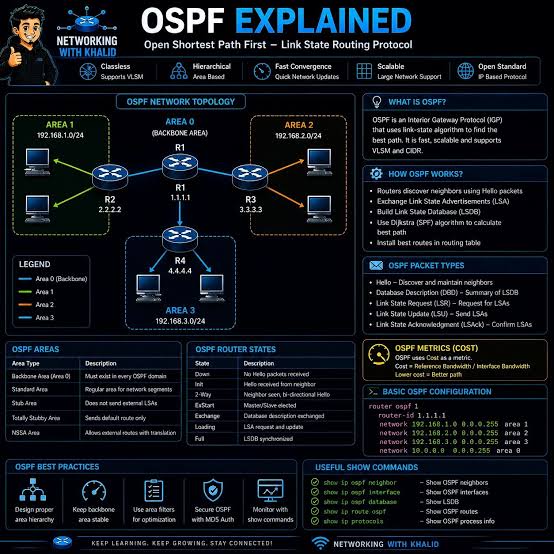
Open Shortest Path First (OSPF) is a link-state routing protocol widely used in enterprise networks to exchange routing information between routers. As networks grow, administrators often need more control over which routes are installed, advertised, or redistributed between different parts of the routing domain.
OSPF route filtering provides several mechanisms for controlling route distribution. These include prefix lists, distribute lists, area filter lists, and route maps.
However, OSPF filtering is different from filtering in distance-vector routing protocols. OSPF routers within the same area rely on a consistent link-state database (LSDB), so preventing a route from appearing in the local routing table does not necessarily prevent its LSA from being flooded.
Understanding this distinction is essential when designing route policies on Cisco routers.
In this guide, you will learn how to configure OSPF route filtering using Cisco IOS and IOS XE, understand the differences between filtering mechanisms, and troubleshoot common route filtering problems with practical configuration examples.
1. What Is OSPF Route Filtering?
OSPF route filtering is the process of controlling how routing information is selected, installed, or advertised within an OSPF network.
Administrators use route filtering to:
- Prevent selected routes from being installed in a router’s routing table.
- Control which inter-area routes are advertised between OSPF areas.
- Filter external routes during redistribution.
- Prevent unwanted routes from entering another routing domain.
- Apply routing policies based on prefixes, route types, or route tags.
- Reduce unnecessary route propagation between routing domains.
For example, consider an enterprise network with three OSPF areas:
                  Area 0
               Core Network
                    |
             +------+------+
             |             |
           ABR1           ABR2
             |             |
          Area 10        Area 20
             |             |
         Branch A      Branch B
Suppose Area 10 contains a network that should not be advertised into Area 20.
An administrator can implement filtering on an Area Border Router (ABR) to control the inter-area prefixes advertised toward the destination area.
The appropriate filtering mechanism depends on where the policy must be enforced.
2. How OSPF Route Advertisement and LSAs Work
Before configuring route filtering, it is important to understand how OSPF distributes routing information.
OSPF does not exchange complete routing tables in the same way as traditional distance-vector protocols.
Instead, routers exchange Link-State Advertisements (LSAs) and build a Link-State Database.
The SPF algorithm uses this database to calculate the shortest paths to known destinations.
Important OSPF LSA Types
| LSA Type | Name | Purpose |
|---|---|---|
| Type 1 | Router LSA | Describes router links within an area |
| Type 2 | Network LSA | Describes multiaccess network segments |
| Type 3 | Summary LSA | Advertises inter-area prefixes |
| Type 4 | ASBR Summary LSA | Provides reachability information for an ASBR |
| Type 5 | AS External LSA | Advertises external routes |
| Type 7 | NSSA External LSA | Advertises external routes inside an NSSA |
These LSA types are important because different OSPF filtering mechanisms operate at different stages of route distribution.
LSDB vs. Routing Table
Consider Router R2 receiving an OSPF advertisement for:
10.20.30.0/24The router may receive the corresponding LSA and store it in its LSDB.
However, a distribute list can prevent the resulting route from being installed in the local routing table.
This means:
- The LSA can remain in the LSDB.
- Other routers can continue receiving the LSA.
- The filtered router may not have the route in its local routing table.
This is one of the most important distinctions in OSPF route filtering.
A distribute list is not a universal mechanism for blocking LSA flooding.
Cisco documents this behavior in its OSPF distribute-list filtering documentation.
3. OSPF Prefix Lists Explained
An IP prefix list is a flexible filtering mechanism that matches routes based on their network prefixes and prefix lengths.
Prefix lists are commonly used with OSPF distribute lists and area filter lists.
Basic Prefix List Syntax
ip prefix-list LIST-NAME seq SEQUENCE permit|deny NETWORK/PREFIX-LENGTHOptional ge and le parameters allow administrators to match a range of prefix lengths.
For example:
ip prefix-list BRANCH-NETWORKS seq 10 permit 10.10.0.0/16This matches exactly:
10.10.0.0/16It does not automatically match every subnet inside that network.
Match a Range of Subnets Using ge and le
Consider the following configuration:
ip prefix-list BRANCH-NETWORKS seq 10 permit 10.10.0.0/16 ge 24 le 28This permits prefixes within 10.10.0.0/16 whose prefix lengths range from /24 through /28.
Examples of matching prefixes:
10.10.1.0/24
10.10.20.0/25
10.10.100.0/28
A /23 or /29 would not match this entry.
Deny a Specific Prefix and Permit Everything Else
Suppose an administrator wants to block:
10.20.30.0/24while permitting other routes.
Use:
ip prefix-list OSPF-FILTER seq 10 deny 10.20.30.0/24
ip prefix-list OSPF-FILTER seq 20 permit 0.0.0.0/0 le 32
The first entry denies the specified prefix.
The second entry permits all remaining IPv4 prefixes.
Important: Prefix lists have an implicit deny at the end. If you omit the final permit statement, all prefixes that do not match an earlier permit entry will be denied.
Verify the Prefix List
Run:
show ip prefix-listTo inspect a particular list:
show ip prefix-list OSPF-FILTERPrefix lists are reusable policy objects. The same list can be referenced by different routing configuration features, but its effect depends on where it is applied.
4. Configure OSPF Distribute Lists
A distribute list controls which routes are accepted into or advertised from a routing process, depending on the protocol and command direction.
In OSPF, the most important distinction is that inbound distribute-list filtering normally controls installation into the local routing table, not LSA flooding.
4.1 OSPF Inbound Route Filtering
Suppose R2 receives the following OSPF routes:
10.10.10.0/24
10.20.20.0/24
10.30.30.0/24
The administrator wants to prevent 10.20.20.0/24 from being installed in R2’s routing table.
First, create a prefix list:
ip prefix-list OSPF-IN seq 10 deny 10.20.20.0/24
ip prefix-list OSPF-IN seq 20 permit 0.0.0.0/0 le 32
Then apply it to the OSPF process:
router ospf 1
 distribute-list prefix OSPF-IN in
The intended result is:
| Prefix | Local Routing Table |
|---|---|
| 10.10.10.0/24 | Permitted |
| 10.20.20.0/24 | Filtered |
| 10.30.30.0/24 | Permitted |
The filtered LSA can still exist in the OSPF database.
This configuration affects R2’s local route installation. It does not automatically prevent other routers from learning the same prefix.
4.2 Apply Inbound Filtering on a Specific Interface
Some Cisco IOS implementations support applying an inbound distribute list to routes received through a particular interface.
Example:
router ospf 1
 distribute-list prefix OSPF-IN in GigabitEthernet0/0
This limits the filtering policy to the specified incoming interface.
Verify the syntax and feature support on the target platform and software release before using interface-specific filtering.
4.3 Understand Distribute List Out
The command distribute-list out requires special attention in OSPF.
For OSPF, traditional outbound distribute-list filtering is used to control routes being redistributed into OSPF from another routing source.
For example, an ASBR may redistribute static routes into OSPF but exclude one unwanted prefix.
ip prefix-list STATIC-TO-OSPF seq 10 deny 192.168.50.0/24
ip prefix-list STATIC-TO-OSPF seq 20 permit 0.0.0.0/0 le 32

router ospf 1
 redistribute static subnets
 distribute-list prefix STATIC-TO-OSPF out static
This example controls which static routes are redistributed into OSPF.
It does not filter ordinary intra-area or inter-area OSPF routes as if OSPF were a distance-vector protocol.
Always verify the exact command syntax and supported redistribution sources on the router platform.
5. OSPF Area Filter-List for Inter-Area Routes
An OSPF area filter list is used on an Area Border Router to control Type 3 inter-area LSAs.
Unlike an ordinary inbound distribute list, this mechanism controls which inter-area prefixes the ABR advertises into or out of a specified area.
Example Network
Consider this topology:
                 Area 0
              172.16.0.0/16
                    |
                   ABR1
                 /      \
                /        \
            Area 10     Area 20
              |            |
        10.10.0.0/16  10.20.0.0/16
Suppose the administrator wants to prevent the prefix:
10.10.50.0/24from being advertised from Area 10 into other areas through ABR1.
Step 1: Create a Prefix List
ip prefix-list AREA10-OUT seq 10 deny 10.10.50.0/24
ip prefix-list AREA10-OUT seq 20 permit 0.0.0.0/0 le 32
Step 2: Apply the Area Filter List
On ABR1:
router ospf 1
 area 10 filter-list prefix AREA10-OUT out
The out direction filters prefixes advertised out of Area 10 toward other areas.
Understand the in and out Directions
The command syntax is:
area AREA-ID filter-list prefix PREFIX-LIST-NAME inor:
area AREA-ID filter-list prefix PREFIX-LIST-NAME outThe difference is important:
| Direction | Meaning |
|---|---|
in | Filters inter-area prefixes advertised into the specified area from other areas |
out | Filters inter-area prefixes advertised out of the specified area toward other areas |
The filter is applied by the ABR to Type 3 inter-area advertisements.
It is not a general mechanism for filtering Type 1 or Type 2 LSAs within an area.
Also remember that a prefix not explicitly permitted by the prefix list is implicitly denied.
Cisco describes this behavior in its OSPF area filter-list command reference.
6. Route Maps and OSPF Redistribution Filtering
Route maps provide more flexible route filtering than prefix lists alone.
They can match routing information using prefix lists and other route attributes, depending on the feature and platform.
Common uses include:
- Filtering static routes before redistribution.
- Filtering connected routes.
- Controlling routes redistributed from EIGRP or BGP.
- Assigning route tags.
- Setting metrics and external route types.
Example: Filter Static Routes Before OSPF Redistribution
Suppose the router has these static routes:
192.168.10.0/24
192.168.20.0/24
192.168.30.0/24
The administrator wants to redistribute only the first and third networks into OSPF.
Create a prefix list:
ip prefix-list STATIC-ROUTES seq 10 permit 192.168.10.0/24
ip prefix-list STATIC-ROUTES seq 20 permit 192.168.30.0/24
Create a route map:
route-map STATIC-TO-OSPF permit 10
 match ip address prefix-list STATIC-ROUTES
Apply it during redistribution:
router ospf 1
 redistribute static subnets route-map STATIC-TO-OSPF
Only static routes matching the permitted prefix list are selected by this redistribution policy.
The route map does not automatically filter unrelated OSPF-learned routes.
Example: Set an OSPF External Metric
A route map can also set attributes for redistributed routes.
route-map STATIC-TO-OSPF permit 10
 match ip address prefix-list STATIC-ROUTES
 set metric 50
 set metric-type type-1
Then apply it:
router ospf 1
 redistribute static subnets route-map STATIC-TO-OSPF
This sets the external metric and selects E1 external route behavior for matching redistributed routes.
For more information, see Cisco’s OSPF redistribution and filtering documentation.
7. Filter OSPF External Routes Using Route Tags
Route tags help administrators identify routes that have passed through a particular redistribution policy.
They are especially useful in networks where multiple routing protocols exchange routes.
For example, an organization may redistribute selected static routes into OSPF and assign them a tag.
Step 1: Create a Route Map That Assigns a Tag
route-map STATIC-TO-OSPF permit 10
 match ip address prefix-list STATIC-ROUTES
 set tag 100
Step 2: Apply the Route Map
router ospf 1
 redistribute static subnets route-map STATIC-TO-OSPF
The matching external routes receive tag 100.
Step 3: Match the Tag on Another Router
On a receiving router, a route map can match that tag:
route-map FILTER-TAGGED-ROUTES deny 10
 match tag 100

route-map FILTER-TAGGED-ROUTES permit 20
On platforms supporting route-map-based OSPF distribute-list filtering:
router ospf 1
 distribute-list route-map FILTER-TAGGED-ROUTES in
This prevents matching routes from being installed in the local routing table.
It does not stop their LSAs from being flooded through the OSPF domain.
Platform note: Route-map-based OSPF distribute-list filtering and its supported match criteria vary by platform and software release. Confirm support before deploying the configuration.
8. Practical Cisco IOS Configuration Examples
The following examples show how to select an appropriate filtering mechanism for common network requirements.
Scenario 1: Prevent One OSPF Route from Entering the Local Routing Table
Requirement:
Block: 10.50.50.0/24
Allow: Other IPv4 prefixes
Configuration:
ip prefix-list BLOCK-ONE-ROUTE seq 10 deny 10.50.50.0/24
ip prefix-list BLOCK-ONE-ROUTE seq 20 permit 0.0.0.0/0 le 32

router ospf 1
 distribute-list prefix BLOCK-ONE-ROUTE in
Expected behavior:
- The selected route is not installed in the local routing table.
- Its LSA may remain in the LSDB.
- Other routers may still install the route.
Scenario 2: Block an Inter-Area Prefix from Leaving an Area
Requirement:
Prevent 10.60.60.0/24 from being advertised out of Area 10.
Configuration on the ABR:
ip prefix-list AREA10-FILTER seq 10 deny 10.60.60.0/24
ip prefix-list AREA10-FILTER seq 20 permit 0.0.0.0/0 le 32

router ospf 1
 area 10 filter-list prefix AREA10-FILTER out
This filters the corresponding Type 3 inter-area advertisement.
Scenario 3: Redistribute Only Selected Static Routes
Requirement:
Redistribute:
172.16.10.0/24
172.16.30.0/24
Do not redistribute other static routes.
Configuration:
ip prefix-list SELECT-STATIC seq 10 permit 172.16.10.0/24
ip prefix-list SELECT-STATIC seq 20 permit 172.16.30.0/24

route-map STATIC-REDISTRIBUTION permit 10
 match ip address prefix-list SELECT-STATIC

router ospf 1
 redistribute static subnets route-map STATIC-REDISTRIBUTION
This applies the filter to static route redistribution into OSPF.
Scenario 4: Apply an Interface-Specific Inbound Filter
Requirement:
Prevent a selected route from being installed when learned through a particular OSPF interface.
Example:
ip prefix-list INTERFACE-FILTER seq 10 deny 10.70.70.0/24
ip prefix-list INTERFACE-FILTER seq 20 permit 0.0.0.0/0 le 32

router ospf 1
 distribute-list prefix INTERFACE-FILTER in GigabitEthernet0/1
Use this only after confirming that the target IOS or IOS XE release supports the required interface-specific syntax.
9. Verify OSPF Route Filtering with show Commands
After applying a filtering policy, verify both the routing table and the OSPF database.
Do not rely on one command alone.
Check the OSPF Routing Table
show ip route ospfThis displays routes installed in the routing table with OSPF as their source.
Check whether the filtered prefix is absent.
Check a Specific Prefix
show ip route 10.50.50.0This helps determine whether the route is installed through another routing source or is missing entirely.
Check the OSPF Database
show ip ospf databaseTo inspect external LSAs:
show ip ospf database externalTo inspect summary LSAs:
show ip ospf database summaryA route blocked by an inbound distribute list may still appear in the LSDB.
Verify the Prefix List
show ip prefix-listCheck sequence numbers and matching conditions.
Verify the OSPF Configuration
show running-config | section router ospfThis helps identify whether the distribute list or area filter list is configured under the correct OSPF process.
Verify OSPF Neighbors
show ip ospf neighborIf an adjacency is down, investigate the neighbor relationship separately.
See our related guide:
OSPF Neighbor Troubleshooting.
Verify Redistribution
show ip protocolsThis displays routing protocol information, including redistribution configuration and applicable filtering details.
For platform-specific commands and outputs, consult the relevant Cisco IOS or IOS XE documentation.
10. Common OSPF Route Filtering Problems
Incorrect filtering configuration can cause missing routes, unexpected advertisements, and routing inconsistencies.
The following table summarizes common problems and their likely causes.
| Problem | Possible Cause | What to Check |
|---|---|---|
| Prefix still appears in the OSPF database | Distribute list only affects local route installation | Inspect LSAs and identify the filtering stage |
| All routes disappear | Missing final permit statement | Review prefix-list sequence entries |
| Inter-area route is still advertised | Filter applied in the wrong direction or on the wrong ABR | Check area filter-list configuration |
| Static route is not redistributed | Route map does not match the static route | Verify the prefix list and route-map sequence |
| External route is unexpectedly filtered | Incorrect route tag or route-map logic | Inspect redistribution policy and tags |
| Filter works on one router but not another | Different configurations or platform support | Compare configurations and software versions |
| Route appears through another protocol | Another route source provides the same destination | Inspect the complete routing table |
Problem 1: Forgetting the Implicit Deny
Consider:
ip prefix-list OSPF-IN seq 10 deny 10.20.20.0/24This configuration denies the selected prefix, but all other prefixes are also denied because prefix lists have an implicit deny at the end.
If the intention is to block only one network, add:
ip prefix-list OSPF-IN seq 20 permit 0.0.0.0/0 le 32Problem 2: Expecting Distribute Lists to Block LSA Flooding
An administrator may configure:
router ospf 1
 distribute-list prefix OSPF-IN in
Then discover that the filtered prefix still appears in:
show ip ospf databaseThis is expected behavior.
The distribute list prevents local route installation; it does not remove the LSA from the OSPF database.
Use an appropriate OSPF area filtering or redistribution policy when the objective is to control advertisements.
Problem 3: Using Area Filter Lists in the Wrong Direction
The in and out directions are relative to the specified area.
Before applying the filter, identify:
- The source area.
- The destination area.
- The ABR performing the filtering.
- Whether the prefix is being advertised into or out of the specified area.
A wrong direction may leave the intended advertisement unchanged.
Problem 4: Filtering the Wrong Route Source
A route map used for redistribution must match the route source being redistributed.
For example, a prefix list may be correct, but the route is not a static route as expected.
Use:
show ip routeto identify the route’s source and verify the redistribution configuration.
11. OSPF Route Filtering Best Practices
Use the following practices when implementing route filtering in production networks.
1. Define the filtering objective first.
Determine whether you need to:
- Prevent local route installation.
- Filter inter-area Type 3 advertisements.
- Control external route redistribution.
- Apply policy based on route tags or other attributes.
2. Use the correct filtering mechanism.
Do not use an inbound distribute list when the objective is to stop LSAs from being advertised to other routers.
3. Add explicit permit statements where appropriate.
Prefix lists use an implicit deny at the end. Make the intended policy clear.
4. Test filtering in a controlled environment.
Use a lab topology before deploying changes to production routers.
5. Verify both the LSDB and routing table.
A route can be present in the OSPF database but absent from the routing table.
6. Document route policies.
Use descriptive prefix-list and route-map names.
For example:
OSPF-AREA10-OUT
OSPF-LOCAL-IN
STATIC-TO-OSPF
OSPF-EXTERNAL-TAGS
7. Consider platform and software differences.
Not every OSPF filtering command or route-map match option is supported identically across Cisco platforms.
Verify command availability and behavior in the target software release.
8. Plan rollback before applying changes.
Keep a backup of the original configuration and understand how to remove the filtering command if an unexpected routing problem occurs.
Conclusion
OSPF route filtering provides administrators with control over route installation, inter-area advertisements, and external route redistribution.
However, the filtering mechanism must match the intended objective.
Use prefix lists to identify routes, distribute lists to control local route installation or supported redistribution paths, area filter lists to control Type 3 inter-area advertisements, and route maps to implement more advanced redistribution and route-selection policies.
The most important distinction is that filtering a route from the local routing table does not necessarily remove its LSA from the OSPF database.
By understanding how each mechanism works and verifying both the LSDB and routing table, network administrators can implement reliable routing policies without unintentionally disrupting OSPF operations.
One Comment