BPDU Guard vs Root Guard: Differences, Configuration & Troubleshooting
Spanning Tree Protocol (STP) prevents Layer 2 switching loops, but a stable spanning-tree topology can still be disrupted by an unexpected switch, an incorrect bridge priority, or a misconfigured connection.
Consider two situations.
In the first, an employee connects an unmanaged or unauthorized switch to a network port intended for a workstation. The device begins sending Bridge Protocol Data Units (BPDUs), potentially introducing an unexpected bridge into the switching topology.
In the second, a downstream managed switch advertises a superior BPDU and attempts to influence the enterprise root bridge election. If the network accepts the new root, traffic paths may change unexpectedly.
These problems require different protections.
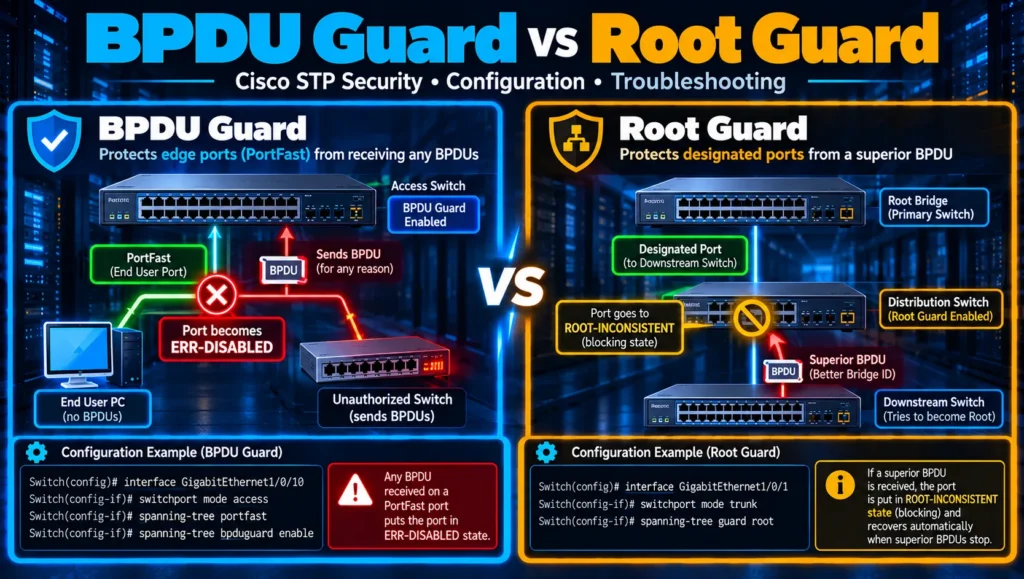
BPDU Guard protects edge ports from unexpected BPDUs, while Root Guard prevents designated ports from accepting a superior bridge as the new path toward the STP root.
Although both features improve Spanning Tree security, they operate differently, trigger under different conditions, and recover from violations in different ways.
This guide explains BPDU Guard vs Root Guard, where to deploy each feature, how to configure them on Cisco switches, and how to troubleshoot err-disabled and root-inconsistent ports.
What Are BPDU Guard and Root Guard?
BPDU Guard and Root Guard are switch-level protection mechanisms designed to enforce expected Spanning Tree behavior.
They do not replace STP.
Instead, they add restrictions that help keep the Layer 2 topology consistent with the network administrator’s design.
BPDU Guard assumes that a protected edge interface should not receive BPDUs. When the feature detects a violation, the switch typically places the interface in an error-disabled state.
Root Guard allows a downstream switch to participate in STP but prevents that connection from becoming the local switch’s root port because of a superior BPDU.
These protections are useful in enterprise switching environments where administrators want to maintain control over which devices participate in STP and where the root bridge is located.
For the underlying switching concepts, see CorgiNetwork’s Spanning Tree Protocol (STP) Explained and Routers, Switches & Network Devices Explained.
BPDU Guard vs Root Guard: Key Differences
| Feature | BPDU Guard | Root Guard |
|---|---|---|
| Primary purpose | Protect edge interfaces from unexpected BPDUs | Prevent an unexpected root bridge from appearing through a protected port |
| Typical interface | PortFast/edge port connected to an endpoint | Designated port toward a downstream switch |
| Trigger | Receiving a BPDU | Receiving a superior BPDU that would violate the root-placement policy |
| Violation response | Interface becomes err-disabled | Affected STP instance enters root-inconsistent state |
| Traffic impact | Entire interface is disabled | Traffic forwarding is blocked for the affected STP instance |
| Recovery | Manual or configured errdisable recovery | Automatic after the superior BPDU condition disappears |
| Typical Cisco command | spanning-tree bpduguard enable | spanning-tree guard root |
| Common deployment | Workstation or endpoint ports | Designated switch-to-switch links |
The most important distinction is how each feature treats BPDUs.
BPDU Guard treats BPDU reception as a violation. Root Guard permits normal STP participation but rejects a superior root advertisement on a protected designated port.
How Spanning Tree Protocol Works
Before configuring these features, it is important to understand why Spanning Tree Protocol exists.
Ethernet switches can have multiple physical paths between network segments.
Redundant paths are useful because they provide alternative connections when a cable or switch fails.
However, an unrestricted Layer 2 loop can cause broadcast storms, duplicate frames, and MAC address instability.
STP prevents forwarding loops by selecting a loop-free logical topology.
It determines which links can forward traffic and which links must remain blocked or discarding.
Root Bridge Election
STP elects a root bridge using the Bridge ID.
The Bridge ID contains a bridge priority component and a MAC address component. Depending on the STP implementation, the priority information also incorporates an extended system ID.
The bridge with the lowest effective Bridge ID wins the root election.
An administrator can influence this process by configuring bridge priority.
For example, in a typical Cisco Rapid PVST+ environment:
configure terminal
spanning-tree vlan 10 priority 4096
end
This sets the configured priority component for VLAN 10 to 4096.
The command does not guarantee that the switch becomes root if another bridge has a superior Bridge ID.
Network administrators usually want root bridges located on designated distribution or core switching infrastructure.
Unexpected root bridge changes can alter traffic paths and degrade network performance.
For a general introduction to Ethernet forwarding and switch topology, read CorgiNetwork’s VLAN Explained: Access vs Trunk, 802.1Q & Inter-VLAN Routing.
What Is BPDU Guard?
BPDU Guard is an STP security feature that protects interfaces expected to connect to endpoint devices rather than other participating bridges.
A normal workstation or printer does not typically need to participate in Spanning Tree.
Therefore, an edge interface configured with PortFast is generally expected not to receive BPDUs.
BPDU Guard enforces that expectation.
When a protected interface receives a BPDU, the switch places the interface in an error-disabled state on supported Cisco IOS/IOS XE platforms.
This prevents the connected device from continuing to participate in the Layer 2 topology through that interface.
BPDU Guard Example
Consider the following topology:
                  Distribution Switch
                           |
                           |
                     Access Switch
                           |
                    Gi1/0/10
                    PortFast
                    BPDU Guard
                           |
                      Employee PC
Under normal conditions, the access port connects to a workstation.
The interface can transition quickly to forwarding because PortFast is enabled.
Now suppose someone replaces the workstation with a switch that sends BPDUs.
                  Distribution Switch
                           |
                     Access Switch
                           |
                    Gi1/0/10
                    BPDU Guard
                           |
                     Rogue Switch
                        BPDU
                         ↑
                   VIOLATION
BPDU Guard detects the unexpected BPDU.
The protected interface is placed in an err-disabled state.
This prevents the newly connected bridge from affecting STP through that port.
Does BPDU Guard Require PortFast?
There is an important distinction between global and interface-level configuration.
On supported Cisco Catalyst platforms:
- Globally enabled BPDU Guard normally applies to ports operating in PortFast/edge mode.
- Interface-level
spanning-tree bpduguard enablecan enable BPDU Guard directly on the selected interface, even without PortFast.
For this reason, BPDU Guard should normally be configured with a clear understanding of how each interface is intended to operate.
Cisco documents these distinctions in its Spanning Tree PortFast and BPDU Guard guide.
How to Configure BPDU Guard on Cisco Switches
The following examples use commonly supported Cisco IOS and IOS XE syntax.
Specific commands, defaults, and supported features depend on the device model and software release.
Verify your configuration guide before deployment.
Method 1: Enable BPDU Guard on a Single Access Port
Assume GigabitEthernet1/0/10 connects to an ordinary workstation.
configure terminal

interface GigabitEthernet1/0/10
 description EMPLOYEE-WORKSTATION
 switchport mode access
 spanning-tree portfast
 spanning-tree bpduguard enable

end
This configuration:
- Selects a workstation-facing interface.
- Configures it as an access port.
- Enables PortFast.
- Enables BPDU Guard.
Some recent IOS XE releases use the terminology spanning-tree portfast edge for edge-port configuration. Use the syntax supported by the exact platform.
Important: Never enable PortFast merely because a port is currently forwarding. Verify that it is an edge connection and not part of a switch-to-switch topology.
Method 2: Enable BPDU Guard Globally for PortFast Ports
On many Cisco Catalyst platforms:
configure terminal

spanning-tree portfast bpduguard default

end
This enables the global PortFast BPDU Guard feature.
The exact effect depends on the operational PortFast status and per-interface overrides.
For example, it does not mean that all ports on the switch become protected regardless of their configuration.
Method 3: Verify BPDU Guard Configuration
Check the STP summary:
show spanning-tree summaryInspect the interface:
show running-config interface GigabitEthernet1/0/10You may also use platform-supported commands to inspect interface spanning-tree details:
show spanning-tree interface GigabitEthernet1/0/10 detailConfirm that the intended interface is an edge port and that BPDU Guard is enabled.
What Happens When BPDU Guard Is Triggered?
Suppose an unauthorized switch starts sending BPDUs into a BPDU Guard-protected interface.
The switch can generate a log message identifying the violation.
For example, an illustrative Cisco-style event may resemble:
%SPANTREE-2-BLOCK_BPDUGUARD:
Received BPDU on protected interface Gi1/0/10
The exact log message depends on the switch family and software release.
The interface is then placed in an error-disabled state.
To inspect it:
show interfaces status err-disabledOn supported platforms, output can identify the interface and the error-disable reason.
How to Recover a BPDU Guard Err-Disabled Port
First, remove or correct the device or topology that caused the BPDU violation.
Then inspect the configuration and logs.
show logging
show interfaces status err-disabled
show spanning-tree summary
After confirming that the connection is safe, an administrator can commonly restore the interface with:
configure terminal

interface GigabitEthernet1/0/10
 shutdown
 no shutdown

end
This sequence resets the interface state.
Do not reset the port repeatedly while an unauthorized switch remains connected. The same violation may occur again.
Automatic BPDU Guard Recovery
Some Cisco platforms support automatic recovery from selected err-disable conditions.
For example:
configure terminal

errdisable recovery cause bpduguard
errdisable recovery interval 300

end
This configures recovery for the BPDU Guard cause with an illustrative 300-second interval.
However, automatic recovery must be evaluated carefully.
If the offending device continues sending BPDUs, the interface may be disabled again after recovery.
Automatic recovery is not a substitute for removing the underlying problem.
What Is Root Guard?
Root Guard is a Spanning Tree security feature designed to help maintain control over root bridge placement.
It is normally applied to designated switch interfaces where a superior root bridge should not appear.
Unlike BPDU Guard, Root Guard allows normal STP communication.
Its purpose is to prevent an unexpected downstream switch from changing the intended root relationship.
How Root Guard Works
Suppose a distribution switch has an interface toward an access switch.
The design requires the distribution layer to remain closer to the STP root than the access layer.
If the downstream switch advertises a superior BPDU through that interface, the upstream switch could otherwise reconsider the root topology.
With Root Guard enabled, the protected interface is placed into the root-inconsistent state for the affected STP instance.
Traffic forwarding is blocked for that instance until the superior BPDU condition disappears.
Root Guard Example
                 Intended Root Bridge
                   Distribution SW1
                          |
                    Designated Port
                      Root Guard
                          |
                      Access SW2
                          |
                    Access Devices
Under normal conditions, the downstream access switch participates in STP without becoming the root.
Now assume SW2 begins advertising a superior Bridge ID.
                 Distribution SW1
                        |
                   ROOT GUARD
                        |
                 Superior BPDU
                        ↑
                        |
                    Access SW2

                 ROOT-INCONSISTENT
                   (STP blocking)
Root Guard prevents the protected interface from becoming the route toward a newly superior root bridge.
The protected STP instance remains blocked on that interface while the superior BPDU condition persists.
This behavior is documented in Cisco’s official Root Guard technical explanation.
How to Configure Root Guard on Cisco Switches
Root Guard is configured per interface on supported Cisco IOS/IOS XE platforms.
Step 1: Identify the Correct Interface
Consider this topology:
            Core / Distribution Layer
                       SW1
                        |
                   Gi1/0/24
                        |
                   Access SW2
Assume SW1’s Gi1/0/24 is intended to be the designated port toward the downstream access switch.
This is a potential Root Guard deployment point.
Do not assume that every uplink is an appropriate Root Guard interface.
Step 2: Enable Root Guard
On SW1:
configure terminal

interface GigabitEthernet1/0/24
 description DOWNSTREAM-ACCESS-SWITCH
 spanning-tree guard root

end
The command enables Root Guard on the selected interface.
Step 3: Verify Root Guard
Check the interface configuration:
show running-config interface GigabitEthernet1/0/24Inspect spanning-tree state:
show spanning-tree interface GigabitEthernet1/0/24 detailThen check for inconsistent ports:
show spanning-tree inconsistentportsWhere the command is supported, it can identify interfaces blocked because of STP inconsistency conditions.
What Is the Root-Inconsistent State?
The root-inconsistent state is the condition associated with a Root Guard violation.
When a Root Guard-protected designated port receives a superior BPDU, the affected STP instance is blocked on that port.
This prevents the superior BPDU from causing the port to become a root port and changing the intended topology through that connection.
Root-Inconsistent vs Err-Disabled
These states are fundamentally different.
| Characteristic | Root-Inconsistent | Err-Disabled |
|---|---|---|
| Typical trigger | Root Guard violation | BPDU Guard or another error-disable cause |
| Interface physically shut down | Not necessarily | Operationally disabled |
| STP forwarding | Blocked for affected instance | Disabled with the interface |
| Automatic return | Normally yes | Requires manual or configured recovery |
| Recovery condition | Superior BPDUs stop | Error condition corrected and interface recovered |
The distinction becomes particularly important in environments using per-VLAN spanning-tree instances.
Root Guard may block one affected instance while the physical interface remains operational.
BPDU Guard error-disables the interface itself.
Does Root Guard Recover Automatically?
Yes, under normal supported Cisco behavior.
When the protected port stops receiving the superior BPDUs that caused the violation, the affected STP instance can return to normal operation through the spanning-tree state transitions.
The administrator does not normally need to shut down and re-enable the physical interface to clear a Root Guard inconsistency.
However, the cause of the superior BPDU should still be investigated.
Automatic recovery does not mean that the original network design error has been fixed.
BPDU Guard vs Root Guard: Real-World Scenarios
Scenario 1: An Employee Connects an Unauthorized Switch
An ordinary workstation port begins receiving BPDUs.
Recommended protection: BPDU Guard.
The interface is expected to connect to an endpoint rather than a participating bridge.
BPDU Guard can isolate the offending connection by placing the interface in an error-disabled state.
Scenario 2: A Downstream Switch Advertises a Better Root
An access switch begins advertising a superior Bridge ID toward a distribution switch.
Recommended protection: Root Guard on the appropriate designated downstream-facing port.
Root Guard prevents that interface from becoming the path to an unexpected root bridge.
Scenario 3: A Legitimate Switch-to-Switch Link Receives BPDUs
Two managed switches are connected as part of an intentional STP topology.
BPDU Guard is generally inappropriate if the link is expected to exchange BPDUs.
Root Guard may be appropriate if the interface is designated and the network design requires the root to remain on the upstream side.
Scenario 4: A Root Bridge Changes After a Configuration Update
A technician changes an access switch’s bridge priority.
The access switch begins advertising a superior Bridge ID.
Root Guard on the intended boundary can prevent the downstream device from becoming the root through the protected interface.
However, the correct long-term response is to investigate and correct the unexpected priority configuration.
Scenario 5: An Endpoint Port Uses PortFast but Receives BPDUs
A device running bridging software, a virtual bridge, or an unexpected physical switch may introduce BPDUs on an edge port.
BPDU Guard is appropriate when policy requires that the interface never connect to an STP-participating bridge.
Not every host virtualization setup should automatically receive identical edge-port policies. Verify the traffic and topology expectations before enabling enforcement.
Can BPDU Guard and Root Guard Be Used Together?
Both features can exist on the same switch, but they generally belong on different interface types.
For example:
                  Distribution Switch
                       |
                  Root Guard
                       |
                    Access Switch
                     /        \
                    /          \
              BPDU Guard    BPDU Guard
                 |              |
             Workstation       Printer
The distribution switch protects its intended root topology using Root Guard.
The access switch protects endpoint-facing ports using BPDU Guard.
This is a common design pattern.
Should Both Features Be Enabled on One Interface?
Generally, do not configure both features on the same port as a substitute for proper interface design.
BPDU Guard is designed to reject unexpected BPDU reception.
Root Guard is designed to evaluate BPDUs and specifically reject superior root information.
Their purposes are different, and combining them on one interface may be unsupported, redundant, or counterproductive depending on the platform.
Select the protection that matches the interface’s intended function.
BPDU Guard vs Root Guard vs Loop Guard
BPDU Guard, Root Guard, and Loop Guard are sometimes confused because all three enhance STP reliability.
However, their purposes differ.
| Feature | Primary protection |
|---|---|
| BPDU Guard | Unexpected BPDUs on protected edge interfaces |
| Root Guard | Unexpected superior root information on designated interfaces |
| Loop Guard | Certain loop risks caused by missing BPDUs on non-designated STP ports |
When Is Loop Guard Used?
Loop Guard helps prevent certain forwarding-loop conditions when expected BPDUs stop arriving on an STP port.
For example, a unidirectional communication problem could prevent a switch from receiving BPDUs while the physical link still appears operational.
Without appropriate protection, the port might incorrectly transition toward forwarding.
Loop Guard can help keep the affected port from entering an unsafe forwarding state.
Root Guard addresses a different problem: receiving a superior BPDU where the network design does not permit a new root path.
Cisco provides more background in its Root Guard and spanning-tree design documentation.
BPDU Guard vs BPDU Filter
BPDU Guard and BPDU Filter are also different.
BPDU Guard detects unexpected BPDUs and protects the topology by disabling a violating interface.
BPDU Filter controls BPDU transmission or reception behavior.
Depending on the configuration and platform, BPDU filtering can suppress STP communication.
This introduces significant risk if applied incorrectly.
For example, interface-level BPDU Filter configurations that suppress sending and receiving BPDUs can effectively remove STP protection from a connection.
Do not use BPDU Filter as a quick fix for BPDU Guard violations.
If an endpoint port receives BPDUs, investigate why the device is sending them.
If a link legitimately needs to exchange BPDUs, reconsider the port’s intended role and protection configuration.
Troubleshooting BPDU Guard Issues
Problem 1: A Switch Port Becomes Err-Disabled
Symptoms
- An endpoint suddenly loses network connectivity.
- The interface remains down even though the cable is connected.
- Switch logs mention BPDU Guard.
- The interface is listed as err-disabled.
Possible causes
- An unauthorized switch was connected.
- A device running bridging software transmitted BPDUs.
- BPDU Guard was configured on an inappropriate switch-to-switch link.
- The port’s operational role changed without a configuration review.
Diagnostic commands
show interfaces status err-disabled
show logging
show spanning-tree summary
show running-config interface GigabitEthernet1/0/10
Resolution
Identify the device connected to the interface.
Confirm whether BPDU transmission is legitimate.
Remove the unauthorized device or correct the interface policy.
Only then restore the interface if appropriate.
Problem 2: BPDU Guard Continues to Disable a Port
A port comes back online and becomes err-disabled again.
This usually indicates that the original triggering condition remains.
Check whether the connected device is still sending BPDUs.
Do not solve repeated violations by disabling BPDU Guard everywhere.
Correct the connection or topology instead.
Problem 3: BPDU Guard Does Not Trigger
A switch is connected to an interface, but the expected violation does not occur.
Possible explanations include:
- BPDU Guard is not enabled.
- The interface is not operationally using PortFast under a global-only configuration.
- Interface-level settings override the expected behavior.
- The connected device is not transmitting BPDUs.
- The interface is using a different STP or switching configuration than expected.
Inspect both the global and interface-level configuration.
show spanning-tree summary
show running-config interface GigabitEthernet1/0/10
Do not assume that plugging in a second switch always produces a BPDU Guard violation. The feature responds to BPDU reception, not simply to the detection of another Ethernet device.
Troubleshooting Root Guard Issues
Problem 1: Port Is Root-Inconsistent
Symptoms
- Traffic stops forwarding for an affected STP instance.
- The physical connection may remain up.
- Switch logs report a Root Guard violation.
- STP diagnostics show an inconsistent port.
Possible cause
The protected designated interface is receiving superior BPDUs.
Diagnostic commands
show spanning-tree inconsistentports
show spanning-tree vlan 10
show spanning-tree interface GigabitEthernet1/0/24 detail
show logging
Resolution
Identify which downstream bridge is advertising superior root information.
Verify its bridge priority and STP configuration.
Correct the root-election policy rather than disabling Root Guard without investigation.
Problem 2: A Root-Inconsistent Port Recovers and Blocks Again
The superior BPDU condition may be intermittent.
Possible reasons include:
- Topology changes on the downstream switch.
- Intermittent link behavior.
- Changes in bridge priority.
- Unexpected connections between switching domains.
- Inconsistent STP configurations.
Inspect the root bridge identity on the relevant switches.
Compare root information over time and review switch logs.
Problem 3: Root Guard Does Not Prevent a Topology Change
Check whether Root Guard is configured on the correct interface.
Root Guard is intended for ports that should remain designated toward a downstream segment.
It should not be installed indiscriminately on links where a superior root bridge is legitimately expected.
A misapplied Root Guard configuration can create connectivity problems rather than protecting the intended topology.
Cisco Troubleshooting Workflow
When diagnosing a BPDU Guard or Root Guard incident, follow a structured sequence.
Step 1: Identify the Affected Interface
Use:
show interfaces status
show logging
Record the interface, time of the incident, and reported cause.
Step 2: Determine Whether the Port Is Err-Disabled or Root-Inconsistent
For error-disabled interfaces:
show interfaces status err-disabledFor STP inconsistent ports:
show spanning-tree inconsistentportsThe commands and output availability depend on the platform.
Step 3: Inspect the Relevant STP Instance
For example:
show spanning-tree vlan 10Verify the root bridge information and port roles.
Step 4: Review Interface Configuration
show running-config interface GigabitEthernet1/0/24Identify PortFast, BPDU Guard, and Root Guard settings.
Step 5: Compare the Configuration with the Intended Topology
Ask:
- Is this an endpoint connection or a switch-to-switch link?
- Should the interface receive BPDUs?
- Is the upstream or downstream side supposed to contain the STP root?
- Has a switch recently been added or replaced?
- Has bridge priority changed?
- Is the affected VLAN expected on this connection?
Step 6: Correct the Root Cause
Do not remove protections merely because they have blocked traffic.
Determine whether the feature exposed a genuine topology problem or was configured on the wrong interface.
Step 7: Verify Recovery
After corrective action, confirm:
- Expected interface state.
- Correct root bridge.
- Intended STP port roles.
- No unexpected inconsistency conditions.
- Normal endpoint connectivity.
- No recurring protection events.
Recommended STP Security Design
Consider a three-tier network with core, distribution, and access switches.
The organization wants the root bridge located at the distribution layer.
A simplified design is:
                    Core / Distribution
                      Root Bridge
                           |
                    Distribution SW
                           |
                 Downstream Designated
                        Root Guard
                           |
                       Access SW
                       /       \
                      /         \
                Edge Port     Edge Port
                BPDU Guard    BPDU Guard
                    |             |
                 Desktop        Printer
In this design:
- Root bridge priority is intentionally managed.
- Root Guard is applied on appropriate downstream-facing designated ports.
- PortFast is enabled on verified edge interfaces.
- BPDU Guard protects those edge interfaces.
- Standard STP remains active on legitimate switch interconnections.
Additional redundancy may require alternate links, different STP roles, and protections such as Loop Guard or UDLD.
The final design depends on actual topology and supported switch features.
For related network design principles, see our Routers, Switches & Network Devices guide and Network Security Basics.
BPDU Guard and Root Guard Best Practices
1. Use BPDU Guard on Verified Edge Ports
Configure BPDU Guard where the network policy prohibits BPDU reception.
Avoid applying it blindly to links that legitimately participate in STP.
2. Use Root Guard on Appropriate Designated Ports
Root Guard belongs on interfaces where a superior root bridge should not appear.
Verify the intended STP port role before enabling it.
3. Plan Root Bridge Placement
Select suitable root and backup-root switches.
Do not leave critical root bridge placement entirely to accidental default priorities.
4. Document Switch-to-Switch Connections
Identify uplinks, downlinks, redundant paths, and downstream switching domains.
Accurate documentation makes Root Guard deployment safer.
5. Monitor Protection Events
Review switch logs for:
- BPDU Guard violations.
- Root-inconsistent transitions.
- Unexpected root bridge changes.
- STP topology changes.
- Repeated interface recoveries.
6. Use Automatic Recovery Carefully
BPDU Guard automatic recovery may be convenient, but it can repeatedly reconnect an offending device.
Choose recovery behavior based on operational risk and security policy.
7. Avoid Disabling STP to Fix Connectivity
Disabling Spanning Tree or suppressing BPDUs without understanding the network can create forwarding loops.
Investigate the actual cause instead.
8. Validate the Configuration in a Lab
Before deploying changes widely, test the intended port behavior on switches running the same software family as production.
9. Check Per-VLAN STP Behavior
In Rapid PVST+ environments, protection and forwarding consequences may differ by VLAN.
Inspect the affected instances rather than relying only on physical interface state.
10. Maintain Configuration Backups
Before making STP changes, preserve the current configuration and prepare a rollback procedure.
STP changes can affect large portions of a Layer 2 network.
Practical Deployment Checklist
Before enabling BPDU Guard or Root Guard, verify:
The switch platform supports the intended feature.
The STP mode is understood.
Root bridge placement is documented.
Edge interfaces are identified.
Switch-to-switch links are identified.
PortFast is used only where appropriate.
BPDU Guard is enabled on selected edge interfaces.
Root Guard is enabled on appropriate designated ports.
Global and interface-level settings do not conflict.
Recovery behavior is documented.
Switch logs are monitored.
The implementation is tested before full deployment.
A rollback plan is available.
Frequently Asked Questions
What is the main difference between BPDU Guard and Root Guard?
BPDU Guard disables a protected interface when it receives a BPDU. Root Guard blocks an affected STP instance when superior BPDUs would otherwise violate the intended root bridge placement.
Does BPDU Guard require PortFast?
Global PortFast BPDU Guard typically applies to operational PortFast ports. On supported Cisco platforms, interface-level BPDU Guard can be enabled directly without requiring PortFast.
What happens when BPDU Guard is triggered?
On supported Cisco switches, the interface is placed in an error-disabled state. It must then be recovered manually or through appropriately configured automatic recovery.
What happens when Root Guard is triggered?
The affected STP instance transitions into the root-inconsistent state. The port stops forwarding traffic for that instance while the superior BPDU condition persists.
Does Root Guard recover automatically?
Yes. Root Guard normally permits automatic recovery when the superior BPDU condition disappears and STP can return the instance to a valid forwarding state.
Should Root Guard be configured on uplink ports?
Not automatically. Root Guard is intended for designated interfaces where a superior root bridge should not appear. A port that legitimately needs to find the root bridge upstream is generally not an appropriate deployment point.
Can BPDU Guard and Root Guard work on the same switch?
Yes. They commonly protect different interface types on the same switch or across different layers of a campus network.
Can BPDU Guard and Root Guard be configured on the same interface?
Their functions are generally not intended to be combined on a single interface. Choose the protection that matches the port’s role and consult platform documentation for restrictions.
Is Root Guard the same as Loop Guard?
No. Root Guard prevents unwanted superior root information from changing the intended topology through a protected port. Loop Guard helps protect against certain STP loop conditions caused by missing expected BPDUs.
What is the Cisco command for BPDU Guard?
A common interface-level command is:
spanning-tree bpduguard enableFor global PortFast BPDU Guard on supported platforms:
spanning-tree portfast bpduguard defaultWhat is the Cisco command for Root Guard?
A common interface configuration command is:
spanning-tree guard rootHow do I troubleshoot a root-inconsistent port?
Check the root bridge and the affected interface using:
show spanning-tree inconsistentports
show spanning-tree vlan 10
show logging
Investigate the downstream bridge advertising superior BPDUs and correct the root-election policy.
Conclusion
BPDU Guard and Root Guard are important tools for maintaining secure and predictable Layer 2 switching networks.
They protect different parts of the Spanning Tree architecture.
BPDU Guard belongs primarily on protected edge interfaces where BPDU reception is not expected. Root Guard belongs on designated ports where a superior root bridge must not appear.
Their violation responses are also different.
BPDU Guard typically disables the interface, while Root Guard blocks the affected STP instance and normally recovers automatically when the superior BPDU condition disappears.
A reliable deployment requires more than copying commands.
Network administrators should understand root bridge placement, STP port roles, PortFast behavior, platform-specific defaults, and recovery procedures before enabling these controls.
When properly designed and tested, BPDU Guard and Root Guard complement STP and help reduce the risk of unexpected topology changes.
For additional networking guidance, explore CorgiNetwork’s Spanning Tree Protocol guide, VLAN troubleshooting guide, and Network Security Basics.
Technical disclaimer: Commands in this article are educational Cisco IOS/IOS XE examples. Verify syntax, feature support, and operational effects against the exact switch model and software release. Test changes before applying them in production.