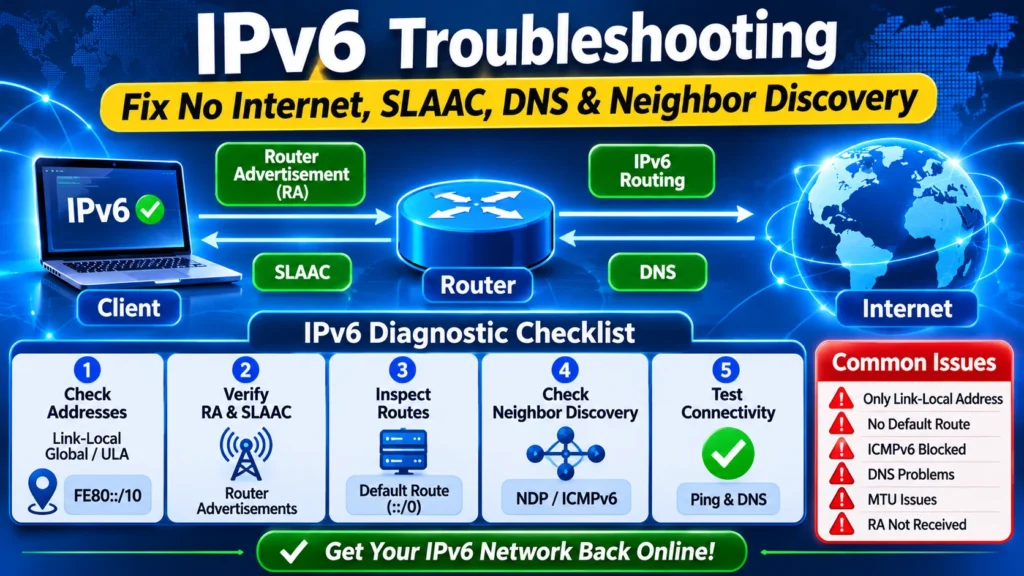
IPv6 Troubleshooting: Fix No Internet, SLAAC, DNS & Neighbor Discovery
Introduction
An IPv6 network can appear partially operational while users still experience connectivity problems.
A computer might have a valid link-local address but no global IPv6 address. Another device may receive an IPv6 address but have no default route. Some websites may load normally over IPv4 while IPv6 connections time out, or applications may connect successfully but hang when transferring larger amounts of data.
These symptoms can result from different problems involving Router Advertisements, Stateless Address Autoconfiguration (SLAAC), DHCPv6, Neighbor Discovery, routing, DNS, firewall rules, or Path MTU Discovery.
Effective IPv6 troubleshooting requires identifying which part of the IPv6 communication process is failing instead of treating every problem as a generic address-configuration issue.
This guide provides a practical diagnostic workflow for Windows, Linux, and Cisco network environments. It explains how to identify missing IPv6 addresses, investigate Router Advertisement failures, inspect Neighbor Discovery, verify default routes, diagnose DNS problems, and troubleshoot connections that work over IPv4 but fail over IPv6.
1. Understand the IPv6 Addressing Basics Before Troubleshooting
Before diagnosing an IPv6 connectivity problem, identify which type of IPv6 address the device has received.
Not every IPv6 address provides internet connectivity.
Link-local addresses
Link-local IPv6 addresses use the FE80::/10 address range.
They are automatically configured on IPv6-enabled interfaces and are used for communication on the local network link.
Example:
fe80::a8bb:ccff:fe00:1234A link-local address is necessary for many IPv6 functions, including Neighbor Discovery and communication with a directly connected router.
However, having a link-local address does not prove that the device has a working route to the internet.
An IPv6 host with only a link-local address may indicate that Router Advertisements are missing, SLAAC is not working, or the local network is not configured to provide a global prefix.
Global unicast addresses
Global Unicast Addresses (GUAs) are globally routable IPv6 addresses.
They commonly belong to the 2000::/3 range.
Example:
2001:db8:100:10::25/64The 2001:db8::/32 block is reserved for documentation and should not be used as a real public address.
A global IPv6 address allows a host to participate in global IPv6 communication when the required routing and security policies are also configured.
Unique local addresses
Unique Local Addresses (ULAs) use the FC00::/7 range, with locally generated addresses normally coming from FD00::/8.
They are intended for private internal networks and are not globally routed on the public internet.
A device may have a ULA and still lack public IPv6 connectivity.
IPv6 address types at a glance
| Address type | Prefix | Typical purpose |
|---|---|---|
| Loopback | ::1/128 | Local host testing |
| Unspecified | ::/128 | Unspecified address |
| Link-local | FE80::/10 | Communication on the local link |
| Unique local | FC00::/7 | Private internal addressing |
| Global unicast | 2000::/3 | Globally routable addressing |
| Multicast | FF00::/8 | One-to-many and group communication |
For a detailed introduction to IP addressing and network fundamentals, see our TCP/IP Explained guide.
2. How IPv6 Address Autoconfiguration Works
IPv6 clients do not necessarily depend on DHCPv6 to receive an address.
One common configuration method is Stateless Address Autoconfiguration (SLAAC), where a router advertises a network prefix and a host generates an address using that information.
The process depends on Router Solicitation and Router Advertisement messages.
The Router Solicitation and Advertisement process
A simplified exchange looks like this:
+----------------------+          +----------------------+
| IPv6 Client          |          | IPv6 Router          |
|                      |          |                      |
| Sends Router         |--------->| Receives RS          |
| Solicitation (RS)    |          |                      |
|                      |          |                      |
| Receives Router      |<---------| Sends Router         |
| Advertisement (RA)  |          | Advertisement (RA)   |
|                      |          |                      |
| Generates IPv6       |          | Advertises Prefix    |
| Address using SLAAC  |          | and Router Lifetime  |
+----------------------+          +----------------------+
The client can then:
- Create or use a link-local address.
- Receive a Router Advertisement.
- Learn the advertised network prefix.
- Generate a global IPv6 address when the advertised prefix and configuration permit SLAAC.
- Perform Duplicate Address Detection.
- Install an appropriate default route when the Router Advertisement advertises a usable router lifetime.
A host may also receive DNS information through Router Advertisement options or DHCPv6, depending on the network configuration and client support.
The protocol behavior is defined in RFC 4861 — Neighbor Discovery for IP Version 6 and RFC 4862 — IPv6 Stateless Address Autoconfiguration.
Understanding Router Advertisement flags
Router Advertisements contain several fields that influence host configuration.
| Flag or field | Meaning |
|---|---|
| M flag | Managed address configuration is available through DHCPv6 |
| O flag | Other configuration information is available through DHCPv6 |
| A flag | The advertised prefix can be used for SLAAC |
| L flag | The advertised prefix is considered on-link |
| Router Lifetime | Indicates how long the advertising router can be used as a default router |
The M and O flags are Router Advertisement flags. The A and L flags are found in the Prefix Information Option.
These settings are not interchangeable.
For example, a network may use SLAAC to assign IPv6 addresses while DHCPv6 supplies additional configuration information.
Important: DHCPv6 does not normally provide the default gateway
One of the most common IPv6 troubleshooting mistakes is expecting DHCPv6 to provide the default gateway in the same way that DHCPv4 commonly provides a router option.
In standard IPv6 host operation, the default router is learned from Router Advertisements.
A host can successfully receive a DHCPv6 address and DNS information but still have no usable default IPv6 route if Router Advertisements are missing or have an unsuitable Router Lifetime.
The current DHCPv6 specification is RFC 9915, published in January 2026 and replacing RFC 8415.
3. Start with Basic IPv6 Connectivity Tests
Do not immediately modify router configuration or disable firewall rules.
First, collect information from the affected client.
Step 1: Check whether IPv6 is enabled
On Linux:
ip -6 addr showCheck whether the interface has IPv6 addresses and whether any address is marked tentative or dadfailed.
On Windows, run:
ipconfig /allLook for IPv6 addresses, a link-local address, DNS servers, and relevant interface information.
You can also use:
Get-NetIPConfigurationStep 2: Test the IPv6 loopback address
On Linux:
ping -6 ::1On Windows:
ping -6 ::1A successful result verifies that the local IPv6 stack responds to loopback traffic.
It does not verify external connectivity.
Step 3: Test the local IPv6 gateway
Find the link-local address of the default router.
On Linux, inspect the IPv6 routing table:
ip -6 routeA default route may look like:
default via fe80::1 dev eth0 proto raThe gateway is a link-local address, and the route is associated with the local interface.
Test it:
ping -6 fe80::1%eth0Replace eth0 with the actual interface name.
The %eth0 suffix identifies the interface scope for a link-local destination. Other operating systems use different interface-scope syntax.
Step 4: Test a public IPv6 destination
Use a known IPv6-enabled destination:
ping -6 2606:4700:4700::1111This address is a Cloudflare public DNS resolver.
A successful response provides evidence of IPv6 connectivity to that destination.
However, some networks block or deprioritize ICMP Echo traffic. A failed ping alone does not prove that IPv6 routing is broken.
Also test an application-level connection:
curl -6 -v https://example.comThis helps determine whether an actual TCP and TLS connection can be established over IPv6.
Step 5: Compare IPv4 and IPv6
Run:
curl -4 -v https://example.comThen:
curl -6 -v https://example.comInterpret the results:
| IPv4 test | IPv6 test | Possible explanation |
|---|---|---|
| Works | Works | Both protocol paths are operational for the tested destination |
| Works | Fails | Investigate IPv6 addressing, routing, DNS or filtering |
| Fails | Works | Investigate IPv4 routing or filtering |
| Fails | Fails | Investigate general connectivity, DNS and application availability |
This comparison is useful when users report that some websites work while others remain inaccessible.
4. Fix IPv6 Devices Stuck with Only a Link-Local Address
A host that has a FE80:: address but no global address may be waiting for a valid Router Advertisement.
This is one of the most useful symptoms to recognize during IPv6 troubleshooting.
For example:
Interface: eth0

Link-local:
fe80::a8bb:ccff:fe00:1234/64

Global IPv6:
Not configured
Start by checking whether the host has received any Router Advertisements.
Check Router Advertisements on a Cisco network
On a supported Cisco IOS or IOS XE device, inspect the interface:
show ipv6 interface GigabitEthernet0/0Check:
- Interface IPv6 status.
- Configured IPv6 prefixes.
- Router Advertisement behavior.
- Neighbor Discovery information.
- Whether RA suppression is configured.
On platforms that support it, a host can inspect received IPv6 routers with:
show ipv6 routersAn empty result may indicate that the host has not received Router Advertisements on that link.
Verify IPv6 forwarding on Cisco routers
A Cisco router expected to forward IPv6 traffic commonly needs:
configure terminal
ipv6 unicast-routing
Then confirm that the LAN interface has the intended IPv6 prefix configured.
For example:
interface GigabitEthernet0/0
 ipv6 address 2001:db8:100:10::1/64
 no shutdown
The 2001:db8 address is an example documentation prefix, not a public address to copy into production.
Inspect whether RA suppression is configured and whether the router is advertising the correct prefix.
Do not enable forwarding or modify RA settings on production equipment without first checking the intended network design.
Check Router Advertisements with tcpdump
On Linux:
sudo tcpdump -ni eth0 'icmp6'To focus on Router Advertisement messages:
sudo tcpdump -ni eth0 'icmp6 and ip6[40] == 134'The capture should help determine whether RA packets are arriving at the client interface.
If the router is sending RAs but the client does not receive them, investigate:
- VLAN assignment.
- Layer 2 multicast handling.
- Switch filtering.
- Router Advertisement Guard policies.
- Firewall rules.
- Wireless client isolation.
For a practical explanation of this failure mode, see IPv6 Neighbor Discovery Troubleshooting: Stuck at Link-Local.
5. Troubleshoot SLAAC and Duplicate Address Detection
SLAAC can fail even when Router Advertisements are visible.
The client must receive a suitable prefix and successfully configure an address.
Check the advertised prefix
A typical SLAAC-capable prefix is a /64 network.
Example:
2001:db8:100:10::/64Inspect the Prefix Information Option in the Router Advertisement.
Check:
- Prefix length.
- Prefix validity lifetime.
- Preferred lifetime.
- Autonomous configuration flag (A).
- On-link flag (L).
The A flag must permit autonomous address configuration for the advertised prefix to be used by SLAAC.
Check Duplicate Address Detection
IPv6 performs Duplicate Address Detection (DAD) before using a newly configured unicast address.
On Linux:
ip -6 addr show dev eth0An address in a tentative state has not completed address validation.
An address marked dadfailed indicates that duplicate address detection failed.
Possible causes include:
- Another device already using the address.
- Duplicate manual address configuration.
- A duplicate address response caused by an incorrectly configured device.
- Layer 2 issues that affect Neighbor Solicitation and Advertisement messages.
Do not disable DAD simply to make the address appear operational.
First identify the device or network behavior causing the conflict.
Check IPv6 address configuration on Windows
Run:
Get-NetIPAddress -AddressFamily IPv6Inspect:
- Address.
- Interface index.
- Address state.
- Prefix length.
- Address origin.
The output helps distinguish automatically configured and manually configured addresses.
6. Fix Missing IPv6 Default Routes
A device can have a valid global IPv6 address but still be unable to reach the internet.
One possible reason is a missing default route.
On Linux:
ip -6 routeA typical route table might contain:
2001:db8:100:10::/64 dev eth0 proto ra
fe80::/64 dev eth0 proto kernel
default via fe80::1 dev eth0 proto ra
The important entry is:
default via fe80::1 dev eth0 proto raIf the default route is missing, investigate the Router Advertisement and the router’s advertised lifetime.
Check the Windows IPv6 routing table
Use:
route print -6Or:
Get-NetRoute -AddressFamily IPv6Look for an appropriate ::/0 route.
If the global address exists but there is no default route, check whether:
- The router is sending Router Advertisements.
- The Router Lifetime is nonzero.
- The host accepts Router Advertisements.
- A network policy has disabled automatic router discovery.
- The host is connected to the intended VLAN.
Check IPv6 routes on Cisco routers
Use:
show ipv6 routeInspect the connected and learned IPv6 routes.
You should also confirm that the router has an appropriate upstream IPv6 default route.
A correct LAN prefix alone does not guarantee upstream IPv6 connectivity.
7. Troubleshoot IPv6 Neighbor Discovery Problems
IPv6 does not use ARP for address resolution.
Instead, it uses Neighbor Discovery Protocol (NDP), which relies on ICMPv6.
NDP performs several functions:
- Address resolution.
- Router discovery.
- Prefix discovery.
- Duplicate Address Detection.
- Neighbor reachability detection.
- Redirect handling.
The five primary Neighbor Discovery message types are:
| Message | ICMPv6 type | Purpose |
|---|---|---|
| Router Solicitation | 133 | Ask routers to send Router Advertisements |
| Router Advertisement | 134 | Advertise routers and network parameters |
| Neighbor Solicitation | 135 | Resolve or verify a neighbor |
| Neighbor Advertisement | 136 | Respond to Neighbor Solicitation or announce information |
| Redirect | 137 | Inform a host of a better first hop |
These messages are defined in RFC 4861.
Inspect the Linux neighbor cache
Run:
ip -6 neigh showExample:
fe80::1 dev eth0 lladdr 00:11:22:33:44:55 REACHABLE
2001:db8:100:10::20 dev eth0 lladdr 00:11:22:33:44:66 STALE
Common neighbor states include:
| State | Meaning |
|---|---|
| REACHABLE | Neighbor reachability has been confirmed recently |
| STALE | Entry exists but has not been recently confirmed |
| DELAY | Waiting before probing a neighbor |
| PROBE | Active reachability probes are being sent |
| INCOMPLETE | Address resolution is still in progress |
| FAILED | Neighbor resolution or reachability attempts failed |
A STALE entry is not necessarily a problem. It can be a normal state in the neighbor cache.
An INCOMPLETE or FAILED entry deserves closer investigation.
Possible causes include:
- Neighbor Solicitation packets are not reaching the destination.
- Neighbor Advertisement packets are blocked.
- The device is offline.
- VLAN tagging is incorrect.
- Multicast traffic is filtered.
- The destination is not on the expected Layer 2 link.
Inspect neighbors on Windows
Use:
Get-NetNeighbor -AddressFamily IPv6Or:
netsh interface ipv6 show neighborsLook for entries associated with the affected interface and destination.
Inspect neighbors on Cisco routers
Use:
show ipv6 neighborsThis displays IPv6 neighbor information, including the associated link-layer address and interface.
Capture NDP traffic
On Linux:
sudo tcpdump -ni eth0 'icmp6'In Wireshark, use:
icmpv6To investigate Neighbor Solicitation specifically:
icmpv6.type == 135For Neighbor Advertisement:
icmpv6.type == 136For Router Advertisement:
icmpv6.type == 134This helps identify whether a device is sending requests without receiving the expected responses.
For additional packet-analysis techniques, see our Wireshark Explained guide.
8. IPv6 Works by Address but Not by Hostname: Troubleshoot DNS
If IPv6 connections work when using an IPv6 address but fail when using a hostname, investigate DNS.
IPv6 networks commonly use AAAA records to map domain names to IPv6 addresses.
Example:
example.com. 300 IN AAAA 2001:db8:100::10This is an illustrative record using a documentation address.
Check AAAA record resolution
On Linux or macOS:
dig AAAA example.comOn Windows:
nslookup -type=AAAA example.comIf no AAAA record is returned, the domain may not have an IPv6 address configured.
If the record exists but the connection fails, investigate reachability to the returned address.
Compare A and AAAA records
Run:
dig A example.comThen:
dig AAAA example.comThe results distinguish IPv4 and IPv6 DNS responses.
A hostname that returns both A and AAAA records may be accessed over either protocol, depending on the client, network conditions, and application behavior.
Test DNS over IPv6
If the DNS server is reachable over IPv6, query it directly.
For example:
dig @2606:4700:4700::1111 AAAA example.comThis tests DNS communication with the selected resolver over IPv6.
A successful query shows that the resolver is reachable and responding for this request. It does not establish that all DNS infrastructure or all domains are configured correctly.
For background on DNS records and how they affect name resolution, see DNS Record Types Explained.
9. IPv6 Connects but Websites Hang: Investigate ICMPv6 and Path MTU Discovery
One of the most confusing IPv6 problems occurs when the TCP connection is established but the application hangs when transferring data.
This can indicate a Path MTU Discovery (PMTUD) problem.
IPv6 routers do not fragment packets in transit in the same way IPv4 routers can.
Instead, if a router cannot forward an IPv6 packet because it is too large for the next link, it sends an ICMPv6 Packet Too Big message to the source.
The source can then adjust its packet size.
Why blocking ICMPv6 causes problems
IPv6 Path MTU Discovery depends on ICMPv6 Packet Too Big messages.
If a firewall blocks these messages, the sender may continue transmitting packets that cannot pass through the smaller-MTU part of the network.
The result can look like this:
- TCP connection starts successfully.
- Small requests work.
- Larger responses stop progressing.
- Some HTTPS sessions hang.
- File transfers become incomplete.
- Certain websites work while others do not.
This behavior is commonly called an IPv6 PMTU black hole.
The mechanism is specified in RFC 8201 — Path MTU Discovery for IP Version 6.
Check for a path MTU problem
On Linux, start with:
tracepath -6 example.comThis can help identify path MTU information reported during the trace.
You can also test a conservative IPv6 packet size with:
ping -6 -M do -s 1232 2606:4700:4700::1111The IPv6 header is 40 bytes and the ICMPv6 header is 8 bytes. A 1232-byte payload therefore produces a 1280-byte IPv6 packet before any extension headers.
The IPv6 minimum link MTU is 1280 bytes.
If larger packets fail while smaller packets succeed, investigate the path MTU and whether Packet Too Big messages reach the source.
ICMP filtering can also cause test failures, so compare multiple destinations and inspect packet captures before deciding that MTU is the root cause.
Verify firewall policy
Make sure that the firewall permits the ICMPv6 error messages required for normal operation, including:
- Destination Unreachable.
- Packet Too Big.
- Time Exceeded.
- Parameter Problem.
Do not block all ICMPv6 traffic as a generic hardening measure.
ICMPv6 is part of normal IPv6 operation, not merely optional diagnostic traffic.
10. Troubleshoot IPv6 Firewall and Router Advertisement Filtering
IPv6 security policies should protect the network without breaking essential protocol functions.
A firewall policy copied directly from an IPv4 environment may not be suitable for IPv6.
Unlike IPv4, IPv6 uses Neighbor Discovery instead of ARP and depends on ICMPv6 for important control functions.
Check ICMPv6 filtering
Review the firewall rules on:
- Endpoint operating systems.
- Linux routers.
- Network firewalls.
- Cloud security groups.
- Switches with Layer 3 ACL capabilities.
Confirm that the required ICMPv6 messages are permitted for the intended network path.
Check Router Advertisement Guard
Rogue Router Advertisements can cause hosts to install an incorrect default router or use an unintended IPv6 prefix.
This may result in:
- Intermittent connectivity.
- Incorrect default routes.
- Traffic sent to an unauthorized router.
- Unexpected prefix configuration.
- Potential traffic interception.
Router Advertisement Guard (RA Guard) can help prevent unauthorized RAs from being accepted on protected switch ports.
A typical design allows legitimate Router Advertisements from trusted router-facing ports while filtering unauthorized advertisements from ordinary endpoint ports.
Be careful not to block legitimate RA traffic on the router-facing path.
For broader enterprise network access security concepts, see our Network Access Control guide.
For operational IPv6 security guidance, consult RFC 9099 — Operational Security Considerations for IPv6 Networks.
11. Troubleshoot IPv6 on Linux
Linux provides several tools for investigating IPv6 addressing, routing, neighbor discovery, and packet delivery.
Inspect IPv6 addresses
ip -6 addr showCheck whether the interface has:
- Link-local address.
- Global address.
- ULA, if used.
- Unexpected tentative or failed addresses.
Inspect the IPv6 routing table
ip -6 route showLook for:
- Connected prefixes.
- Default route.
- Next-hop router.
- Interface association.
- Route protocol and metric.
Inspect the neighbor cache
ip -6 neigh showCheck for unresolved or failed neighbors.
Check whether IPv6 is disabled
sysctl net.ipv6.conf.all.disable_ipv6A value of 1 indicates that IPv6 is disabled for all interfaces through this setting.
Also inspect the individual interface:
sysctl net.ipv6.conf.eth0.disable_ipv6Check Router Advertisement acceptance
On Linux:
sysctl net.ipv6.conf.eth0.accept_raThis setting controls whether the interface accepts Router Advertisements.
A value of 0 prevents normal RA acceptance.
A value of 1 permits RA acceptance under the normal host behavior.
A value of 2 permits RA acceptance even when IPv6 forwarding is enabled.
This distinction is important on Linux routers.
When IPv6 forwarding is enabled, Linux commonly changes the default RA acceptance behavior because a router is not expected to behave like an ordinary host.
Do not set accept_ra=2 blindly on every interface. Configure it only where the system is intentionally expected to learn upstream IPv6 information from Router Advertisements.
Check IPv6 forwarding
sysctl net.ipv6.conf.all.forwardingA value of 1 enables IPv6 forwarding globally through this setting.
A Linux device acting as a router needs forwarding enabled, but a normal workstation usually does not.
Capture IPv6 control traffic
sudo tcpdump -ni eth0 'icmp6'This can reveal Router Advertisements, Neighbor Discovery messages, and ICMPv6 errors.
For more commands used in Linux network diagnosis, see Linux Network Tools.
12. Troubleshoot IPv6 on Windows
Windows includes several tools for IPv6 diagnostics.
Inspect IP configuration
ipconfig /allCheck:
- IPv6 addresses.
- Default gateway information.
- DNS server addresses.
- Interface status.
- Whether the address is link-local or global.
Inspect IPv6 routes
route print -6Look for the default route and connected IPv6 prefixes.
You can also use:
Get-NetRoute -AddressFamily IPv6Inspect IPv6 addresses
Get-NetIPAddress -AddressFamily IPv6This shows address state, origin, prefix length, and interface information.
Inspect IPv6 neighbors
Get-NetNeighbor -AddressFamily IPv6Look for unresolved or failed neighbor entries.
Test IPv6 reachability
ping -6 2606:4700:4700::1111Trace an IPv6 path
tracert -6 example.comIf the first hop is reachable but later hops fail, investigate upstream routing, filtering, or the destination’s IPv6 connectivity.
A missing response from an intermediate hop does not always indicate a broken path because some routers filter or rate-limit diagnostic traffic.
Microsoft’s PowerShell networking commands can also help inspect interface state and address configuration without relying only on legacy command-line output.
13. Troubleshoot IPv6 on Cisco Routers
Cisco IOS and IOS XE provide commands for checking IPv6 interfaces, neighbors, routes, and Router Advertisement behavior.
Check IPv6 interface status
show ipv6 interface briefVerify that the expected interfaces are enabled and have the correct addresses.
Inspect an interface in detail
show ipv6 interface GigabitEthernet0/0Review:
- IPv6 address.
- Link-local address.
- Joined multicast groups.
- Neighbor Discovery configuration.
- Router Advertisement settings.
- MTU.
Check the IPv6 routing table
show ipv6 routeConfirm that the router has the expected connected and learned prefixes.
Inspect the IPv6 neighbor table
show ipv6 neighborsThis helps determine whether the router has successfully resolved local IPv6 neighbors.
Check Router Advertisement configuration
Inspect the interface configuration:
show running-config interface GigabitEthernet0/0Pay particular attention to:
- IPv6 address configuration.
- RA suppression.
- Prefix configuration.
- Access lists.
- Interface state.
Check the global IPv6 routing setting
show running-config | include ipv6 unicast-routingIf the Cisco device is intended to route IPv6 traffic, verify that IPv6 forwarding is enabled according to the platform and configuration design.
14. Troubleshoot IPv6 Prefix Delegation
In many residential, branch, and enterprise environments, an upstream provider delegates an IPv6 prefix to a customer router.
This is called DHCPv6 Prefix Delegation (DHCPv6-PD).
The router receives a prefix from its upstream connection and assigns suitable subprefixes to downstream networks.
For example, an upstream provider might delegate:
2001:db8:1200::/56The router can then allocate individual /64 prefixes to LAN interfaces:
LAN 1: 2001:db8:1200:0001::/64
LAN 2: 2001:db8:1200:0002::/64
LAN 3: 2001:db8:1200:0003::/64
These are documentation addresses used only to illustrate prefix delegation.
Common Prefix Delegation problems
A router may receive an IPv6 address on its WAN interface but still have no usable IPv6 prefix for its LAN.
Investigate:
- Whether the provider actually delegates a prefix.
- Whether the DHCPv6 client requests Prefix Delegation.
- Whether the requested prefix size is supported.
- Whether the delegated prefix has expired.
- Whether the LAN interface has a valid /64 assigned.
- Whether Router Advertisements are enabled on the LAN.
- Whether the router has an upstream IPv6 default route.
An IPv6 address assigned to a WAN interface is not the same thing as a delegated prefix for downstream networks.
The distinction is important when troubleshooting a router that appears to have IPv6 service but whose clients cannot obtain global addresses.
15. IPv6 Troubleshooting Decision Table
Use the observed symptom to choose the next diagnostic step.
| Symptom | Likely area to investigate |
|---|---|
| Only a link-local address | Router Advertisements, SLAAC and VLAN configuration |
| Global address but no internet | Default route, upstream routing and firewall |
| No default IPv6 route | Router Advertisement lifetime and host RA acceptance |
| IPv6 ping to local neighbor fails | NDP, VLANs and ICMPv6 filtering |
| Neighbor state is INCOMPLETE | Neighbor Solicitation and Advertisement delivery |
| Address marked tentative | Duplicate Address Detection still in progress |
| Address marked dadfailed | Duplicate IPv6 address or DAD failure |
| IPv6 works by address, not hostname | DNS AAAA records and IPv6 DNS reachability |
| IPv4 works but IPv6 fails | IPv6 routing, addressing, firewall or ISP support |
| TCP connects but large transfers hang | ICMPv6 Packet Too Big and PMTUD |
| LAN clients have no global prefix | DHCPv6 Prefix Delegation and LAN Router Advertisements |
| Intermittent incorrect default gateway | Rogue or unexpected Router Advertisements |
16. A Practical IPv6 Troubleshooting Workflow
When investigating an IPv6 outage, follow the steps in this order.
Step 1: Check the client address.
Determine whether the host has only a link-local address, a ULA, or a global IPv6 address.
Step 2: Verify Router Advertisements.
Confirm that the client receives an appropriate RA and that the advertised prefix permits the intended configuration method.
Step 3: Verify the default route.
Check whether the host has a usable ::/0 route through the intended router.
Step 4: Test the local neighbor.
Inspect NDP entries and confirm that Neighbor Solicitation and Advertisement messages are exchanged.
Step 5: Test IPv6 routing.
Test the local gateway and then an external IPv6 destination.
Step 6: Check DNS separately.
Compare A and AAAA records and test the configured DNS resolver over IPv6.
Step 7: Investigate packet size.
If small traffic works but larger transfers hang, investigate Path MTU Discovery and Packet Too Big handling.
Step 8: Inspect firewall and switch policies.
Verify that essential ICMPv6 traffic is permitted and legitimate Router Advertisements are not being filtered.
Step 9: Compare with another client or VLAN.
This helps determine whether the failure is isolated to one endpoint, one switch segment, or an upstream network.
Step 10: Capture traffic when the cause remains unclear.
Use tcpdump or Wireshark to observe the relevant ICMPv6, DNS, and application traffic.
This sequence helps separate addressing problems from routing, name resolution, and packet-delivery failures.
17. IPv6 Troubleshooting Best Practices
A reliable IPv6 network requires more than assigning an IPv6 prefix to an interface.
Follow these practices:
- Maintain a documented IPv6 prefix allocation plan.
- Use consistent /64 subnetting where appropriate for ordinary LAN segments.
- Verify Router Advertisement settings and lifetimes.
- Keep SLAAC and DHCPv6 roles clearly documented.
- Do not expect DHCPv6 to supply the default router.
- Permit necessary ICMPv6 messages through firewalls.
- Use RA Guard where suitable to prevent unauthorized router advertisements.
- Monitor duplicate address detection failures.
- Inspect NDP neighbor states instead of relying only on ping.
- Validate IPv6 routing independently from IPv4.
- Preserve Path MTU Discovery functionality.
- Test dual-stack applications over both IPv4 and IPv6.
- Verify delegated IPv6 prefixes before troubleshooting individual client addresses.
- Avoid disabling DAD or Neighbor Discovery as a shortcut.
An IPv6 design that follows these practices is easier to operate, monitor, and troubleshoot.
Frequently Asked Questions
Why does my device have only a link-local IPv6 address?
A device may have only a link-local address because it has not received a suitable Router Advertisement or cannot use the advertised prefix through SLAAC. Check RA delivery, prefix information, VLAN configuration, and client address configuration.
Why does IPv6 show connected but there is no internet access?
The device may have a global IPv6 address but no default route, an unreachable gateway, an incorrect upstream route, or a firewall blocking required traffic. Check the IPv6 routing table and test the gateway before investigating DNS.
What is the difference between SLAAC and DHCPv6?
SLAAC allows a host to configure its address using prefix information advertised by a router. DHCPv6 provides managed address assignment or additional configuration information. They can be used separately or together.
Does DHCPv6 provide the default gateway?
No. In standard IPv6 host operation, the default router is learned through Router Advertisements. DHCPv6 can provide addresses, prefixes, and other configuration information, but it does not replace Router Advertisement-based default-router discovery.
What is Neighbor Discovery in IPv6?
Neighbor Discovery is an ICMPv6-based mechanism that supports router discovery, address resolution, duplicate address detection, and neighbor reachability functions. It replaces several functions that IPv4 performs using separate protocols such as ARP.
Why does IPv6 work on some websites but not others?
Some websites may have IPv6 connectivity while others do not. Problems can also occur when a client prefers an IPv6 destination but the IPv6 path has a routing, firewall, DNS, or MTU issue.
Can blocking ICMPv6 break IPv6 connectivity?
Yes. Blocking required ICMPv6 messages can disrupt Neighbor Discovery, Router Advertisements, error reporting, and Path MTU Discovery. Firewall rules should permit the messages required for normal IPv6 operation.
What does an INCOMPLETE IPv6 neighbor entry mean?
It means that the system is attempting to resolve a neighbor’s link-layer address but has not yet received the required response. Investigate Neighbor Solicitation and Advertisement packets, local VLAN configuration, and packet filtering.
What is IPv6 Path MTU Discovery?
Path MTU Discovery allows an IPv6 sender to determine the largest packet size that can traverse a network path. It relies on ICMPv6 Packet Too Big messages to report packet-size limitations.
How do I check IPv6 routes on Linux?
Use:
ip -6 route showThis displays IPv6 routing entries, including connected networks and the default route.
How do I check IPv6 connectivity on Windows?
Use:
ipconfig /all
ping -6 2606:4700:4700::1111
route print -6
These commands help inspect IP configuration, test IPv6 reachability, and examine the IPv6 routing table.
Conclusion
IPv6 troubleshooting becomes more straightforward when the addressing, routing, Neighbor Discovery, DNS, and packet-delivery stages are examined separately.
A device with only a link-local address may be waiting for Router Advertisements. A device with a global address but no internet access may lack a default route. A neighbor marked INCOMPLETE may indicate failed address resolution, while connections that hang during large transfers may point to a Path MTU Discovery problem.
Start with the client address, verify Router Advertisements, inspect the default route, check NDP, and then test DNS and application connectivity.
Using the same structured workflow on Linux, Windows, and Cisco devices helps network administrators identify IPv6 failures without making unnecessary configuration changes.
References
- RFC 4861 — Neighbor Discovery for IP Version 6 (IPv6)
- RFC 4862 — IPv6 Stateless Address Autoconfiguration
- RFC 9915 — Dynamic Host Configuration Protocol for IPv6 (DHCPv6), January 2026
- RFC 8201 — Path MTU Discovery for IP Version 6
- RFC 9099 — Operational Security Considerations for IPv6 Networks
- OpenWrt — IPv6 Troubleshooting
- University of Wisconsin–Madison — Network Troubleshooting Tools, IPv4 and IPv6
- Ping Labz — IPv6 Neighbor Discovery Troubleshooting
FAQ Schema (JSON-LD)
{
  "@context": "https://schema.org",
  "@type": "FAQPage",
  "mainEntity": [
    {
      "@type": "Question",
      "name": "Why does my device have only a link-local IPv6 address?",
      "acceptedAnswer": {
        "@type": "Answer",
        "text": "A device may have only a link-local address because it has not received a suitable Router Advertisement or cannot use the advertised prefix through SLAAC. Check RA delivery, prefix information, VLAN configuration, and client address configuration."
      }
    },
    {
      "@type": "Question",
      "name": "Does DHCPv6 provide the default gateway?",
      "acceptedAnswer": {
        "@type": "Answer",
        "text": "No. In standard IPv6 host operation, the default router is learned through Router Advertisements. DHCPv6 can provide addresses, prefixes, and other configuration information."
      }
    },
    {
      "@type": "Question",
      "name": "What is Neighbor Discovery in IPv6?",
      "acceptedAnswer": {
        "@type": "Answer",
        "text": "Neighbor Discovery is an ICMPv6-based mechanism that supports router discovery, address resolution, duplicate address detection, and neighbor reachability functions."
      }
    },
    {
      "@type": "Question",
      "name": "Can blocking ICMPv6 break IPv6 connectivity?",
      "acceptedAnswer": {
        "@type": "Answer",
        "text": "Yes. Blocking required ICMPv6 messages can disrupt Neighbor Discovery, Router Advertisements, error reporting, and Path MTU Discovery."
      }
    },
    {
      "@type": "Question",
      "name": "What does an INCOMPLETE IPv6 neighbor entry mean?",
      "acceptedAnswer": {
        "@type": "Answer",
        "text": "It means that the system is attempting to resolve a neighbor's link-layer address but has not yet received the required response. Investigate Neighbor Solicitation and Advertisement packets, VLAN configuration, and packet filtering."
      }
    },
    {
      "@type": "Question",
      "name": "What is IPv6 Path MTU Discovery?",
      "acceptedAnswer": {
        "@type": "Answer",
        "text": "Path MTU Discovery allows an IPv6 sender to determine the largest packet size that can traverse a network path. It relies on ICMPv6 Packet Too Big messages to report packet-size limitations."
      }
    },
    {
      "@type": "Question",
      "name": "How do I check IPv6 routes on Linux?",
      "acceptedAnswer": {
        "@type": "Answer",
        "text": "Run ip -6 route show to display IPv6 routing entries, including connected networks and the default route."
      }
    }
  ]
}