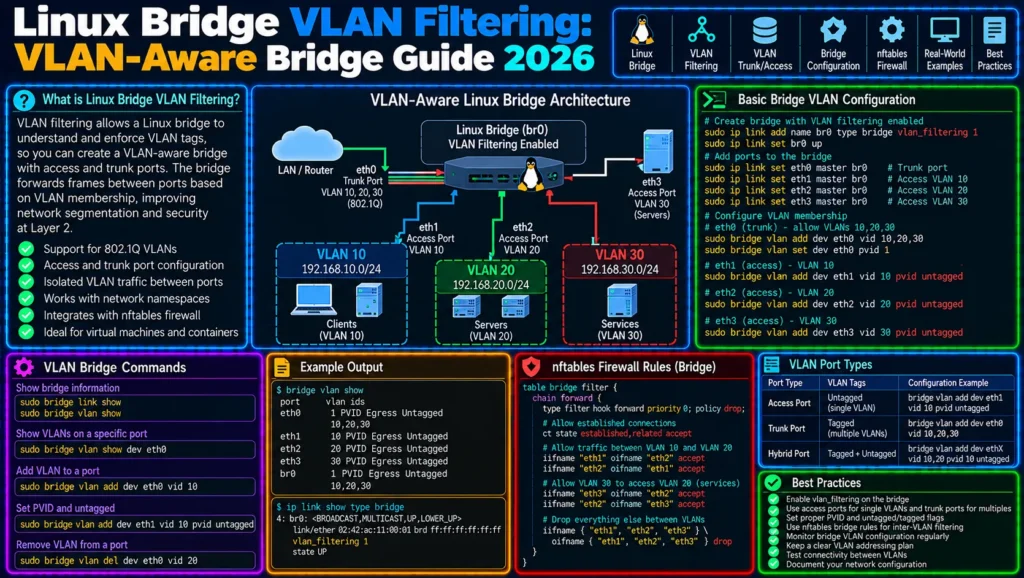
A basic Linux bridge can connect multiple interfaces and forward Ethernet frames between them much like a software Layer 2 switch.
But real networks rarely consist of a single broadcast domain.
Production environments commonly separate traffic into VLANs for servers, management systems, storage, containers, virtual machines, IoT devices, or tenants.
Linux can implement this segmentation directly inside the kernel using bridge VLAN filtering.
Instead of creating a separate Linux bridge for every VLAN, a single VLAN-aware bridge can control which VLANs are permitted on each port, which VLAN is assigned to untagged incoming traffic, and whether frames leave a port tagged or untagged.
In this practical guide, we will build a complete VLAN-aware virtual switch using:
Linux Bridge
Network Namespaces
veth pairs
802.1Q VLANs
bridge vlan
PVID
tagged ports
untagged ports
Forwarding Database
tcpdump
The final lab will demonstrate how Linux can behave much like a managed Ethernet switch—all on one machine.
If you have not yet worked with bridges and namespaces, read CorgiNetwork’s Linux Bridge Networking with Network Namespaces and veth first.
For the namespace layer itself, see Linux Network Namespaces Explained
What Is Linux Bridge VLAN Filtering?
A standard Linux bridge operates primarily at Layer 2.
Imagine:
          br0
       /   |   \
      /    |    \
  veth1  veth2  veth3
Without VLAN segmentation, devices attached to the bridge can belong to the same Layer 2 broadcast domain.
Now imagine that we need:
VLAN 10 → Servers
VLAN 20 → Management
VLAN 30 → Storage
Creating three separate bridges is possible:
br10
br20
br30
but Linux can also maintain these VLAN domains inside one bridge.
Conceptually:
                    br0
                     |
              VLAN Filtering
             /       |       \
            /        |        \
       VLAN 10    VLAN 20    VLAN 30
The bridge utility provided by iproute2 includes a dedicated vlan object for displaying, adding, deleting, and modifying VLAN filter entries on bridge ports.
This transforms the Linux bridge from a simple virtual switch into a VLAN-aware software switch.
Why Use a VLAN-Aware Linux Bridge?
Suppose a virtualization host contains:
VM1 → VLAN 10
VM2 → VLAN 10
VM3 → VLAN 20
VM4 → VLAN 30
You could construct:
br10
br20
br30
But another architecture is:
                     br0
                      |
             vlan_filtering=1
          /           |           \
         /            |            \
      VM1           VM3          uplink
    VLAN 10       VLAN 20        trunk
This can simplify designs where one physical or virtual bridge must carry many VLANs.
The same concepts are useful for:
- virtualization hosts;
- containers;
- network namespaces;
- virtual routers;
- network laboratories;
- multi-tenant systems;
- VLAN trunks;
- software switching.
Linux drivers using switchdev can also offload supported bridge VLAN operations to hardware on compatible devices. Linux kernel documentation shows bridge VLAN filtering, PVID assignment, and untagged egress as supported bridge operations in relevant switchdev implementations.
Tagged vs Untagged Ethernet Traffic
Before configuring Linux, understand two concepts.
Untagged Traffic
An ordinary Ethernet frame can arrive without an 802.1Q VLAN tag.
Conceptually:
Ethernet Frame
     |
     +-- Destination MAC
     +-- Source MAC
     +-- EtherType
     +-- Payload
An access port commonly receives this type of frame from an endpoint.
Linux then needs to determine:
Which VLAN should this untagged frame belong to?
That is where the PVID becomes important.
Tagged Traffic
A VLAN-aware Ethernet frame contains VLAN information.
Conceptually:
Ethernet Frame
     |
     +-- Destination MAC
     +-- Source MAC
     +-- 802.1Q VLAN information
     +-- EtherType
     +-- Payload
A trunk connection can transport multiple VLANs.
For example:
          trunk
            |
      +-----+-----+
      |     |     |
    VLAN10 VLAN20 VLAN30
This is conceptually similar to the uplink between managed Ethernet switches.
What Is a PVID?
PVID means Port VLAN ID.
For Linux bridge VLAN filtering, the PVID determines which VLAN should be assigned to untagged frames arriving on a port.
The bridge(8) documentation describes pvid as the VLAN considered the PVID at ingress; untagged incoming frames are assigned to that VLAN.
Suppose:
Port veth10
PVID 10
An untagged frame enters:
Untagged frame
      ↓
veth10
      ↓
PVID 10
      ↓
VLAN 10
This behavior makes a Linux bridge port act similarly to an access port on a managed switch.
What Does untagged Mean?
The untagged flag controls egress behavior.
The bridge manual defines an untagged VLAN entry as one where the specified VLAN is treated as untagged when frames leave the port.
So an access-style port often uses both:
pvid
untagged
Conceptually:
Incoming:
untagged
   ↓
PVID 10
   ↓
VLAN 10


Outgoing:
VLAN 10
   ↓
remove tag
   ↓
untagged endpoint
This distinction between ingress classification and egress presentation is fundamental.
Our Practical VLAN Lab
We will build:
                     Linux Host

                       br0
                vlan_filtering=1
                 /      |      \
                /       |       \
          veth10-h  veth20-h   trunk
              |         |
          veth10-n   veth20-n
              |         |
            ns10       ns20
              |         |
           VLAN 10    VLAN 20
Namespace ns10 will behave like a device attached to an access port in VLAN 10.
Namespace ns20 will behave like a device attached to an access port in VLAN 20.
The bridge will enforce isolation between them.
Step 1: Create the Network Namespaces
Create the first namespace:
sudo ip netns add ns10Create the second:
sudo ip netns add ns20Verify:
ip netns listIf network namespaces are unfamiliar, read Linux Network Namespaces Explained: Build Isolated Networks with ip netns and veth before continuing.
Step 2: Create the Linux Bridge
Create:
sudo ip link add br0 type bridgeBring it up:
sudo ip link set br0 upInspect:
ip -d link show br0At this stage we have:
Linux
  |
 br0
but no namespace interfaces are attached.
Step 3: Enable VLAN Filtering
Enable VLAN filtering:
sudo ip link set dev br0 type bridge vlan_filtering 1Verify:
ip -d link show br0Look for bridge information indicating that VLAN filtering is enabled.
This is the key transition:
Ordinary bridge
      ↓
vlan_filtering=1
      ↓
VLAN-aware bridge
Kernel networking documentation and switchdev examples use this same bridge setting to enable VLAN filtering behavior.
Step 4: Create the VLAN 10 veth Pair
Create:
sudo ip link add veth10-h type veth peer name veth10-nMove the namespace endpoint:
sudo ip link set veth10-n netns ns10Attach the host endpoint to the bridge:
sudo ip link set veth10-h master br0Bring it up:
sudo ip link set veth10-h upInside the namespace:
sudo ip netns exec ns10 ip link set lo up
sudo ip netns exec ns10 ip link set veth10-n up
Step 5: Create the VLAN 20 veth Pair
Create:
sudo ip link add veth20-h type veth peer name veth20-nMove:
sudo ip link set veth20-n netns ns20Attach:
sudo ip link set veth20-h master br0Bring the host side up:
sudo ip link set veth20-h upThen:
sudo ip netns exec ns20 ip link set lo up
sudo ip netns exec ns20 ip link set veth20-n up
Our topology is now:
ns10                         ns20
 |                            |
veth10-n                   veth20-n
 |                            |
veth10-h                   veth20-h
     \                       /
      \                     /
              br0
For a deeper explanation of this bridge/veth architecture, use Linux Bridge Networking with Network Namespaces and veth.
Step 6: Assign IP Addresses
Give ns10:
sudo ip netns exec ns10 \
ip addr add 10.10.10.10/24 dev veth10-n
Give ns20:
sudo ip netns exec ns20 \
ip addr add 10.10.10.20/24 dev veth20-n
Notice something intentional:
Both addresses belong to the same IP subnet.
Without VLAN isolation, they could potentially communicate through the Layer 2 bridge.
We will use VLAN filtering to separate them.
This makes the lab especially useful because the effect of VLAN filtering becomes obvious.
Step 7: Inspect the Default VLAN Configuration
Run:
bridge vlan showDepending on the bridge configuration and defaults, you may see VLAN 1 entries.
Before building a production configuration, inspect what actually exists rather than assuming a clean table.
Use:
bridge -d vlan showfor more detail.
The bridge utility supports both detailed VLAN output and VLAN statistics.
Step 8: Configure veth10-h as a VLAN 10 Access Port
Add VLAN 10:
sudo bridge vlan add dev veth10-h vid 10 pvid untaggedConceptually:
ns10
 |
untagged
 |
veth10-h
 |
PVID 10
 |
VLAN 10
The two important keywords are:
pvid
untagged
pvid classifies incoming untagged frames into VLAN 10.
untagged causes VLAN 10 frames to leave this port without a VLAN tag.
Step 9: Configure veth20-h as a VLAN 20 Access Port
Run:
sudo bridge vlan add dev veth20-h vid 20 pvid untaggedNow:
veth10-h
   ↓
VLAN 10


veth20-h
   ↓
VLAN 20
The bridge now has enough information to treat the two ports as members of different VLAN domains.
Step 10: Verify VLAN Membership
Run:
bridge vlan showYou should see VLAN membership associated with each bridge port.
Conceptually:
port        vlan

veth10-h    10 PVID Egress Untagged
veth20-h    20 PVID Egress Untagged
Do not rely only on the configuration commands succeeding.
Always verify the actual bridge state.
For more verbose output:
bridge -d vlan showFor statistics where supported:
bridge -s vlan showThe iproute2 bridge interface explicitly supports show, detailed output, and per-VLAN statistics.
Test VLAN Isolation
From ns10, try:
sudo ip netns exec ns10 \
ping 10.10.10.20
The hosts use addresses from the same IP subnet.
But they occupy different VLANs.
Therefore the expected Layer 2 relationship is:
ns10
 ↓
VLAN 10
 ↓
br0
 X
VLAN 20
 ↓
ns20
Without an explicit Layer 3 routing mechanism between the VLANs, they should remain isolated.
This demonstrates a fundamental networking principle:
Same IP subnet
does not override
Layer 2 VLAN isolation
Why ARP Fails Across the VLAN Boundary
Suppose ns10 wants to reach:
10.10.10.20Because the destination appears local according to the /24 mask, ns10 attempts neighbor discovery using ARP.
Conceptually:
ns10
 |
ARP:
Who has 10.10.10.20?
 |
VLAN 10
But ns20 exists in:
VLAN 20The Layer 2 broadcast is not delivered into the other VLAN.
Therefore ARP resolution fails.
Inspect:
sudo ip netns exec ns10 ip neighThis illustrates why VLAN segmentation operates before ordinary IP routing can solve the problem.
Adding Two Hosts to VLAN 10
Now imagine another namespace:
ns11connected through:
veth11-hand configure:
sudo bridge vlan add dev veth11-h vid 10 pvid untaggedNow:
ns10              ns11
 |                  |
VLAN 10            VLAN 10
  \                  /
   \                /
         br0
These two hosts can share the same Layer 2 VLAN.
Meanwhile:
ns20
 |
VLAN 20
remains isolated.
This is precisely the behavior expected from a VLAN-aware switch.
Access Ports vs Trunk Ports
Our namespace ports currently behave like access ports.
Conceptually:
ACCESS PORT

Endpoint
   |
untagged
   |
Switch Port
   |
VLAN 10
But sometimes a port needs to carry several VLANs.
That is a trunk-style architecture:
             trunk
               |
      +--------+--------+
      |        |        |
   VLAN 10  VLAN 20  VLAN 30
Linux bridge VLAN filtering can represent this too.
Creating a Trunk Port
Suppose:
eth1is connected to an external VLAN-aware switch.
Attach it to the bridge:
sudo ip link set eth1 master br0
sudo ip link set eth1 up
Permit VLAN 10:
sudo bridge vlan add dev eth1 vid 10Permit VLAN 20:
sudo bridge vlan add dev eth1 vid 20Permit VLAN 30:
sudo bridge vlan add dev eth1 vid 30Notice that we did not specify:
untaggedfor those VLANs.
Conceptually:
                 eth1
                  |
                trunk
          +-------+-------+
          |       |       |
        VLAN10  VLAN20  VLAN30
The bridge vlan interface also supports VLAN ranges, making larger allowed VLAN sets easier to configure.
Access-to-Trunk Traffic Flow
Suppose a host sends an untagged frame into:
veth10-hconfigured as:
PVID 10
untagged
The bridge associates the frame with VLAN 10.
When forwarding it through the trunk:
eth1VLAN 10 remains represented as tagged traffic.
Conceptually:
Host
 |
untagged
 |
Access Port
 |
PVID 10
 |
Linux Bridge
 |
802.1Q VLAN 10
 |
Trunk
Traffic returning from the trunk follows the reverse process.
Inspect the Forwarding Database
VLAN filtering does not eliminate MAC learning.
Inspect:
bridge fdb show br br0or:
bridge fdb showThe bridge’s Forwarding Database (FDB) tracks learned MAC-address forwarding information.
Conceptually:
MAC A → veth10-h
MAC B → veth20-h
MAC C → eth1
In VLAN-aware designs, forwarding decisions must also respect VLAN membership.
This is why the Linux bridge should be understood as more than:
MAC → PortThe forwarding context can include VLAN information as well.
Watch the FDB Learn Dynamically
Start with:
bridge fdb show br br0Generate traffic.
Then run the command again.
You may observe dynamic entries appear as the bridge learns source MAC addresses.
The Linux bridge therefore behaves according to the familiar Layer 2 switching process:
Frame arrives
     ↓
Learn source MAC
     ↓
Check destination MAC
     ↓
Consult FDB
     ↓
Forward / flood
while VLAN filtering constrains where that forwarding is permitted.
Capture Untagged Traffic
Capture inside ns10:
sudo ip netns exec ns10 \
tcpdump -eni veth10-n
The namespace endpoint behaves as an ordinary untagged access host.
This gives you visibility into what the endpoint sees.
Capture Traffic on the Trunk
Now capture:
sudo tcpdump -eni eth1On an actual trunk carrying tagged frames, tcpdump can expose the VLAN information.
You can filter specifically:
sudo tcpdump -eni eth1 vlanor:
sudo tcpdump -eni eth1 vlan 10Packet capture is one of the strongest methods for distinguishing:
configuration looks correctfrom:
frames are actually tagged correctlyFor deeper packet analysis, continue with CorgiNetwork’s Wireshark Explained.
Common Problem: VLAN Filtering Is Disabled
You configure:
bridge vlan add ...but behavior does not match the expected VLAN architecture.
Check:
ip -d link show br0Confirm:
vlan_filtering 1A VLAN membership configuration is useful only in the context of a bridge actually performing VLAN-aware filtering.
Common Problem: Wrong PVID
Suppose:
veth10-hshould represent VLAN 10 but its PVID is VLAN 20.
Then untagged traffic can be classified into the wrong VLAN.
Inspect:
bridge vlan showDo not troubleshoot IP routing before confirming Layer 2 VLAN classification.
Common Problem: Forgetting untagged
Suppose an endpoint does not understand VLAN tagging but its bridge port sends tagged frames.
The endpoint may not process the traffic as expected.
For access-style ports, verify whether you intended:
pvid untaggedrather than only:
vid 10The first configuration describes access-style behavior much more closely.
Common Problem: Accidentally Leaving VLAN 1
When experimenting with bridge VLAN filtering, administrators sometimes add new VLANs without examining existing VLAN membership.
Always run:
bridge vlan showbefore and after changes.
Do not assume the bridge begins with exactly the VLAN state you have in mind.
Common Problem: Treating VLAN Failure as a Routing Problem
Suppose:
pingfails.
It is tempting to inspect:
ip routeimmediately.
But if both systems should communicate within the same VLAN, routing may not be involved at all.
Check:
interface state
↓
VLAN membership
↓
PVID
↓
tagging
↓
FDB
↓
ARP
↓
IP
This order follows the packet through the actual networking layers.
Common Problem: VLAN Exists on One Side Only
Suppose:
Linux trunk → VLAN 20but the external switch does not permit VLAN 20 on its corresponding port.
Linux may be configured correctly while traffic still disappears.
Both ends of a trunk must agree on the VLAN design.
Document:
Allowed VLANs
Native/PVID VLAN
Tagged VLANs
Untagged VLAN
on both sides.
Common Problem: Native VLAN / PVID Mismatch
Imagine:
Linux PVID = 10but:
Switch native VLAN = 20Untagged traffic may be classified differently at each end.
This can produce particularly confusing failures because tagged VLANs may work while untagged traffic does not.
Explicit VLAN documentation prevents this class of problem.
Bridge VLAN Filtering and Network Namespaces
Network namespaces are ideal for testing VLAN configurations safely.
You can build:
                   br0
             VLAN-aware bridge
             /      |       \
            /       |        \
         ns10      ns20      ns30
           |         |         |
        VLAN10    VLAN20    VLAN30
without requiring three physical computers.
This is why the combination of:
network namespaces
+
veth
+
Linux bridge
+
VLAN filtering
is such a powerful networking laboratory.
Bridge VLAN Filtering vs Multiple Linux Bridges
There are two common architectures.
Multiple Bridges
br10 → VLAN 10
br20 → VLAN 20
br30 → VLAN 30
This can be simple to understand for small environments.
One VLAN-Aware Bridge
             br0
              |
      VLAN Filtering
       /     |     \
     10     20     30
This often scales more naturally when many VLANs share common ports or trunks.
Neither model is universally correct.
The right choice depends on the surrounding virtualization, container, physical-switch, and management architecture.
VLAN Filtering and systemd-networkd
Runtime commands are excellent for laboratories:
bridge vlan add ...but production configurations normally need persistence.
For systems using systemd-networkd, its documentation provides a [BridgeVLAN] section for VLAN IDs associated with bridge masters and enslaved devices. It also requires VLAN filtering to be enabled on the bridge master for these settings to take effect.
Persistent configuration deserves separate treatment because the exact syntax depends on the network-management stack.
The important objective here is to understand the kernel behavior first.
VLAN Filtering and Hardware Offload
A Linux bridge is not necessarily restricted to software forwarding.
On supported hardware and drivers, Linux’s switchdev architecture can offload bridge operations.
For example, current kernel documentation for the mlx5 switchdev driver shows support for:
VLAN filtering
multiple VLANs per port
PVID
untagged egress
through Linux bridge configuration.
That means the same Linux networking model can extend from virtual interfaces to capable physical switching hardware.
VLAN Filtering and Netfilter
Another advanced troubleshooting layer appears when firewall processing is involved.
Linux provides bridge-related Netfilter controls, including settings affecting whether bridged VLAN-tagged ARP, IPv4, and IPv6 traffic is passed through corresponding filtering paths.
Therefore, when:
VLAN configuration = correct
FDB = correct
ARP = visible
but traffic is still unexpectedly blocked, investigate the firewall layer as well.
For modern systems:
sudo nft list rulesetis often an important part of that investigation.
Do not disable firewall processing blindly.
Capture packets and identify where the traffic disappears.
Complete Linux Bridge VLAN Troubleshooting Workflow
Start with the bridge:
ip -d link show br0Confirm:
vlan_filtering 1Then inspect ports:
bridge link showInspect VLAN membership:
bridge vlan showInspect detailed VLAN state:
bridge -d vlan showInspect MAC learning:
bridge fdb show br br0Inspect namespace addresses:
sudo ip netns exec ns10 ip -br addrInspect neighbors:
sudo ip netns exec ns10 ip neighCapture endpoint traffic:
sudo ip netns exec ns10 \
tcpdump -eni veth10-n
Capture trunk traffic:
sudo tcpdump -eni eth1 vlanFinally inspect the firewall:
sudo nft list rulesetThis produces a troubleshooting chain:
Interface
    ↓
Bridge Port
    ↓
VLAN Membership
    ↓
PVID
    ↓
Tagging
    ↓
FDB
    ↓
ARP
    ↓
IP
    ↓
Firewall
Diagnostic Decision Tree
Host cannot communicate
        |
        v
Is interface UP?
        |
   +----+----+
   |         |
  NO        YES
   |         |
   v         v
 Fix link  Check bridge membership
             |
             v
       Correct bridge?
             |
        +----+----+
        |         |
       NO        YES
        |         |
        v         v
       Fix      Check VLAN
                  |
                  v
            Correct VID/PVID?
                  |
             +----+----+
             |         |
            NO        YES
             |         |
             v         v
            Fix      Check FDB
                        |
                        v
                    Check ARP
                        |
                        v
                  Capture frames
                        |
                        v
                Check firewall/IP
This is far more reliable than randomly changing VLAN or routing commands.
Production Validation Checklist
Before deploying a VLAN-aware Linux bridge, verify:
✓ Bridge exists
✓ Bridge is UP
✓ vlan_filtering is enabled
✓ Expected ports belong to the bridge
✓ Access ports have correct VLAN
✓ Access ports have correct PVID
✓ Untagged egress is intentional
✓ Trunks permit required VLANs
✓ VLAN 1/default membership is understood
✓ FDB learning behaves correctly
✓ ARP remains inside intended VLAN
✓ Tagged frames appear on trunk captures
✓ Untagged frames appear correctly on access ports
✓ External switch configuration matches Linux
✓ Firewall behavior is understood
✓ Configuration persists after reboot
Frequently Asked Questions
What is Linux bridge VLAN filtering?
Linux bridge VLAN filtering allows a Linux bridge to maintain VLAN membership and forwarding rules for its ports, enabling one bridge to separate multiple Layer 2 VLAN domains.
How do I enable VLAN filtering on a Linux bridge?
A typical runtime command is:
ip link set dev br0 type bridge vlan_filtering 1Then verify the resulting bridge state.
How do I see VLANs on a Linux bridge?
Run:
bridge vlan showFor more detailed information:
bridge -d vlan showThe iproute2 bridge interface provides dedicated commands for displaying VLAN filter entries.
What does PVID mean in a Linux bridge?
PVID is the VLAN assigned to untagged frames entering a bridge port.
The bridge vlan documentation explicitly defines pvid as the VLAN used for untagged ingress frames.
What does untagged mean?
It means that frames belonging to that VLAN should leave the selected port without the VLAN tag.
What is the difference between an access port and a trunk?
An access-style port typically presents one VLAN to an endpoint as untagged traffic.
A trunk carries multiple VLANs, generally retaining VLAN tagging so the receiving VLAN-aware device can distinguish them.
Can a Linux bridge carry multiple VLANs?
Yes.
A VLAN-aware bridge can maintain multiple VLAN memberships on its ports, and the bridge vlan interface supports individual VLAN IDs and VLAN ranges.
Can Linux bridge VLANs work with network namespaces?
Yes.
Network namespaces connected with veth pairs provide an excellent way to create virtual endpoints for testing Linux bridge VLAN behavior.
Read Linux Network Namespaces Explained for the namespace architecture.
Can VLAN filtering be hardware accelerated?
On compatible devices and drivers, bridge operations can be offloaded through Linux switchdev. Hardware support varies, so the relevant network driver documentation must be checked.
Conclusion
Linux bridge VLAN filtering turns the Linux bridge into a powerful VLAN-aware Layer 2 networking component.
The architecture can be summarized as:
Endpoint
   ↓
veth
   ↓
Bridge Port
   ↓
PVID / VLAN membership
   ↓
Linux Bridge
   ↓
FDB
   ↓
Access Port or Trunk
For access-style traffic:
untagged frame
      ↓
PVID
      ↓
VLAN
      ↓
bridge forwarding
For a trunk:
VLAN 10 ─┐
VLAN 20 ─┼── trunk
VLAN 30 ─┘
The essential commands to remember are:
ip link set dev br0 type bridge vlan_filtering 1
bridge vlan show
bridge vlan add dev PORT vid VLAN
bridge vlan add dev PORT vid VLAN pvid untagged
bridge fdb show
tcpdump -eni INTERFACE vlan
But the real skill is understanding how the layers interact.
When a VLAN configuration fails, follow:
Link
 ↓
Bridge
 ↓
VLAN
 ↓
PVID
 ↓
Tagging
 ↓
FDB
 ↓
ARP
 ↓
IP
 ↓
Firewall
rather than immediately changing routing configuration.
This article also extends the existing CorgiNetwork Linux networking cluster.
Start with Linux Network Namespaces Explained to understand isolated networking stacks.
Then use Linux Bridge Networking with Network Namespaces and veth to understand virtual Layer 2 switching.
For complex Layer 3 path selection, continue with Linux Policy Routing with ip rule and Multiple Routing Tables.
When a multi-homed server chooses the wrong NIC, use Linux Traffic Uses the Wrong Interface.
For persistent Ubuntu multi-gateway routing, read Netplan Multiple Default Routes and Policy Routing.
If reverse-path validation interferes with asymmetric traffic, use Linux rp_filter and Asymmetric Routing.
And when several physical NICs share the same subnet, see Linux ARP Flux and Multiple NICs on the Same Subnet.
Together, these guides create a structured path from:
Network Namespace
       ↓
veth
       ↓
Linux Bridge
       ↓
VLAN Filtering
       ↓
FDB / Layer 2
       ↓
ARP
       ↓
Layer 3 Routing
       ↓
Policy Routing
       ↓
Multiple Gateways
The next logical article in this cluster is Linux Inter-VLAN Routing with Network Namespaces: Build a Virtual Router Between VLANs, where VLAN 10 and VLAN 20 remain isolated at Layer 2 but communicate through a controlled Layer 3 Linux router.