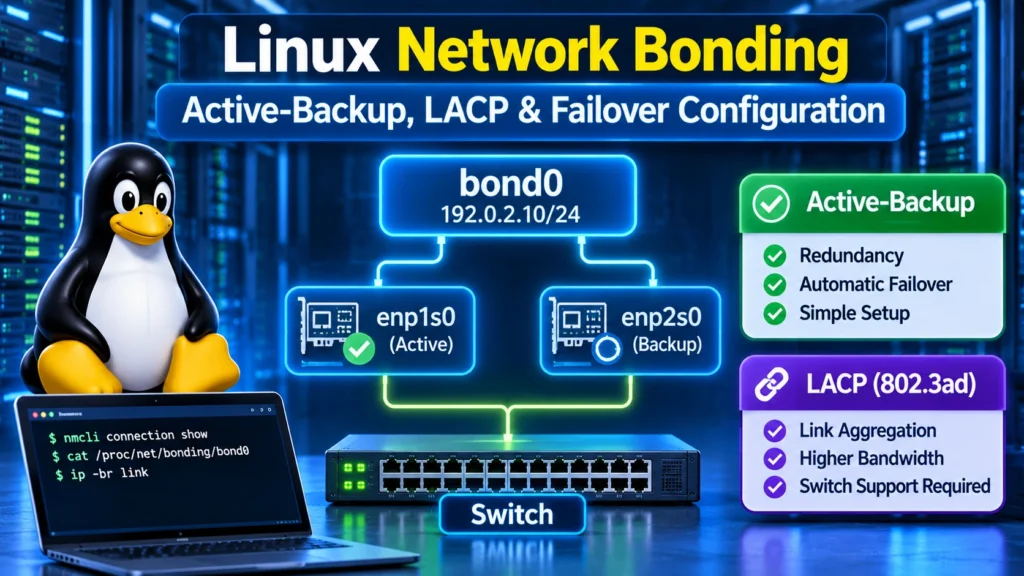
Linux Network Bonding Explained: Active-Backup, LACP & Failover Configuration
Linux network bonding is a technique that combines two or more physical network interfaces into a single logical interface. It is commonly used on Linux servers to improve network availability, provide link redundancy, and distribute traffic across multiple Ethernet connections.
Instead of configuring an application to use several independent network interfaces, administrators can create a logical interface such as bond0 and configure the server’s IP address on that interface.
Linux bonding supports several operating modes. Two of the most widely used are:
- Active-Backup: Uses one active interface while keeping another interface available for failover.
- 802.3ad (LACP): Combines multiple Ethernet links into a negotiated link aggregation group to provide redundancy and distribute traffic.
Although both modes can use multiple network interfaces, they solve different problems and require different switch configurations.
This guide explains how Linux network bonding works, how to configure active-backup and LACP using NetworkManager, how to verify the bond, and how to test failover safely.
1. What Is Linux Network Bonding?
Linux network bonding combines multiple physical or virtual network interfaces into one logical network interface.
The Linux kernel bonding driver manages the member interfaces, commonly called slaves in older documentation or ports in newer terminology.
For example, a Linux server may have two Ethernet interfaces:
enp1s0
enp2s0
Instead of assigning the server’s IP address independently to both interfaces, an administrator can create a bond:
              Linux Server
          +-------------------+
          |                   |
          |       bond0       |
          |    192.0.2.10     |
          |                   |
          +---------+---------+
                    |
              +-----+-----+
              |           |
            enp1s0      enp2s0
              |           |
              +-----+-----+
                    |
                Network
Applications communicate through bond0, while the bonding driver selects the physical interface or interfaces used to transmit traffic.
The logical bond provides a single point for configuring IP addresses, routes, and other network settings.
Why Use Network Bonding?
Linux network bonding is commonly used for several reasons:
1. Network redundancy
If one physical interface fails, another interface can continue carrying traffic when the selected bonding mode and monitoring configuration support failover.
2. Improved availability
A server can maintain network connectivity despite certain cable, NIC, or switch-port failures.
3. Traffic distribution
Modes such as 802.3ad can distribute traffic across multiple active links, depending on the configured hashing policy.
4. Simplified network configuration
Applications and administrators work with one logical interface instead of managing separate IP configurations on individual physical ports.
5. Better use of network capacity
Link aggregation can provide higher aggregate bandwidth across multiple traffic flows, subject to the bonding mode, hashing behavior, switch capabilities, and workload.
2. Linux Bonding Modes Explained
The Linux bonding driver supports several operating modes. Each mode uses a different method for handling traffic and link failures.
| Mode | Name | Main purpose | Switch requirement |
|---|---|---|---|
| 0 | balance-rr | Round-robin transmission | Static link aggregation |
| 1 | active-backup | Link redundancy | No special aggregation configuration |
| 2 | balance-xor | Hash-based load distribution | Static link aggregation |
| 3 | broadcast | Send traffic through all member links | Static link aggregation |
| 4 | 802.3ad | Dynamic LACP aggregation | LACP-enabled port channel |
| 5 | balance-tlb | Adaptive transmit load balancing | No special aggregation configuration |
| 6 | balance-alb | Adaptive transmit and receive load balancing | No special aggregation configuration |
For most practical server deployments, the key decision is between mode 1 and mode 4.
Choose active-backup when the main requirement is redundancy and switch-side aggregation is not available.
Choose 802.3ad when the switch supports LACP and you want multiple links to participate in an aggregated connection.
3. Active-Backup Bonding (Mode 1)
Active-backup is one of the simplest Linux bonding modes.
Only one physical interface carries traffic at a time. The remaining interfaces stay available as backups.
If the active interface fails and the configured link-monitoring mechanism detects the failure, another member interface can become active.
How Active-Backup Works
Consider a server with two Ethernet connections:
                 Linux Server
                +-------------+
                |    bond0    |
                +------+------+
                       |
             +---------+---------+
             |                   |
          enp1s0               enp2s0
          ACTIVE                BACKUP
             |                   |
             +---------+---------+
                       |
                 Network Switch
Under normal conditions:
enp1s0carries traffic.enp2s0remains available.- The bond uses the active interface for network communication.
If enp1s0 fails:
Before Failure:

enp1s0 = ACTIVE
enp2s0 = BACKUP

After Failure:

enp1s0 = DOWN
enp2s0 = ACTIVE
The bond changes its active member and continues using the remaining connection.
The Linux bonding driver also sends gratuitous ARP notifications after active-backup failover when applicable, helping connected IPv4 devices update their neighbor information.
Advantages of Active-Backup
- Simple configuration.
- Does not require LACP on the switch.
- Provides redundancy against individual link failures.
- Can be useful with different physical switches when the network topology supports the required connectivity.
- Does not depend on load-balancing hashes.
Limitations of Active-Backup
- Only one member carries normal traffic at a time.
- It does not combine the bandwidth of all member interfaces.
- Failover behavior depends on the monitoring mechanism.
- It cannot automatically protect against every upstream network failure.
Active-backup is appropriate when availability is more important than increasing aggregate bandwidth.
4. LACP Bonding (802.3ad, Mode 4)
LACP stands for Link Aggregation Control Protocol.
It is used to dynamically negotiate the aggregation of multiple Ethernet links between connected devices.
Linux bonding supports LACP through mode 802.3ad, also known as mode 4.
Unlike active-backup, LACP allows multiple member interfaces to participate in an active aggregation group.
How LACP Works
Consider a Linux server connected to a managed switch through two Ethernet links:
                Linux Server
               +-------------+
               |    bond0    |
               +------+------+
                      |
            +---------+---------+
            |                   |
          enp1s0              enp2s0
            |                   |
            |                   |
            +---------+---------+
                      |
                Managed Switch
                 LACP Group
The Linux server and the switch exchange LACP Data Units (LACPDUs).
They negotiate whether the physical interfaces can become members of the same aggregation group.
Once the negotiation succeeds, the links can operate as one logical connection.
LACP Requirements
Before configuring mode 4, verify the following:
- The Linux server has at least two supported Ethernet interfaces.
- The connected switch supports LACP.
- The switch ports are assigned to the same LACP aggregation group.
- The member ports have compatible speed and duplex settings.
- VLAN and switchport settings are consistent across the aggregated ports.
- The switch and Linux host are configured to use compatible aggregation parameters.
LACP mode 4 requires matching switch-side configuration. Simply changing the Linux bond mode is not enough.
Does LACP Double the Speed of One Connection?
Not necessarily.
LACP typically distributes traffic using a hashing algorithm based on information such as MAC addresses, IP addresses, and transport ports.
An individual flow is generally assigned to one physical member link rather than being split arbitrarily across all links.
For example, a two-link 1 Gbps LACP bond may provide up to 2 Gbps of aggregate capacity across multiple suitably distributed flows.
However, one TCP connection will generally remain limited by the capacity of the selected member link.
The actual distribution depends on the hashing policies of both the Linux host and the switch.
5. Active-Backup vs. LACP: Which Should You Choose?
Both bonding modes can improve network availability, but they have different operating requirements.
| Feature | Active-Backup | LACP (802.3ad) |
|---|---|---|
| Bonding mode | 1 | 4 |
| Main purpose | Redundancy | Aggregation and redundancy |
| Active links | One at a time | Multiple |
| Switch LACP configuration | Not required | Required |
| Traffic distribution | No load balancing | Hash-based |
| Aggregate bandwidth | One active member’s capacity | Can use multiple links across flows |
| Single-flow throughput | Limited to active link | Generally limited to one selected member |
| Typical use | Simple server redundancy | Managed switch link aggregation |
When Should You Choose Active-Backup?
Use active-backup when:
- The main objective is network redundancy.
- You cannot configure the connected switch.
- You need a straightforward failover design.
- You are connecting to different switches that provide the required network connectivity.
When Should You Choose LACP?
Use LACP when:
- Both the Linux server and the switch support link aggregation.
- You want multiple links to carry traffic.
- You need additional aggregate network capacity.
- You can configure and monitor the switch-side LAG.
For the switch-side concepts and common LACP errors, see CorgiNetwork’s guide to Cisco EtherChannel Troubleshooting: Fix LACP Errors.
6. Check Network Interfaces Before Configuring Bonding
Before creating a bond, identify the available network interfaces.
Run:
ip -br linkExample output:
lo        UNKNOWN
enp1s0    UP
enp2s0    UP
You can also use NetworkManager:
nmcli device statusExample:
DEVICE   TYPE      STATE         CONNECTION
enp1s0   ethernet  connected     Wired connection 1
enp2s0   ethernet  disconnected  --
lo       loopback  connected     lo
Inspect the link speed and status of each physical interface:
sudo ethtool enp1s0To display only useful information:
sudo ethtool enp1s0 | grep -E 'Speed|Duplex|Link detected'Repeat the check for the second interface:
sudo ethtool enp2s0 | grep -E 'Speed|Duplex|Link detected'Before proceeding, confirm that:
- The interfaces exist.
- Both interfaces are supported by the system.
- The cables and switch ports are connected.
- The selected interfaces are not still being used by unrelated network profiles.
- You have a safe way to recover the system if the network configuration interrupts access.
Important: When configuring bonding on a remote server, use a console or out-of-band management connection whenever possible. Reconfiguring the active network interface can interrupt SSH connectivity.
7. Configure Active-Backup Bonding Using nmcli
This section uses NetworkManager and nmcli, which are commonly available on Red Hat Enterprise Linux and other distributions.
The example uses:
Bond interface: bond0
First NIC:      enp1s0
Second NIC:     enp2s0
Bond mode:      active-backup
IP address:     192.0.2.10/24
Gateway:        192.0.2.1
DNS:            192.0.2.53
These are documentation example addresses. Replace them with the actual values for your network.
Step 1: Create the Bond Interface
Run:
sudo nmcli connection add type bond \
  con-name bond0 \
  ifname bond0 \
  bond.options "mode=active-backup,miimon=100"
This creates a logical interface named bond0.
The important options are:
mode=active-backup: Selects active-backup mode.miimon=100: Checks physical link status at 100 ms intervals.
MII monitoring is commonly used to detect physical link failures.
Step 2: Add the First Ethernet Interface
Run:
sudo nmcli connection add type ethernet \
  port-type bond \
  con-name bond0-port1 \
  ifname enp1s0 \
  controller bond0
This creates a NetworkManager profile that assigns enp1s0 to bond0.
Step 3: Add the Second Ethernet Interface
Run:
sudo nmcli connection add type ethernet \
  port-type bond \
  con-name bond0-port2 \
  ifname enp2s0 \
  controller bond0
The second interface becomes another member of the bond.
On older NetworkManager releases, the equivalent relationship may use slave-type bond and master bond0 instead of port-type bond and controller bond0.
Step 4: Configure the Bond IP Address
The IP address should normally be configured on the logical bond interface rather than independently on its physical member interfaces.
For a static IPv4 configuration:
sudo nmcli connection modify bond0 \
  ipv4.method manual \
  ipv4.addresses "192.0.2.10/24" \
  ipv4.gateway "192.0.2.1" \
  ipv4.dns "192.0.2.53"
For DHCP instead:
sudo nmcli connection modify bond0 ipv4.method autoChoose the method appropriate for your network.
Step 5: Enable Automatic Port Activation
Run:
sudo nmcli connection modify bond0 connection.autoconnect-ports 1This instructs NetworkManager to activate the bond’s member ports when the bond is activated.
This property is available on newer NetworkManager releases. Older versions may use connection.autoconnect-slaves.
Step 6: Activate the Bond
Run:
sudo nmcli connection up bond0Check the devices:
nmcli device statusThe bond should appear as the logical connection, and its member interfaces should be associated with their bond-port profiles.
8. Configure LACP Bonding Using nmcli
The LACP configuration follows a similar process, but the switch must be configured for LACP aggregation before the links are expected to operate as a working group.
Use these example settings:
Bond interface: bond0
Member interfaces: enp1s0, enp2s0
Bond mode: 802.3ad
LACP rate: fast
Monitoring: MII
Step 1: Create the LACP Bond
Run:
sudo nmcli connection add type bond \
  con-name bond0 \
  ifname bond0 \
  bond.options "mode=802.3ad,miimon=100,lacp_rate=fast,xmit_hash_policy=layer3+4"
The main options are:
| Option | Purpose |
|---|---|
mode=802.3ad | Enables LACP bonding |
miimon=100 | Checks physical link status |
lacp_rate=fast | Requests faster LACPDU transmission |
xmit_hash_policy=layer3+4 | Uses network and transport-layer information in transmit selection |
The layer3+4 policy can help distribute different IP and TCP/UDP flows across member links.
It does not guarantee that every traffic pattern will use all links equally.
Step 2: Add the Member Interfaces
Create the first member:
sudo nmcli connection add type ethernet \
  port-type bond \
  con-name bond0-port1 \
  ifname enp1s0 \
  controller bond0
Create the second member:
sudo nmcli connection add type ethernet \
  port-type bond \
  con-name bond0-port2 \
  ifname enp2s0 \
  controller bond0
Step 3: Configure the Bond IP Address
For a static IPv4 address:
sudo nmcli connection modify bond0 \
  ipv4.method manual \
  ipv4.addresses "192.0.2.10/24" \
  ipv4.gateway "192.0.2.1" \
  ipv4.dns "192.0.2.53"
Do not configure the same server IP independently on both member interfaces.
Step 4: Activate the Configuration
Enable automatic port activation:
sudo nmcli connection modify bond0 connection.autoconnect-ports 1Then activate:
sudo nmcli connection up bond0Check the device status:
nmcli device statusBefore testing traffic, confirm that the switch has successfully negotiated the LACP group.
9. Configure Linux Bonding on Ubuntu Using Netplan
Ubuntu Server commonly uses Netplan for persistent network configuration.
The following example creates an active-backup bond using the networkd renderer.
Edit the appropriate Netplan YAML file under:
/etc/netplan/Example:
network:
  version: 2
  renderer: networkd

  ethernets:
    enp1s0: {}
    enp2s0: {}

  bonds:
    bond0:
      interfaces:
        - enp1s0
        - enp2s0

      addresses:
        - 192.0.2.10/24

      routes:
        - to: default
          via: 192.0.2.1

      nameservers:
        addresses:
          - 192.0.2.53

      parameters:
        mode: active-backup
        primary: enp1s0
        mii-monitor-interval: 100
Adjust the interface names and addressing to match the server.
For an LACP configuration, the relevant bonding parameters can be changed to:
      parameters:
        mode: 802.3ad
        lacp-rate: fast
        transmit-hash-policy: layer3+4
        mii-monitor-interval: 100
The switch ports must also be configured as an LACP aggregation group.
Before applying the changes, validate the configuration:
sudo netplan generateThen use:
sudo netplan trynetplan try provides an opportunity to confirm the new network configuration and can revert it if confirmation is not received.
This is particularly useful when applying network changes remotely.
For the supported Netplan bonding parameters, see the Ubuntu Netplan documentation.
10. Verify Linux Bonding Status
After creating the bond, verify that the Linux kernel recognizes it and that the member interfaces have the expected status.
Check the Bond Interface
Run:
ip -br link showYou should see the logical interface:
bond0For more detailed information:
ip -d link show bond0Inspect Bonding Driver Status
The most useful bonding status file is:
cat /proc/net/bonding/bond0For active-backup, the output may include:
Bonding Mode: fault-tolerance (active-backup)
Primary Slave: None
Currently Active Slave: enp1s0
MII Status: up
MII Polling Interval (ms): 100

Slave Interface: enp1s0
MII Status: up

Slave Interface: enp2s0
MII Status: up
The active member should be visible under Currently Active Slave.
For LACP, inspect the same file and look for:
- Bonding Mode: IEEE 802.3ad Dynamic link aggregation
- Active Aggregator Info
- Aggregator ID
- Actor and Partner information
- Member interface status
- LACP-related state information
A healthy physical link alone does not prove that LACP negotiation has succeeded.
Check Interface Counters
Run:
ip -s link show bond0Also inspect each physical member:
ip -s link show enp1s0
ip -s link show enp2s0
These counters help identify traffic distribution, errors, and drops.
Verify Physical Link State
Use:
sudo ethtool enp1s0And:
sudo ethtool enp2s0Confirm that both links report the expected speed, duplex, and link status.
For additional Linux interface and packet diagnostics, see the Linux Network Tools guide.
11. How to Test Network Bonding Failover
A configured bond should not be considered production-ready until its failover behavior has been tested.
A practical test should confirm that the server continues communicating when one physical member actually fails.
Test Active-Backup Failover
First, inspect the current active member:
cat /proc/net/bonding/bond0For example:
Currently Active Slave: enp1s0Start a continuous connectivity test to a known reachable destination:
ping 192.0.2.1Then, during an approved maintenance test, physically disconnect the active member’s Ethernet cable.
Inspect the bonding status again:
cat /proc/net/bonding/bond0The backup interface should become active if the failure is detected and the network remains available through that path.
For example:
Currently Active Slave: enp2s0Check whether connectivity continues and whether the expected traffic is passing through the replacement member.
Reconnect the cable and observe whether the original interface returns according to the configured primary and failback behavior.
Test LACP Member Failure
For an LACP bond:
- Confirm that all expected ports are members of the same aggregation group.
- Inspect the Linux bond status.
- Monitor traffic across the bond.
- Disconnect one member during an approved test.
- Confirm that the LACP group remains operational through the surviving member.
- Verify that traffic continues and the remaining link carries the required workload.
LACP should be checked on both the Linux host and the switch.
Important: Software Link-Down Is Not the Same as a Physical Failure
Commands such as:
sudo ip link set enp1s0 downor disabling an interface profile with NetworkManager can test certain administrative state changes.
However, they do not fully reproduce every physical link failure event.
Red Hat’s configuration guidance specifically recommends testing with a physical cable disconnection and explains this difference.
Always test failover in a controlled environment with console access or another recovery path. Do not disconnect the only working management interface on a remote production server.
12. Common Linux Network Bonding Problems
Even when the configuration looks correct, bonding may fail to behave as expected.
The following checks help narrow down common problems.
Problem 1: Bond Interface Does Not Come Up
Possible causes:
- The bonding module is unavailable.
- The NetworkManager profiles are incorrect.
- Member interfaces are not assigned to the bond.
- The physical interfaces are unavailable.
- The bond configuration contains unsupported options.
Check:
ip -br linkThen inspect:
nmcli connection showAnd:
nmcli device statusCheck the kernel bonding driver:
lsmod | grep bondingIf appropriate, load the module:
sudo modprobe bondingProblem 2: LACP Does Not Establish
If the Linux bond remains in 802.3ad mode but aggregation does not work correctly, inspect both ends of the connection.
Possible causes include:
- The switch ports are not assigned to the same LACP group.
- The switch uses static aggregation instead of LACP.
- The server interfaces are connected to incompatible switch groups.
- Speed or duplex settings differ.
- VLAN or switchport configuration is inconsistent.
- LACP negotiation is not completing.
Inspect Linux bonding status:
cat /proc/net/bonding/bond0You can also capture LACP traffic:
sudo tcpdump -nn -i enp1s0 ether proto 0x8809LACP uses Ethernet type 0x8809.
If LACPDUs are not being exchanged as expected, check the physical path, switch configuration, and interface state.
For Cisco-specific LACP problems, see Cisco EtherChannel Troubleshooting.
Problem 3: Traffic Does Not Use Both LACP Links
A common misunderstanding is that both member links should carry the same amount of traffic at every moment.
LACP uses traffic distribution policies. A single flow may remain on one member link, even when other links are available.
Check the transmit hash policy:
nmcli connection show bond0Inspect the kernel’s bonding status:
cat /proc/net/bonding/bond0Review the switch’s hashing policy and compare it with the traffic patterns generated by the server.
To evaluate aggregate throughput, test multiple independent flows rather than relying on a single TCP connection.
Problem 4: Failover Does Not Occur
Possible causes include:
- Link monitoring is not enabled.
- The active link failure is not being detected.
- The backup interface is not operational.
- The backup switch port does not provide the expected VLAN or network connectivity.
- The network beyond the physical link is unavailable even though carrier remains up.
Check the configured monitoring parameters and bond status:
cat /proc/net/bonding/bond0For physical link monitoring, inspect the MII status of each member.
If the failure occurs beyond the local Ethernet link, investigate whether the selected monitoring method can detect that type of failure.
MII monitoring detects physical carrier status. It does not guarantee end-to-end reachability through upstream routers or services.
The bonding driver also supports ARP-based monitoring in appropriate configurations. ARP monitoring and MII monitoring should not be configured together.
Problem 5: Network Connectivity Disappears After Creating the Bond
This can happen when the IP address or default route remains configured on a physical member instead of the bond interface.
Review the active configuration:
ip -br addressCheck the routing table:
ip routeCheck NetworkManager profiles:
nmcli connection showThe expected design is generally:
bond0    → IP address and routing configuration
enp1s0   → Bond member
enp2s0   → Bond member
Also verify that the VLAN and gateway configuration matches the connected switch ports.
If multiple interfaces share the same subnet, review the Linux ARP Flux guide to understand related multi-NIC behavior.
13. Bonding with VLANs
Linux bonding can also be combined with VLAN interfaces.
In this design, the bond provides the underlying logical Ethernet connection, and VLAN interfaces are created above it.
For example:
                 Linux Server
                       |
                     bond0
                       |
                +------+------+
                |             |
             enp1s0         enp2s0
                       |
                 VLAN Interfaces
                       |
              +--------+--------+
              |                 |
          bond0.10          bond0.20
          VLAN 10           VLAN 20
The IP address for each VLAN should be configured on the appropriate VLAN interface.
The switch ports must carry the VLANs expected by the Linux server.
For example, if the server needs VLAN 10 and VLAN 20, the switch configuration must allow those tagged VLANs on the corresponding link or aggregation group.
For more information about VLAN tags and trunk ports, see VLAN Explained: Access, Trunk, 802.1Q and Inter-VLAN Routing.
14. Best Practices for Linux Network Bonding
Follow these practices when deploying bonding on a production server.
1. Choose the bonding mode based on the requirement
Use active-backup for simple redundancy. Use LACP when both the Linux host and switch are configured for link aggregation.
2. Configure the switch before enabling LACP
The switch-side port channel and LACP settings must be ready for the Linux bond to negotiate correctly.
3. Configure IP addresses on the bond
Avoid assigning the same production IP configuration independently to physical member interfaces.
4. Enable link monitoring
Use an appropriate monitoring mechanism so the bonding driver can detect member failures.
5. Verify both ends of the connection
A healthy Linux bond status is not enough when the switch-side aggregation is incorrectly configured.
6. Test real failure scenarios
Validate failover under controlled conditions instead of assuming that a successful configuration command proves redundancy works.
7. Keep configuration consistent
Ensure member ports have compatible VLAN, MTU, speed, duplex, and aggregation settings.
8. Maintain a recovery path
Before changing server networking remotely, prepare console access or another way to recover connectivity.
9. Monitor performance and interface counters
Observe traffic distribution, link errors, and failover events over time.
10. Document the topology
Record which NICs connect to which switch ports, the selected bond mode, VLANs, and the expected failure behavior.
15. Frequently Asked Questions
What is Linux network bonding?
Linux network bonding combines multiple network interfaces into one logical interface. It can provide link redundancy, traffic distribution, or both, depending on the selected bonding mode.
What is the difference between active-backup and LACP?
Active-backup uses one active interface and keeps other interfaces available for failover. LACP negotiates an aggregated group in which multiple physical links can participate in traffic forwarding.
Does Linux bonding require a managed switch?
Not always. Active-backup does not require a special aggregation configuration on the switch. LACP mode 4 requires a switch that supports and is configured for LACP.
What is mode 4 in Linux bonding?
Mode 4 is 802.3ad, which implements dynamic link aggregation using LACP.
How do I check Linux bond status?
Run:
cat /proc/net/bonding/bond0This displays the bonding mode, active member, link status, and additional bonding information.
Can LACP provide double bandwidth?
It can increase aggregate capacity across multiple suitably distributed traffic flows. However, one TCP connection generally remains limited to a single selected member link.
Can I use two different switches with Linux bonding?
Active-backup can use separate switches when the upstream network is designed to provide connectivity through either path.
LACP across multiple physical switches requires an appropriate multi-chassis aggregation technology, such as stacking or MLAG, so that the switches operate as one logical aggregation peer.
What is the difference between Linux bonding and Cisco EtherChannel?
Linux bonding is the host-side mechanism for grouping network interfaces. Cisco EtherChannel is a switch-side link aggregation implementation.
They can work together using LACP when both endpoints are configured compatibly.
Does active-backup increase network throughput?
No. Active-backup normally uses only one member link at a time. Its primary purpose is redundancy rather than aggregate throughput.
How can I test a Linux bonding failover?
Inspect the current bond status, maintain a connectivity test to a reachable destination, and physically disconnect one member link during an approved test. Verify that the remaining member carries traffic.
Conclusion
Linux network bonding is a practical way to improve network availability and manage multiple Ethernet connections through a single logical interface.
Active-backup is suitable for straightforward link redundancy, while LACP provides negotiated link aggregation and traffic distribution when the switch supports it.
The most important part of a successful deployment is choosing the correct bonding mode, configuring the switch appropriately, assigning IP settings to the logical bond, and testing real failure scenarios.
Use nmcli, Netplan, ip, ethtool, and /proc/net/bonding/bond0 to configure and verify the implementation.
A properly tested Linux bond can help reduce the impact of physical link failures and provide a more resilient network connection for Linux servers.