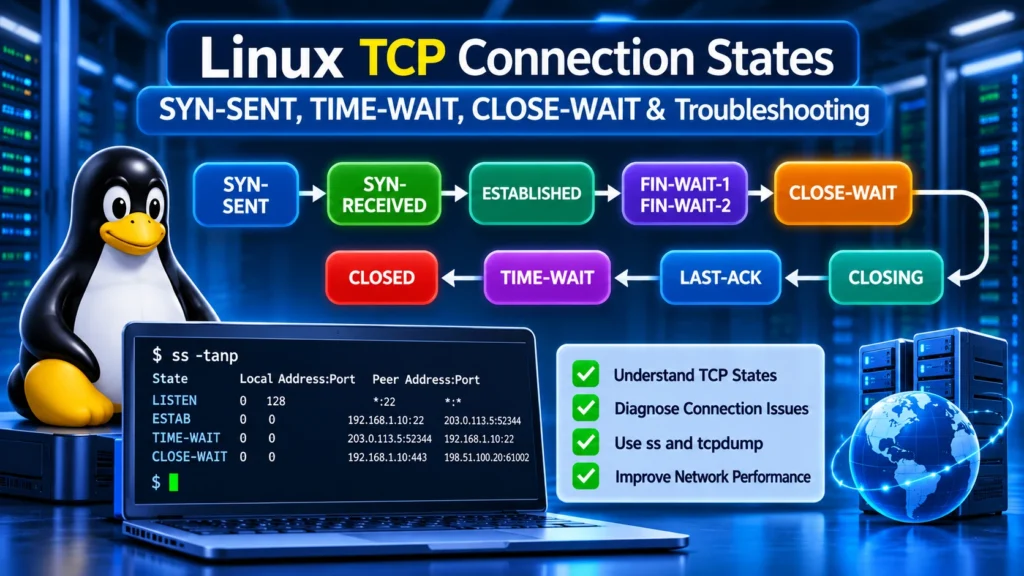
Linux TCP Connection States Explained: SYN-SENT, TIME-WAIT, CLOSE-WAIT & Troubleshooting
Understanding Linux TCP connection states is essential when troubleshooting network connectivity, application timeouts, slow servers, and unexpected socket behavior.
A Linux server can have hundreds or thousands of TCP connections in different states. Some are completely normal, such as ESTABLISHED and TIME-WAIT. Others may indicate a problem when they accumulate or remain unchanged for a long time, particularly CLOSE-WAIT and SYN-SENT.
Linux provides the ss command to inspect these connections, identify their states, and associate sockets with processes. By combining ss, tcpdump, and application-level checks, administrators can investigate whether a problem originates from the application, the remote endpoint, or the network.
This guide explains all standard TCP connection states, how connections transition between them, and how to diagnose common TCP problems on Linux.
1. What Are TCP Connection States?
Transmission Control Protocol (TCP) is a connection-oriented transport protocol. Before two endpoints exchange application data, they establish a connection through a three-way handshake.
TCP maintains connection information, including sequence numbers, acknowledgment numbers, and connection status. This status changes as TCP segments are sent and received.
For example, when a Linux client connects to a web server, the client and server progress through several TCP states before data transfer begins.
The main TCP connection states are:
- LISTEN
- SYN-SENT
- SYN-RECEIVED
- ESTABLISHED
- FIN-WAIT-1
- FIN-WAIT-2
- CLOSE-WAIT
- CLOSING
- LAST-ACK
- TIME-WAIT
- CLOSED
These states are defined in the TCP state machine described by RFC 9293.
An important point is that a TCP connection has a state at each endpoint. The client and server do not necessarily display the same state at the same moment.
2. The TCP Three-Way Handshake and Connection States
Before data can be exchanged, TCP normally establishes a connection using three segments: SYN, SYN-ACK, and ACK.
Consider a Linux client connecting to a web server on TCP port 443.
Step 1: SYN-SENT
The client starts a connection by sending a SYN segment.
Its TCP state becomes:
SYN-SENT
The client is waiting for a matching response from the remote endpoint.
Step 2: SYN-RECEIVED
The server receives the SYN and responds with a SYN-ACK segment.
The server enters:
SYN-RECEIVED
It is waiting for the client’s final acknowledgment.
Step 3: ESTABLISHED
The client receives SYN-ACK and sends the final ACK.
Both endpoints enter:
ESTABLISHED
The TCP connection is now ready for normal data transfer.
The process can be summarized as:
             TCP THREE-WAY HANDSHAKE

    Linux Client                    Web Server
         |                               |
         | -------- SYN --------------> |
         |                               |
         | <------ SYN + ACK ----------- |
         |                               |
         | -------- ACK --------------> |
         |                               |
         |                               |
    ESTABLISHED                     ESTABLISHED
For more information about the handshake, sequence numbers, and acknowledgments, see the TCP/IP Explained guide on CorgiNetwork.
3. All 11 TCP Connection States Explained
Each TCP state represents a particular stage in connection establishment, data transfer, or connection termination.
| TCP State | Meaning |
|---|---|
| LISTEN | Waiting for incoming connection requests |
| SYN-SENT | A connection request was sent; waiting for a response |
| SYN-RECEIVED | A SYN was received and SYN-ACK was sent; waiting for ACK |
| ESTABLISHED | Connection is established and can transfer data |
| FIN-WAIT-1 | Local endpoint sent FIN and is waiting for acknowledgment or peer FIN |
| FIN-WAIT-2 | Local FIN was acknowledged; waiting for the peer to close |
| CLOSE-WAIT | Remote endpoint sent FIN; waiting for the local application to close |
| CLOSING | Both endpoints initiated closure; waiting for acknowledgment |
| LAST-ACK | Local endpoint sent its final FIN and is waiting for acknowledgment |
| TIME-WAIT | Waiting to protect the connection from delayed segments and ensure the final ACK is handled |
| CLOSED | No active TCP connection exists |
The following sections explain the states that are particularly useful during Linux network troubleshooting.
3.1 LISTEN
The LISTEN state indicates that a server-side TCP socket is waiting for incoming connection requests.
For example, an Nginx web server listening on port 80 or 443 may display a LISTEN socket.
Check listening TCP ports:
sudo ss -ltnpExample output:
State   Recv-Q   Send-Q   Local Address:Port   Peer Address:Port
LISTEN  0        511      0.0.0.0:80           0.0.0.0:*
LISTEN  0        511      0.0.0.0:443          0.0.0.0:*
The -l option displays listening sockets, -t selects TCP, -n disables name resolution, and -p displays process information when available.
If an application should accept connections but no corresponding LISTEN socket appears, investigate whether the service is running and bound to the expected address and port.
For example:
sudo systemctl status nginxAlso verify whether the application is listening on the correct IP address, not only on localhost.
3.2 SYN-SENT
SYN-SENT appears when a local endpoint has sent a SYN segment and is waiting for a response.
For example, a Linux server may attempt to connect to a remote database, API, or HTTPS service.
Check SYN-SENT connections:
sudo ss -tan state syn-sentA connection remaining in this state can indicate that the SYN or response is not reaching its destination.
Possible causes include:
- The remote host is unavailable.
- A firewall silently drops connection requests.
- A routing problem prevents communication.
- The remote service is not responding.
- Network congestion or packet loss delays the response.
Start by checking the route:
ip route get 203.0.113.20Then test the remote TCP port:
nc -vz -w 3 203.0.113.20 443Replace the example address and port with the actual destination.
You can also capture the connection attempt:
sudo tcpdump -nn -i any 'host 203.0.113.20 and tcp port 443'Interpret the result carefully:
- Repeated outgoing SYN packets without a response suggest that the connection attempt is not receiving a valid reply.
- A SYN followed by a SYN-ACK indicates that the remote endpoint responded.
- A SYN followed by an RST generally indicates that the connection was actively rejected.
A persistent SYN-SENT state is therefore a useful starting point for investigating outbound connectivity problems.
3.3 SYN-RECEIVED
SYN-RECEIVED is a server-side state.
It occurs when a server receives a SYN, sends a SYN-ACK, and waits for the final ACK from the client.
Check these connections:
sudo ss -tan state syn-recvA small number of SYN-RECEIVED sockets can be normal during periods of incoming connection activity.
However, a rapidly growing number may require investigation.
Possible causes include:
- Clients not receiving the server’s SYN-ACK.
- Network devices dropping the final ACK.
- High connection rates.
- Problems affecting the server’s connection backlog.
- SYN flood activity.
Do not automatically classify every SYN-RECEIVED connection as an attack.
Inspect the listening socket:
sudo ss -ltnpFor listening sockets, Recv-Q shows connections waiting to be accepted, while Send-Q shows the configured backlog limit.
If the queues remain full or connection requests are being dropped, investigate application performance, backlog configuration, network behavior, and relevant kernel counters.
3.4 ESTABLISHED
ESTABLISHED indicates that the TCP handshake completed successfully.
It is the normal state for a connection that is ready to transfer data.
Display established connections:
sudo ss -tan state establishedTo display the owning processes when possible:
sudo ss -tanp state establishedExample:
State  Recv-Q  Send-Q  Local Address:Port   Peer Address:Port
ESTAB  0       0       192.0.2.10:443       198.51.100.20:52144
An established connection is not automatically healthy from an application perspective. The connection may remain open while the application is waiting, blocked, or unable to process data.
When investigating slow applications, examine the socket queues, retransmissions, application logs, and resource usage rather than relying only on the ESTABLISHED state.
3.5 FIN-WAIT-1
FIN-WAIT-1 appears when the local endpoint initiates connection termination by sending a FIN segment.
It is waiting for acknowledgment of that FIN or for the peer to initiate its own closure.
For example, a client may finish downloading a file and close its TCP connection.
The client can enter FIN-WAIT-1 while waiting for the server to acknowledge the FIN.
If many connections remain in this state, investigate whether acknowledgments or the remote endpoint’s response are delayed.
3.6 FIN-WAIT-2
FIN-WAIT-2 occurs after the remote endpoint acknowledges the local FIN.
The local endpoint is now waiting for the peer to send its own FIN.
Inspect FIN-WAIT-2 sockets:
sudo ss -tan state fin-wait-2A connection remaining in FIN-WAIT-2 for an unusually long time may indicate that the remote application has not completed its side of the shutdown.
Linux also has a tcp_fin_timeout setting related to how long orphaned FIN-WAIT-2 sockets are retained.
Inspect the current value with:
sysctl net.ipv4.tcp_fin_timeoutDo not change this parameter simply because FIN-WAIT-2 connections are visible. First determine whether the application, peer, or network is responsible.
3.7 CLOSE-WAIT
CLOSE-WAIT is one of the most important TCP states to understand when troubleshooting Linux application servers.
It occurs when the remote endpoint sends a FIN, indicating that it has finished sending data.
The local TCP stack acknowledges the FIN, but the local application has not yet closed its socket.
The sequence is:
Remote Endpoint                 Linux Server
      |                              |
      | -------- FIN -------------> |
      |                              |
      | <------- ACK -------------- |
      |                              |
      |                         CLOSE-WAIT
      |                              |
      |                  Application should
      |                  close the socket
A small number of CLOSE-WAIT sockets may be temporary and normal.
However, a steadily increasing number that remains for a long time often points to an application lifecycle problem, such as a socket not being closed correctly.
Common causes include:
- Application code does not close sockets.
- Error-handling paths fail to release connections.
- HTTP response bodies are not properly consumed or closed.
- Connection pools are not releasing resources.
- A process becomes blocked before completing its cleanup logic.
How to Find CLOSE-WAIT Connections
Run:
sudo ss -tanp state close-waitCount them:
ss -Htan state close-wait | wc -lTo observe changes over time:
watch -n 2 'ss -Htan state close-wait | wc -l'Identify the process that owns the sockets from the ss -p output.
Then inspect its file descriptors:
sudo ls -l /proc/PID/fdReplace PID with the actual process ID.
Check the process’s open-file limit:
sudo cat /proc/PID/limits | grep -i "open files"A large number of CLOSE-WAIT sockets belonging to one application deserves investigation in that application.
How to Fix CLOSE-WAIT Problems
The lasting solution is normally in the application.
Review the code and verify that:
- Every successfully opened socket is eventually closed.
- Error-handling paths release network resources.
- HTTP clients consume or close response bodies appropriately.
- Connection pools release unused connections.
- Cleanup operations run even when an exception occurs.
Restarting the affected service may temporarily remove its existing sockets, but it does not fix an application bug that continues creating CLOSE-WAIT connections.
Important: Do not confuse CLOSE-WAIT with FIN-WAIT-2. The tcp_fin_timeout setting is not a general timeout that automatically fixes CLOSE-WAIT accumulation.
Red Hat also documents large CLOSE-WAIT socket counts as a condition that can originate in application behavior. See its CLOSE-WAIT troubleshooting guidance.
3.8 CLOSING
CLOSING is associated with simultaneous connection termination.
It can occur when both endpoints send FIN before receiving acknowledgment of their own FIN.
The connection remains in this state while the required acknowledgment is pending.
CLOSING is less commonly seen than FIN-WAIT or TIME-WAIT in routine diagnostics.
3.9 LAST-ACK
LAST-ACK occurs when an endpoint has received a FIN from the peer, acknowledged it, and then sent its own FIN.
The endpoint is waiting for the final acknowledgment.
Once the ACK is received, the connection can transition to CLOSED.
If LAST-ACK sockets remain for an unusually long time, investigate whether the final acknowledgment is being lost or whether the remote endpoint is reachable.
3.10 TIME-WAIT
TIME-WAIT is a normal part of TCP connection termination.
It generally occurs on the endpoint that actively closes the connection.
Its purposes include:
- Allowing enough time for the peer to receive the final acknowledgment.
- Handling a possible retransmission of the peer’s FIN.
- Preventing delayed segments from an earlier connection from interfering with a later connection that uses the same network identifiers.
Inspect TIME-WAIT sockets:
sudo ss -tan state time-waitCount them:
ss -Htan state time-wait | wc -lA large TIME-WAIT count does not necessarily indicate a problem.
Busy web servers, reverse proxies, and applications that frequently create short-lived TCP connections can naturally generate many TIME-WAIT sockets.
Investigate further when the count is associated with symptoms such as:
- Local ephemeral-port exhaustion.
- Failed outbound connections.
- Bind errors.
- Unusually high connection creation rates.
Inspect the local ephemeral port range:
sysctl net.ipv4.ip_local_port_rangePotential improvements include reusing persistent TCP connections, enabling appropriate HTTP keep-alive behavior, and reviewing application connection-pool settings.
Do not try to eliminate TIME-WAIT simply because it appears in ss output.
Linux supports TIME-WAIT socket reuse under specific conditions, but kernel documentation advises that tcp_tw_reuse should not be changed without appropriate technical guidance. See the Linux kernel IP sysctl documentation.
4. How to Monitor All TCP Connection States in Linux
The ss command is the primary tool for examining TCP sockets on modern Linux systems.
To display all TCP sockets:
sudo ss -tanTo include process information:
sudo ss -tanpTo display listening TCP sockets:
sudo ss -ltnpTo inspect a particular state, use a state filter:
ss -tan state established
ss -tan state syn-sent
ss -tan state syn-recv
ss -tan state close-wait
ss -tan state time-wait
The state names used by the filter are lowercase and use hyphens.
View a Summary of TCP Connections
Run:
ss -sThis provides a summary of socket usage and can help identify whether the system has an unusually high number of TCP connections.
Monitor Connection State Changes
For repeated monitoring, use:
watch -n 2 'ss -s'This refreshes the summary every two seconds.
To monitor one state:
watch -n 2 'ss -Htan state syn-sent'The ss manual documents the state filters, socket display options, and supported TCP states. See the ss(8) Linux manual.
5. How to Investigate TCP Problems with tcpdump
The ss command shows the current socket state, but packet captures provide additional evidence about what happened during connection establishment and termination.
Use tcpdump to capture traffic for a specific destination:
sudo tcpdump -nn -i any 'host 203.0.113.20 and tcp port 443'Replace the example IP address and port with the values you are investigating.
Look for the following TCP flags:
| TCP Flag | Purpose |
|---|---|
| SYN | Starts a connection or participates in synchronization |
| ACK | Acknowledges received TCP data or control information |
| FIN | Indicates that the sender has finished sending data |
| RST | Resets a TCP connection |
For example, repeated SYN packets without a SYN-ACK response may indicate a connectivity problem, filtering, an unavailable destination, or another issue along the route.
A FIN exchange helps show how the connection is being closed. An RST indicates that the connection is being reset rather than following a normal FIN-based termination.
For a graphical packet analysis workflow, see Wireshark Explained: Packet Capture, Filters and Network Analysis.
Useful Wireshark display filters include:
tcp.flags.syn == 1
tcp.flags.fin == 1
tcp.flags.reset == 1
tcp.analysis.retransmission
These filters help isolate connection setup, connection closure, resets, and retransmission events.
6. Practical TCP Troubleshooting Scenarios
The following examples show how TCP states can help narrow down real-world Linux networking problems.
Scenario 1: A Linux Client Cannot Connect to a Remote Service
Symptoms:
- An application reports connection timeouts.
- Outbound connections remain in SYN-SENT.
- The remote service does not appear to respond.
Start with:
sudo ss -tan state syn-sentThen inspect the route:
ip route get 203.0.113.20Test the destination port:
nc -vz -w 3 203.0.113.20 443Capture the packets:
sudo tcpdump -nn -i any 'host 203.0.113.20 and tcp port 443'Use these results to distinguish routing failures, filtered traffic, and an actively rejected connection.
Scenario 2: A Linux Application Has Thousands of CLOSE-WAIT Sockets
Symptoms:
- The application becomes unstable.
- The number of open file descriptors increases.
- Connections remain in CLOSE-WAIT.
- New client requests begin failing.
Start with:
sudo ss -tanp state close-waitCount the sockets:
ss -Htan state close-wait | wc -lIdentify the process and inspect its file descriptors:
sudo ls -l /proc/PID/fdReview application logs and connection-management code.
The likely area to investigate is application cleanup, not an arbitrary TCP timeout adjustment.
Scenario 3: A Web Server Has Many TIME-WAIT Connections
Symptoms:
- A large number of TIME-WAIT sockets appear.
- The server handles many short-lived client connections.
- The application creates frequent outbound requests.
Check:
ss -Htan state time-wait | wc -lInspect the ephemeral port range:
sysctl net.ipv4.ip_local_port_rangeReview HTTP keep-alive settings, connection reuse, and application connection pooling.
The goal is to reduce unnecessary connection creation when appropriate, not to remove the TCP safeguards associated with TIME-WAIT.
Scenario 4: Incoming TCP Connections Accumulate in SYN-RECV
Symptoms:
- Many incoming connections appear in SYN-RECV.
- Clients report connection timeouts.
- The server experiences unusually high incoming connection traffic.
Check:
sudo ss -tan state syn-recvInspect listening services:
sudo ss -ltnpAlso review firewall rules, load balancers, connection backlog behavior, and packet captures.
If the number of SYN-RECV sockets increases sharply, investigate whether the pattern is caused by a network issue, legitimate traffic spike, or malicious traffic.
7. Common TCP Connection Troubleshooting Mistakes
Avoid these mistakes when analyzing TCP connections on Linux.
1. Treating every TIME-WAIT socket as a problem
TIME-WAIT is part of normal TCP connection termination. Its presence alone does not prove a resource leak.
2. Assuming CLOSE-WAIT is caused by the network
CLOSE-WAIT normally indicates that the remote endpoint has closed its sending side and the local application has not completed its socket closure.
3. Killing connections without identifying their owner
Closing sockets forcibly may interrupt legitimate application traffic. Identify the process and understand the impact before taking action.
4. Changing TCP kernel parameters without evidence
Parameters such as tcp_tw_reuse should not be modified simply because a socket-state count appears high.
5. Using netstat as the only diagnostic tool
The modern ss utility provides detailed socket information and supports flexible state filtering. Older netstat examples can often be replaced with equivalent ss commands.
6. Ignoring application behavior
TCP connection states reflect both network events and application actions. Application logs, file descriptors, connection pools, and service behavior are essential parts of troubleshooting.
8. Frequently Asked Questions
What are TCP connection states in Linux?
TCP connection states describe the current stage of a TCP connection, including listening, connection establishment, data transfer, and connection termination.
Linux exposes these states through socket inspection tools such as ss.
How do I check TCP connections in Linux?
Run:
sudo ss -tanTo display process information:
sudo ss -tanpWhat does SYN-SENT mean in Linux?
SYN-SENT means the local endpoint sent a TCP SYN segment and is waiting for a response. Persistent SYN-SENT connections may indicate a network, firewall, routing, or remote-service problem.
What is the difference between SYN-SENT and SYN-RECV?
SYN-SENT normally appears on the endpoint that initiated a connection and is waiting for a response.
SYN-RECV appears on the endpoint that received a SYN, responded with SYN-ACK, and is waiting for the final ACK.
What causes CLOSE-WAIT in Linux?
CLOSE-WAIT occurs after the remote endpoint sends FIN and the local TCP stack acknowledges it. The local application still needs to close its socket.
Persistent accumulation often indicates a socket cleanup problem in the application.
Is TIME-WAIT normal in Linux?
Yes. TIME-WAIT is a normal TCP state that helps protect against delayed segments and supports reliable connection termination.
A high count should be investigated only when it is associated with actual resource or connectivity symptoms.
How do I count CLOSE-WAIT connections?
Use:
ss -Htan state close-wait | wc -lFor process information:
sudo ss -tanp state close-waitCan I remove TIME-WAIT connections manually?
TIME-WAIT sockets are managed by the TCP stack. Forcibly removing them is not a recommended general solution. Investigate connection patterns, ephemeral-port usage, and application connection reuse instead.
Does tcp_fin_timeout fix CLOSE-WAIT?
No. tcp_fin_timeout relates to orphaned FIN-WAIT-2 sockets. It is not a general solution for CLOSE-WAIT sockets that an application has failed to close.
9. Conclusion
Understanding Linux TCP connection states makes network troubleshooting more precise.
Instead of treating every connection problem as a firewall or routing issue, administrators can use the TCP state machine to identify where the connection process is stopping.
The ss command provides a practical view of socket states, while tcpdump and Wireshark help verify the actual packet exchange.
In particular, remember these distinctions:
- SYN-SENT helps investigate unanswered outbound connection attempts.
- SYN-RECV helps examine incomplete incoming handshakes.
- CLOSE-WAIT often points to application socket cleanup.
- TIME-WAIT is normally part of correct TCP termination.
- ESTABLISHED confirms that the handshake completed, but does not guarantee that the application is healthy.
Combining socket inspection, packet analysis, and application monitoring provides a reliable method for diagnosing TCP connection problems on Linux servers.