IP Source Guard Explained: Cisco Configuration, DHCP Snooping & Troubleshooting
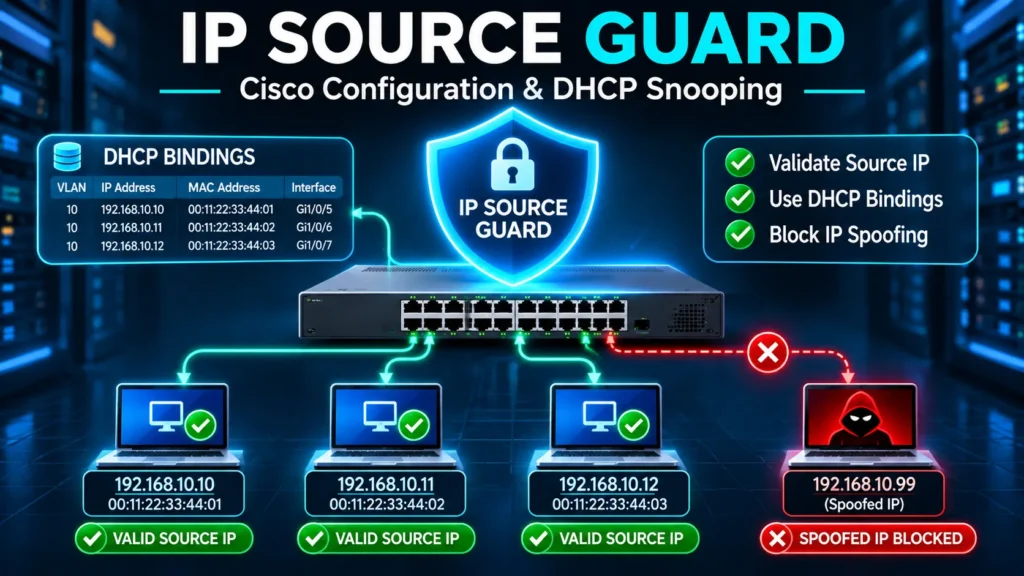
IP Source Guard (IPSG) is a Layer 2 security feature that helps protect enterprise networks against unauthorized source IPv4 addresses on switch access ports. It is commonly deployed with DHCP Snooping and Dynamic ARP Inspection (DAI) to strengthen access-layer security on Cisco Catalyst switches.
An attacker who connects a device to an Ethernet port may try to configure an IP address belonging to another workstation or network device. Without appropriate source validation, the switch may forward traffic using that unauthorized address, depending on the surrounding network controls.
IP Source Guard reduces this risk by restricting which source IPv4 addresses are permitted on protected interfaces. On supported Cisco switches, it uses DHCP Snooping bindings or manually configured source bindings to establish which addresses are associated with a port.
However, IP Source Guard can also interrupt legitimate connectivity if enabled before valid bindings exist. Static-IP printers, servers, virtual machines, and devices behind downstream switches may require additional planning.
In this guide, you will learn how IP Source Guard works, how to configure it on Cisco Catalyst switches, how to verify source bindings, and how to troubleshoot common deployment failures.
What Is IP Source Guard?
IP Source Guard is an access-layer security mechanism that filters IPv4 traffic according to permitted source-address bindings.
The switch can use information such as:
- Source IPv4 address
- Source MAC address, when MAC verification is supported and enabled
- VLAN
- Ingress switch interface
- DHCP Snooping bindings
- Manually configured static IP source bindings
On a protected port, traffic using an unauthorized source IPv4 address can be discarded rather than forwarded.
For example, suppose a workstation legitimately receives 192.168.10.25 through DHCP on switch interface GigabitEthernet1/0/5.
If the workstation changes its source address to 192.168.10.50, but the approved binding remains 192.168.10.25, IP Source Guard can prevent the unauthorized IPv4 traffic from passing through the port.
This does not mean IP Source Guard authenticates the user or guarantees protection against every spoofing technique. Its effectiveness depends on correct bindings, platform support, and the security controls around it.
For a broader explanation of how Ethernet switching works, see Routers, Switches and Network Devices Explained.
Why Is IP Source Guard Important?
IPv4 addresses are logical identifiers assigned to network devices. On many ordinary endpoints, users or processes with sufficient privileges can change local IP configuration.
If a network does not validate source addresses at the access layer, a device may attempt to send traffic using an address that it was not assigned.
Possible consequences include:
- Source IP address spoofing
- Conflicts with legitimate endpoint addresses
- Bypassing weak IP-based access restrictions
- Disruption caused by incorrect host configurations
- Difficulty attributing traffic to the correct switch port
- Certain unauthorized communication attempts within a VLAN
IP Source Guard establishes an additional control close to the endpoint.
Instead of relying only on a firewall or routing device to reject suspicious traffic later, the access switch can apply restrictions as packets enter the network.
Importantly, IPSG is not a replacement for 802.1X authentication, network access control, firewall policies, endpoint security, or encrypted communications.
How IP Source Guard Works
On supported Cisco Catalyst platforms, IP Source Guard uses a source-binding database to determine which addresses may be used on protected interfaces.
This database can contain dynamic bindings learned through DHCP Snooping and static bindings configured by an administrator.
Consider the following example.
| Device | VLAN | IPv4 Address | MAC Address | Switch Interface |
|---|---|---|---|---|
| PC-A | 10 | 192.168.10.25 | 0011.2233.4455 | Gi1/0/5 |
| PC-B | 10 | 192.168.10.26 | 0011.2233.4466 | Gi1/0/6 |
| Printer | 10 | 192.168.10.50 | 00aa.bbcc.ddee | Gi1/0/10 |
PC-A has an approved binding for 192.168.10.25 on Gi1/0/5.
When that client sends IPv4 traffic, IP Source Guard can match the source address against the binding permitted on its interface.
If a different source address is used and no valid binding allows it, the traffic can be dropped.
IP Source Guard Packet Filtering Process
A simplified operational sequence is:
- DHCP Snooping observes a legitimate DHCP lease exchange.
- The switch records an authorized IPv4 address and associated client information.
- IP Source Guard uses the available binding information to enforce source filtering on the protected interface.
- Packets using an allowed source address are permitted according to the configured mode.
- Packets using unauthorized source information are dropped.
- Bindings and permitted traffic may change when clients renew leases, move ports, or are explicitly reconfigured.
Some implementations program filtering rules into switch hardware.
Actual packet exceptions and implementation details vary by switch family and software release. The feature should not be treated as a generic firewall rule that operates identically on every platform.
Cisco describes these mechanisms in its official IP Source Guard configuration guide.
IP Source Guard vs DHCP Snooping
DHCP Snooping and IP Source Guard are different security functions.
DHCP Snooping inspects DHCP messages, restricts unauthorized DHCP server responses, and learns client address bindings.
IP Source Guard uses valid source-binding information to restrict the IPv4 addresses that protected endpoints can send.
| Feature | DHCP Snooping | IP Source Guard |
|---|---|---|
| Primary purpose | Protect DHCP address assignment | Restrict unauthorized source IP traffic |
| Traffic focus | DHCP messages | IPv4 source addresses |
| Binding database | Creates dynamic bindings | Uses dynamic or approved static bindings |
| Applied to | VLANs and relevant interfaces | Protected Layer 2 interfaces |
| Common deployment risk | DHCP leases cannot be obtained | Clients have leases but cannot send IPv4 traffic |
| Typical verification | show ip dhcp snooping | show ip verify source |
DHCP Snooping is the usual prerequisite for DHCP-based IPSG deployment.
Before enabling IPSG, administrators should confirm that DHCP Snooping is functioning and that expected client bindings exist.
Our DHCP Snooping Configuration and Troubleshooting Guide explains how to configure trusted ports, inspect bindings, and diagnose missing DHCP leases.
IP Source Guard vs Dynamic ARP Inspection
Both features can use information learned through DHCP Snooping, but they protect different aspects of network communication.
IP Source Guard restricts source IPv4 traffic on protected switch ports.
Dynamic ARP Inspection validates ARP messages on untrusted interfaces to help prevent false IP-to-MAC address claims.
For example:
- A workstation attempts to send IPv4 packets with an unauthorized source address: IPSG can block the traffic.
- A malicious endpoint sends forged ARP information claiming to own the default gateway’s IP address: DAI can reject invalid ARP messages.
- An unauthorized DHCP server attempts to assign malicious network settings: DHCP Snooping can block its server responses on untrusted ports.
These controls work best when configured as a coordinated access-layer security design.
IPSG does not replace DAI, because source IPv4 filtering and ARP validation are separate enforcement mechanisms.
Cisco IP Source Guard Configuration: Example Network
The following lab demonstrates a basic deployment on a supported Cisco Catalyst switch running an appropriate IOS or IOS XE release.
The exact commands, prerequisites, and supported filtering modes depend on the switch model and software version.
Lab Topology
The topology contains:
- VLAN 10 for user workstations.
- A DHCP server accessible through the distribution network.
GigabitEthernet1/0/48as the uplink.GigabitEthernet1/0/5as the protected workstation port.GigabitEthernet1/0/10as the static-IP printer port.- An authorized DHCP address pool for
192.168.10.0/24.
The default gateway is 192.168.10.1.
The access switch is operating at Layer 2.
Before applying the configuration, verify the switch platform, DHCP path, VLAN assignments, interface roles, and existing security features.
Production warning: Do not apply these example commands blindly to a live network. An incorrect DHCP Snooping or IPSG deployment can interrupt client connectivity.
Step 1: Verify the Switch and VLAN Configuration
Start with the existing configuration.
show version
show vlan brief
show interfaces trunk
show running-config interface GigabitEthernet1/0/48
show running-config interface GigabitEthernet1/0/5
show ip dhcp snooping
Confirm that:
- VLAN 10 exists.
- The client interface belongs to VLAN 10.
- The uplink carries the required VLAN.
- DHCP responses reach the switch through the authorized network path.
- The switch supports IP Source Guard on the selected interface.
- No conflicting source-security configuration is already applied.
On platforms that support Cisco Feature Navigator, use it to verify whether the intended feature is available for your hardware and software image.
Step 2: Enable DHCP Snooping
For DHCP-based IP Source Guard, enable DHCP Snooping globally and for the client VLAN.
enable
configure terminal

ip dhcp snooping
ip dhcp snooping vlan 10
Now configure the verified DHCP-server-facing uplink.
interface GigabitEthernet1/0/48
 description AUTHORIZED-DHCP-UPLINK
 ip dhcp snooping trust
 exit
Client-facing interfaces should normally remain untrusted.
interface GigabitEthernet1/0/5
 description WORKSTATION-ACCESS
 switchport mode access
 switchport access vlan 10
 no ip dhcp snooping trust
 exit

end
Do not trust an uplink simply because it connects to another switch. The trust decision must reflect the actual path of authorized DHCP server responses.
Verify the DHCP Snooping Binding
Run:
show ip dhcp snooping
show ip dhcp snooping binding
The binding database should include legitimate DHCP clients after successful lease exchanges.
An illustrative entry might resemble:
MacAddress          IpAddress       Lease(sec) Type          VLAN Interface
------------------  --------------  ---------- ------------ ---- ----------
00:11:22:33:44:55   192.168.10.25   72000      dhcp-snooping 10   Gi1/0/5
The precise format depends on the switch model and release.
Do not enable source filtering on a production endpoint until you have confirmed that its address can be permitted.
An empty binding database may mean that the client has not completed a DHCP transaction, the traffic follows another path, or DHCP Snooping is misconfigured.
Step 3: Enable IP Source Guard on the Access Port
Once the client has a valid binding, enable IPSG on the protected Layer 2 interface.
configure terminal

interface GigabitEthernet1/0/5
 ip verify source
 exit

end
On supported Cisco Catalyst IOS XE platforms, ip verify source enables source IPv4 address filtering.
The switch uses permitted source information for that interface rather than allowing arbitrary source IPv4 addresses.
Verify the Configuration
show ip verify sourceWhere supported, check the specific interface:
show ip verify source interface GigabitEthernet1/0/5You should verify that the protected interface has the intended filtering mode and permitted bindings.
The output varies by release.
Test connectivity from the authorized client before extending IPSG to additional ports.
Step 4: Configure IP and MAC Address Filtering
Some Catalyst platforms support IP Source Guard with an additional source MAC verification option.
The relevant interface command is:
configure terminal

interface GigabitEthernet1/0/5
 ip verify source mac-check
 exit

end
With this mode, the switch can restrict traffic using both source IPv4 and source MAC binding information.
IP-Only vs IP-and-MAC Filtering
| Mode | Example command | What is checked |
|---|---|---|
| IP filtering | ip verify source | Source IPv4 address against permitted bindings |
| IP and MAC filtering | ip verify source mac-check | Source IPv4 and associated MAC information |
MAC verification has platform-specific prerequisites and compatibility requirements.
Before applying it, confirm that the selected switch and software version support the command and that the required source-binding and port-security conditions are satisfied.
For example, ports supporting multiple endpoints or virtual machines may need more careful configuration than ordinary single-workstation access ports.
Do not assume MAC verification is safe on every interface.
Step 5: Configure a Static IP Source Binding
Not every legitimate device receives an address through DHCP.
Printers, servers, management devices, and certain network appliances may use static IPv4 addresses.
Because they do not necessarily create DHCP Snooping bindings, IP Source Guard may block their traffic unless the switch has another supported source of valid bindings.
Example: Static Printer
Assume a printer uses:
| Property | Value |
|---|---|
| IPv4 address | 192.168.10.50 |
| MAC address | 00aa.bbcc.ddee |
| VLAN | 10 |
| Interface | Gi1/0/10 |
On supported Cisco Catalyst platforms, a manually configured source binding can use:
configure terminal

ip source binding 00aa.bbcc.ddee vlan 10 192.168.10.50 interface GigabitEthernet1/0/10

end
The command associates the specified MAC address, VLAN, IPv4 address, and interface.
Verify the binding and platform behavior before enabling filtering on the printer port.
show ip source binding
show ip verify source
Then, where the platform supports the required configuration:
configure terminal

interface GigabitEthernet1/0/10
 switchport mode access
 switchport access vlan 10
 ip verify source
 exit

end
Static binding support, syntax, and interactions with device tracking can vary by platform.
Do not confuse a manually configured ip source binding with special IP Source Guard modes that dynamically learn static-host addresses through device tracking.
Those are different configuration mechanisms and may have separate prerequisites.
Cisco documents both static bindings and supported source-filtering modes in its IP Source Guard configuration reference.
Step 6: Verify IP Source Guard After Deployment
Verification should confirm both the security policy and normal endpoint connectivity.
Use these commands on platforms where they are supported.
| Cisco Command | Purpose |
|---|---|
show ip verify source | Display IPSG status and permitted source information |
show ip verify source interface Gi1/0/5 | Inspect a protected interface |
show ip dhcp snooping | Verify DHCP Snooping configuration |
show ip dhcp snooping binding | Review dynamic DHCP bindings |
show ip source binding | Review available source bindings |
show ip device tracking all | Inspect device tracking information on supported implementations |
show vlan brief | Check VLAN membership |
show interfaces status | Check interface state |
show logging | Review relevant events |
The exact supported monitoring commands depend on the Cisco platform.
Do not treat the absence of a particular command as evidence that IPSG is inactive. Use the model-specific documentation.
Functional Verification Checklist
After enabling IPSG, confirm that:
- The legitimate client still has the expected IPv4 address.
- The DHCP Snooping binding matches the client.
- Normal IPv4 communication to the gateway works.
- DNS queries and permitted application traffic work.
- A controlled test using an unauthorized source address is blocked where expected.
- The interface remains operational.
- No unexpected errors appear in the switch logs.
Spoofing tests should be conducted only in an isolated lab or authorized maintenance window.
IP Source Guard Troubleshooting
IP Source Guard is valuable when correctly deployed, but incorrect bindings can cause difficult-to-diagnose network failures.
The following workflow covers common Cisco access-switch problems.
Problem 1: Client Has a DHCP Address but Cannot Access the Network
Symptoms
- The workstation receives a valid DHCP lease.
- IPv4 connectivity to its gateway fails.
- Normal traffic worked before IPSG was enabled.
- The protected interface remains physically up.
Possible causes
- No permitted source binding exists.
- The binding references the wrong interface.
- The client moved to another port.
- The VLAN in the binding does not match the access VLAN.
- The DHCP Snooping database is stale or incomplete.
Troubleshooting
show ip verify source
show ip dhcp snooping binding
show vlan brief
show running-config interface GigabitEthernet1/0/5
Confirm that the client IPv4 address, MAC address, VLAN, and interface match the expected binding.
If the binding is missing, investigate why DHCP Snooping did not learn or retain it.
Do not solve the problem by disabling all source-security controls across the VLAN.
Problem 2: IP Source Guard Blocks a Static-IP Device
Symptoms
- A printer or server has a valid statically configured address.
- Its Ethernet link is active.
- IPv4 communication fails after IPSG is enabled.
Likely cause
The endpoint has no DHCP-learned binding and no applicable static source binding.
Troubleshooting
show ip verify source
show ip source binding
show running-config interface GigabitEthernet1/0/10
Verify the static binding’s IP address, MAC address, VLAN, and interface.
If the platform requires device tracking for the selected static-host mode, confirm that its prerequisites are configured.
A manually assigned IP address on the endpoint does not automatically authorize that address in the switch.
Problem 3: IP Source Guard Is Enabled but Spoofed Traffic Still Passes
Possible causes include:
- IPSG is configured on the wrong interface.
- The endpoint’s traffic takes another path.
- The source-filtering mode is not what the administrator expected.
- The device has multiple valid bindings.
- The VLAN or interface configuration changed after deployment.
- The platform applies different exceptions or forwarding behavior than expected.
Check:
show ip verify source
show ip dhcp snooping binding
show running-config interface GigabitEthernet1/0/5
Inspect the protected interface and the actual packet path.
Also verify that the switch and software release support the intended security enforcement.
Do not assume that applying a command guarantees the desired protection without traffic testing.
Problem 4: IPSG Stops Working After an Endpoint Moves Ports
The approved binding may remain associated with the previous interface, depending on the learning and aging behavior.
For example, a client moves from Gi1/0/5 to Gi1/0/12.
If the switch continues to associate the permitted address with the previous port, the new port may not permit the client’s IPv4 traffic.
Check:
show ip dhcp snooping binding
show ip verify source
Determine how the source binding should be updated.
For DHCP clients, an authorized lease renewal may allow the switch to learn the new attachment point.
For static hosts, update the approved binding according to the platform’s configuration requirements.
Avoid blindly deleting bindings on a production switch.
Problem 5: IPSG Fails After a Switch Reload
A DHCP-based source-binding database may not contain all expected client entries after a restart.
Binding persistence depends on the platform and its configured DHCP Snooping database behavior.
If the dynamic binding table is empty, IPSG may prevent clients from sending normal IPv4 traffic until the relevant valid bindings are available.
Check:
show ip dhcp snooping binding
show ip verify source
show logging
Review the DHCP Snooping database persistence configuration and whether endpoints have completed legitimate DHCP exchanges since the reload.
Where supported, binding database persistence should be planned before deploying IPSG widely.
Problem 6: MAC Verification Causes Unexpected Drops
If ip verify source mac-check is enabled, the switch may require both the source IPv4 address and source MAC information to match its permitted state.
Problems can occur when:
- A network adapter has been replaced.
- A host presents a different MAC address.
- Several virtual devices share one physical switch port.
- A port-security configuration conflicts with the intended source-security design.
- Binding information has not been updated after an endpoint change.
Use the switch’s IPSG, binding, and relevant port-security verification commands.
If a legitimate design requires multiple MAC addresses on a port, verify the supported configuration rather than permanently bypassing the control.
Problem 7: DHCP Snooping Binding Table Is Empty
An empty binding table is one of the most common reasons that DHCP-based IPSG deployments fail.
Possible explanations include:
- DHCP Snooping is disabled.
- The wrong VLAN is configured.
- Clients have not completed lease exchanges since the feature was activated.
- The DHCP server response bypasses the expected switch.
- DHCP traffic is being dropped.
- Clients use static addresses.
- The snooping database was not restored after a reload.
Verify:
show ip dhcp snooping
show ip dhcp snooping binding
show interfaces trunk
Correct the DHCP path and binding problem before expanding IP Source Guard to more ports.
IP Source Guard and Virtualized Environments
A physical switch interface connected to a hypervisor may carry traffic from multiple virtual machines.
This differs from a conventional access port connected to one workstation.
A hypervisor may present:
- Multiple source MAC addresses
- Multiple source IPv4 addresses
- VM address changes
- VM migration events
- Bridged virtual interfaces
- DHCP and static IPv4 configurations
Applying a single-client IPSG policy without accounting for those conditions can interrupt legitimate traffic.
Before protecting hypervisor-facing interfaces, confirm the supported number of bindings, port mode, MAC verification capabilities, and operational behavior during VM migration.
The best choice depends on the switch model, virtualization platform, and network architecture.
IP Source Guard, Port Security, and 802.1X
IP Source Guard is one component of access-layer security.
It is useful to distinguish it from other technologies.
| Technology | Primary function |
|---|---|
| DHCP Snooping | Reject unauthorized DHCP server messages and learn bindings |
| IP Source Guard | Restrict source IPv4 addresses on protected interfaces |
| Dynamic ARP Inspection | Validate ARP address claims |
| Port Security | Restrict permitted source MAC addresses |
| 802.1X | Authenticate devices or users for network access |
| VLAN segmentation | Separate Layer 2 broadcast domains |
| Firewall policies | Control traffic according to security rules |
An enterprise switch can use multiple controls together when the platform supports their coexistence.
However, enabling every access-layer security feature without evaluating dependencies can create unnecessary outages.
For a broader look at VLAN boundaries, read VLAN Explained: Access and Trunk Ports.
For additional spanning-tree protection concepts, see BPDU Guard vs Root Guard: Cisco Configuration & Troubleshooting.
IP Source Guard Deployment Best Practices
1. Build a Source-Binding Inventory
Document endpoints that use DHCP and those that use static IPv4 addresses.
This prevents static servers or printers from being blocked unexpectedly.
2. Verify DHCP Snooping Before Enabling IPSG
Check bindings before applying source filtering.
An incorrect or empty binding database can cause immediate connectivity failures.
3. Start With a Single Test Port
Apply IPSG to an authorized lab or pilot workstation.
Verify legitimate traffic and source restrictions before expanding to other interfaces.
4. Avoid Applying IPSG to Every Uplink
IP Source Guard is commonly designed for specific Layer 2 interfaces, especially endpoint-facing access ports.
Trunk and uplink support varies by platform and configuration. Do not assume a deployment appropriate for one workstation is suitable for a multi-client uplink.
5. Test Static Hosts and Multi-Client Ports
Printers, IP phones, hypervisors, wireless access points, and downstream switches can require special handling.
Check the actual endpoint population and supported source-binding model.
6. Document the Change and Rollback Procedure
Record the original configuration and expected authorized bindings.
If IPSG causes a critical outage, a targeted rollback on a supported interface may be:
configure terminal
interface GigabitEthernet1/0/5
 no ip verify source
end
This disables the interface’s IP Source Guard configuration on platforms supporting that syntax.
It does not remove every static source binding or change the DHCP Snooping configuration.
Only perform a rollback under an approved change procedure, and verify the results afterward.
7. Monitor Changes After Deployment
Review DHCP leases, switch logs, endpoint moves, and source-binding entries.
Recurring source-filtering failures may reveal incorrect configuration, unusual endpoint behavior, or actual attempts to use unauthorized addresses.
Frequently Asked Questions
What is IP Source Guard on a Cisco switch?
IP Source Guard is a security feature that restricts source IPv4 traffic on protected Layer 2 switch interfaces using approved bindings. It helps prevent endpoints from sending traffic with unauthorized source IP addresses.
Does IP Source Guard require DHCP Snooping?
For typical DHCP-based deployments, IPSG uses DHCP Snooping to obtain valid dynamic source bindings. Supported platforms may also allow manually configured bindings or other source-tracking approaches.
What does ip verify source do?
On supported Cisco Catalyst switches, ip verify source enables source IPv4 filtering on an interface. The switch uses permitted source bindings to determine which traffic can pass.
What does ip verify source mac-check do?
The mac-check option enables additional source MAC verification where supported. Its exact prerequisites and behavior depend on the switch model and software release.
How do I configure IP Source Guard for a static-IP device?
On supported platforms, an administrator can create a static source binding specifying the IPv4 address, MAC address, VLAN, and interface. The corresponding IPSG configuration must be compatible with the switch’s static-host support.
What is the difference between IP Source Guard and Dynamic ARP Inspection?
IP Source Guard restricts IPv4 source addresses, while Dynamic ARP Inspection validates ARP packets to help prevent forged IP-to-MAC address claims. They mitigate different types of abuse and can complement each other.
Why does IP Source Guard block legitimate traffic?
Common causes include missing DHCP Snooping bindings, incorrect static bindings, wrong VLAN assignments, endpoint port changes, and unsupported source-filtering configurations.
Is IP Source Guard supported on all Cisco switches?
No. Support depends on the Cisco product family, hardware capabilities, and software release. Check the official model-specific Cisco documentation before configuring it.
Conclusion
IP Source Guard helps strengthen enterprise access-layer security by restricting the source IPv4 addresses that endpoints can use on protected switch interfaces.
Its effectiveness depends on accurate source bindings, reliable DHCP Snooping operation, careful configuration of static devices, and verification of platform support.
A successful deployment begins with a working DHCP Snooping configuration, continues with a controlled IPSG pilot, and expands only after administrators verify legitimate connectivity and source filtering.
For the next step in securing access networks, combine this guide with our DHCP Snooping configuration walkthrough and the relevant Cisco IP Source Guard documentation linked throughout the article.