Cisco Port Security: Sticky MAC, Configuration & Fixes
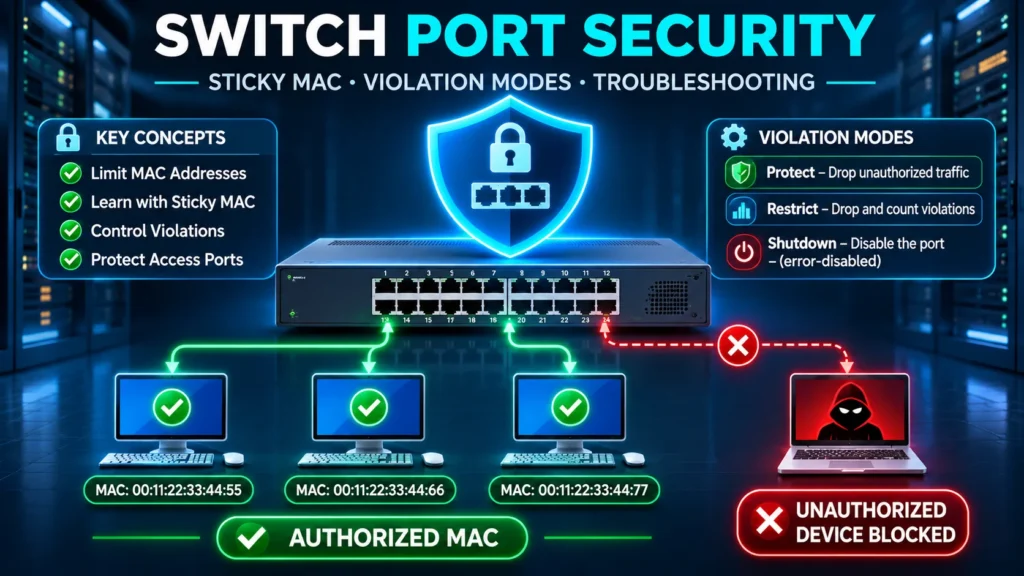
Switch port security is a Layer 2 security feature that helps network administrators control which devices can send traffic through an Ethernet switch interface. By limiting the number of permitted source MAC addresses and defining how a switch reacts to violations, port security provides an additional layer of protection for enterprise access networks.
On Cisco Catalyst switches, port security can be configured using static MAC addresses, dynamically learned secure addresses, or sticky MAC addresses that are automatically learned and added to the running configuration.
However, an incorrectly configured port-security policy can disrupt legitimate connectivity. A workstation replacement, an IP phone with a connected PC, or an unexpected device can trigger a security violation and potentially place the interface into an error-disabled state.
This guide explains how Cisco switch port security works, how to configure sticky MAC learning, how to choose appropriate violation modes, and how to troubleshoot common problems with practical Cisco IOS and IOS XE commands.
What Is Switch Port Security?
Switch port security is a security mechanism that restricts the source MAC addresses allowed to send traffic through a switch interface.
Every Ethernet network interface has a MAC address. Switches normally learn source MAC addresses and associate them with the ports on which they are observed.
Without additional restrictions, a switch access port may learn multiple MAC addresses over time, depending on the network topology and configuration.
Port security allows the administrator to establish limits and define which MAC addresses should be treated as secure.
For example, an administrator may configure an access port to permit a single workstation MAC address. If traffic from an additional, unauthorized source MAC address arrives, the switch can drop that traffic or disable the interface according to its configured violation mode.
Port security is commonly implemented on endpoint-facing access ports.
For background on Ethernet switching, access ports, and device forwarding, see Routers, Switches and Network Devices Explained.
What Does Port Security Protect Against?
Properly configured port security can help:
- Restrict the number of source MAC addresses learned on a switch port.
- Prevent unauthorized devices from communicating through a protected access port.
- Detect unexpected source MAC addresses on an interface.
- Reduce certain risks associated with unmanaged downstream switches.
- Enforce basic endpoint attachment policies.
- Provide security violation counters and operational visibility.
Port security is not a complete access-control system.
Because MAC addresses can be spoofed, it does not provide the identity assurance of certificate-based 802.1X authentication. It also does not directly validate IPv4 addresses, ARP claims, or DHCP server responses.
For comprehensive access-layer security, it should be considered alongside authentication, DHCP Snooping, Dynamic ARP Inspection, IP Source Guard, and VLAN segmentation.
How Cisco Port Security Works
Cisco port security associates a set of approved secure MAC addresses with a protected switch interface.
The switch monitors source MAC addresses arriving on the port and compares them with the addresses that are currently permitted.
A port-security violation can occur when a new source MAC address appears after the configured maximum number of secure MAC addresses has been reached.
On supported Catalyst implementations, another violation scenario involves a secure MAC address associated with one secure port appearing on a different secure port in the same VLAN. Platform-specific rules must be verified before assuming all violation modes behave identically in this situation.
Example: One Workstation per Port
Consider a small office network:
| Device | MAC address | Switch port |
|---|---|---|
| PC-1 | 0011.2233.4455 | Gi1/0/5 |
| PC-2 | 0011.2233.4466 | Gi1/0/6 |
| Unauthorized laptop | 00aa.bbcc.ddee | Attempts Gi1/0/5 |
If Gi1/0/5 permits only the source MAC address 0011.2233.4455, the unauthorized laptop’s traffic can trigger the configured security response.
The result depends on whether the interface uses protect, restrict, or shutdown mode.
Types of Secure MAC Addresses
Cisco port security supports several methods for defining permitted source MAC addresses.
1. Static Secure MAC Addresses
Static secure MAC addresses are manually configured by an administrator.
Example:
switchport port-security mac-address 0011.2233.4455This method is useful when an authorized device and its physical connection are known in advance.
Advantages include predictable authorization and explicit configuration control.
The drawback is administrative overhead: if the device changes or its network adapter is replaced, the configuration may require an update.
2. Dynamic Secure MAC Addresses
Dynamic secure MAC addresses are learned automatically when port security is enabled and learning capacity is available.
They are maintained in the switch’s operational secure address table.
A dynamically learned secure address is not automatically saved as a permanent configuration entry. On many Catalyst platforms, it must be relearned after a reload.
Dynamic learning is convenient but may not meet environments requiring persistent, documented address assignments.
3. Sticky Secure MAC Addresses
Sticky MAC learning combines automatic learning with configuration persistence.
When sticky learning is enabled, supported Cisco switches can convert dynamically learned secure MAC addresses into sticky entries in the running configuration.
These addresses can then be preserved across reloads if the running configuration is saved to the startup configuration.
The key command is:
switchport port-security mac-address stickyImportant: Sticky MAC learning does not authenticate the first device connected to the port. It learns the observed source address, which could belong to an unauthorized device if the port is not controlled during initial enrollment.
For secure deployments, verify that the correct endpoint is connected before allowing sticky learning and saving the configuration.
Cisco Port Security Configuration: Step-by-Step Lab
The following configuration illustrates a typical workstation-facing access port on a Cisco Catalyst switch using a supported IOS or IOS XE software release.
The example topology contains:
- VLAN 10: employee workstations
GigabitEthernet1/0/5: protected workstation portGigabitEthernet1/0/48: distribution uplink- One authorized PC connected to
Gi1/0/5
Port security support and restrictions vary across Cisco product families, software releases, stacks, and interface types.
Test these commands in a lab or approved maintenance window before deploying them in production.
Step 1: Verify the Existing Interface
Begin by checking the interface and VLAN configuration.
show version
show interfaces status
show vlan brief
show running-config interface GigabitEthernet1/0/5
Confirm that the selected port is a supported Layer 2 switchport and is not subject to incompatible configurations.
Avoid applying the access-port example to uplinks, EtherChannels, or hypervisor-facing ports without checking the specific platform’s feature restrictions.
Step 2: Configure the Access Port
Enter global configuration mode:
enable
configure terminal
Configure the workstation port:
interface GigabitEthernet1/0/5
 description EMPLOYEE-WORKSTATION
 switchport mode access
 switchport access vlan 10
This explicitly establishes an access port in VLAN 10.
For a deeper explanation of access interfaces and tagged trunks, read VLAN Explained: Access and Trunk Ports.
Step 3: Enable Port Security
Under the interface, enter:
switchport port-securityOn supported Catalyst switches, this enables port security for the interface.
Port security is disabled by default on many Catalyst models.
A common documented default maximum is one secure MAC address, with shutdown as the violation mode, but confirm your platform’s defaults rather than relying on them universally.
Step 4: Set the Maximum Number of Secure MAC Addresses
For a single-workstation port:
switchport port-security maximum 1This permits one secure source MAC address on the interface under the applicable platform rules.
If a new source MAC appears after the maximum has been reached, the switch can trigger the configured violation behavior.
Do not automatically configure maximum 1 on every access port.
An IP phone with a PC connected behind it may legitimately present two MAC addresses. Wireless access points, virtualized environments, and specialized endpoint configurations may also need different limits.
Step 5: Enable Sticky MAC Learning
To automatically learn and retain the permitted source MAC in the running configuration:
switchport port-security mac-address stickyThe switch can learn the connected workstation’s MAC address and add a sticky secure entry to the interface configuration.
Review the learned address before saving.
Step 6: Select the Violation Mode
For a lab that should visibly detect unauthorized sources without disabling the port:
switchport port-security violation restrictThis causes violating traffic to be dropped while keeping the port operational, with logging or monitoring behavior supported by the platform.
For environments where a violation should disable the interface, shutdown may be more appropriate.
The correct choice depends on the security policy and outage tolerance.
Complete Example Configuration
enable
configure terminal

interface GigabitEthernet1/0/5
 description EMPLOYEE-WORKSTATION
 switchport mode access
 switchport access vlan 10
 switchport port-security
 switchport port-security maximum 1
 switchport port-security mac-address sticky
 switchport port-security violation restrict
 exit

end
Once the authorized MAC address has been learned and verified, save the configuration if the results match the intended policy:
copy running-config startup-configSaving the configuration is important when the deployment relies on sticky MAC persistence after a switch reload.
Cisco Port Security Violation Modes Explained
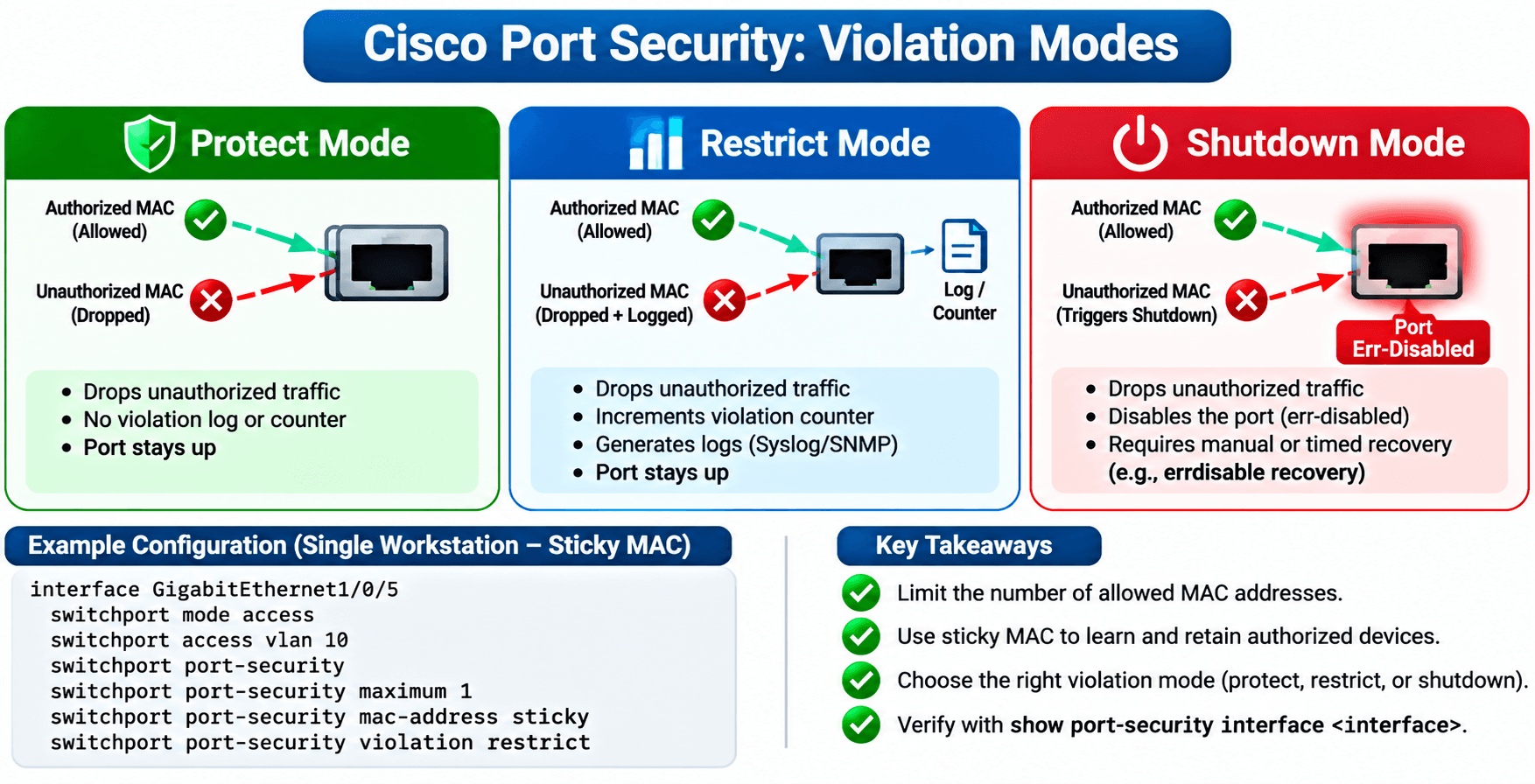
Cisco Catalyst port security commonly provides three violation modes:
- Protect
- Restrict
- Shutdown
Some platforms additionally support per-VLAN shutdown behavior.
Each mode handles violating traffic differently.
| Violation mode | Drops violating traffic | Reports violations | Disables entire port |
|---|---|---|---|
| Protect | Yes | Generally no | No |
| Restrict | Yes | Typically logs/traps and increments counter | No |
| Shutdown | Yes | Counter/event visibility depends on platform | Yes |
| Shutdown VLAN | Yes | Platform-dependent reporting | Usually disables affected VLAN instead of the entire interface |
The exact available modes and monitoring behavior depend on the switch software.
Protect Mode
Protect mode drops traffic from unauthorized source MAC addresses when the secure address limit has been reached.
Example:
switchport port-security violation protectThis can maintain connectivity for authorized devices, but it generally provides less visibility into violations.
Because troubleshooting depends heavily on monitoring, protect mode may be less desirable where administrators need audit records or security alerts.
Restrict Mode
Restrict mode also drops unauthorized traffic, but typically increments violation counters and generates logging or SNMP notifications.
Example:
switchport port-security violation restrictThe interface remains active.
This is useful when administrators want to identify unauthorized sources without immediately interrupting all legitimate users on the port.
It does not guarantee that every security violation scenario will follow the same non-shutdown behavior across Cisco platforms.
Shutdown Mode
Shutdown mode places the protected port into an error-disabled state when a qualifying security violation occurs.
Example:
switchport port-security violation shutdownThis provides a strong response but can cause a user-facing outage.
The interface normally requires manual recovery or a configured automatic error-recovery mechanism.
Use shutdown mode where the operational impact is understood and the incident response procedure is documented.
For the detailed behavior of violation modes and sticky learning, refer to the Cisco IOS XE MAC and Port Security Configuration Guide.
Configure a Static Secure MAC Address
Some networks require an explicitly assigned MAC address rather than automatic sticky learning.
Suppose the approved workstation has MAC address:
0011.2233.4455Configure:
enable
configure terminal

interface GigabitEthernet1/0/5
 switchport mode access
 switchport access vlan 10
 switchport port-security
 switchport port-security maximum 1
 switchport port-security mac-address 0011.2233.4455
 switchport port-security violation restrict
 exit

end
This configuration explicitly authorizes the expected source MAC address.
Before applying a static address, verify it from a trusted inventory or controlled endpoint enrollment process.
MAC addresses can be spoofed; a static MAC entry alone does not prove endpoint identity.
Configure Port Security for an IP Phone and PC
An IP phone may connect directly to the switch while a workstation connects through the phone’s internal Ethernet switch.
Both devices can present source MAC addresses on the same physical switch port.
A maximum of one secure MAC address may therefore interrupt normal communication.
A representative design might allow two secure addresses:
configure terminal

interface GigabitEthernet1/0/8
 description IP-PHONE-AND-PC
 switchport mode access
 switchport access vlan 10
 switchport voice vlan 20
 switchport port-security
 switchport port-security maximum 2
 switchport port-security violation restrict
 exit

end
This is a simplified example. Where supported, Cisco Catalyst platforms may provide separate limits for access and voice VLANs.
Before deploying, verify the switch’s support for voice VLAN port security, the phone model, and the correct number of source MAC addresses.
If the organization uses 802.1X or MAC Authentication Bypass, review the interaction with port security rather than assuming that these mechanisms can be configured independently.
How to Verify Port Security on Cisco Switches
After configuration, verify both security status and expected device connectivity.
Check Overall Port Security
show port-securityThis command provides an overview of protected interfaces and associated security information.
Check a Specific Interface
show port-security interface GigabitEthernet1/0/5On a supported Catalyst switch, output may include:
Port Security              : Enabled
Port Status                : Secure-up
Violation Mode             : Restrict
Aging Time                 : 0 mins
Maximum MAC Addresses      : 1
Total MAC Addresses        : 1
Configured MAC Addresses   : 0
Sticky MAC Addresses       : 1
Security Violation Count   : 0
This is illustrative output; field names and values vary by platform and release.
Show Secure MAC Addresses
show port-security addressTo inspect the interface configuration:
show running-config interface GigabitEthernet1/0/5With sticky learning, an entry similar to the following may appear:
switchport port-security mac-address sticky 0011.2233.4455If the learned address is legitimate and the policy is correct, save the configuration.
Verify Normal Connectivity
Make sure the authorized workstation can:
- Obtain or retain its intended network configuration.
- Reach its default gateway.
- Resolve DNS names.
- Access permitted local services.
- Continue communicating after normal interface events.
- Reconnect after a planned switch reload if sticky persistence is required.
Troubleshooting Cisco Port Security Problems
An effective troubleshooting process distinguishes between a security violation, an interface-state problem, and unrelated network connectivity faults.
Problem 1: Port Security Violation — Interface Err-Disabled
Symptoms:
- The switch interface stops forwarding traffic.
- The workstation loses connectivity.
show interfaces statusreportserr-disabled.- Switch logs mention a port-security violation.
Check:
show interfaces status err-disabled
show port-security interface GigabitEthernet1/0/5
show logging
Confirm whether the interface was disabled by port security or by another cause such as BPDU Guard, DHCP Snooping rate limiting, or ARP inspection.
Fix:
Determine why the violation occurred.
Was an unauthorized device connected? Was a legitimate workstation replaced? Did an IP phone introduce another MAC address?
Correct the cause and review the secure MAC entries.
Then, during an approved recovery procedure, a supported IOS or IOS XE interface can typically be re-enabled using:
configure terminal

interface GigabitEthernet1/0/5
 shutdown
 no shutdown
 exit

end
If the underlying violation remains, the port may return to the error-disabled state.
Cisco’s Errdisable Recovery Troubleshooting Guide provides additional diagnostic guidance.
Problem 2: Sticky MAC Learning Stores the Wrong Address
Symptoms:
- A newly connected legitimate workstation cannot communicate.
- The interface permits only an old or unexpected source MAC address.
- The running configuration contains a sticky entry from a previous device.
Check:
show port-security address
show running-config interface GigabitEthernet1/0/5
If the approved workstation has changed, verify the new device’s identity before updating the policy.
An old sticky entry may require removal using the supported interface configuration command.
For example, if the current configuration contains:
switchport port-security mac-address sticky 0011.2233.4455The corresponding removal command on supported platforms is:
configure terminal
interface GigabitEthernet1/0/5
 no switchport port-security mac-address sticky 0011.2233.4455
end
After clearing the approved old entry, allow the replacement endpoint to be learned under controlled conditions, verify the resulting address, and save the updated configuration.
Do not clear all secure MAC addresses across production interfaces just to resolve one workstation issue.
Problem 3: Port Security Maximum MAC Address Limit Exceeded
Symptoms:
- A workstation or IP phone is connected.
- Another legitimate MAC address appears.
- The switch records a violation or blocks traffic.
Check:
show port-security interface GigabitEthernet1/0/8
show port-security address
Review all legitimate devices connected through the interface.
The appropriate maximum may be two for an IP phone and workstation, but the correct value depends on the actual topology.
For a controlled configuration that legitimately requires two MAC addresses:
configure terminal
interface GigabitEthernet1/0/8
 switchport port-security maximum 2
end
Do not raise the limit arbitrarily; excessive limits weaken the intended restriction.
Problem 4: Port Security Enabled but Unauthorized Devices Still Work
Possible causes include:
- The permitted maximum is higher than intended.
- The unauthorized device’s MAC address was previously learned as secure.
- The interface is not configured with the expected policy.
- The endpoint’s traffic follows a different path.
- MAC address spoofing makes the unauthorized source appear to be an approved device.
- Another feature or platform limitation changes the effective behavior.
Check:
show port-security
show port-security address
show running-config interface GigabitEthernet1/0/5
Remember that port security restricts source MAC addresses, not authenticated user identities.
If the objective is strong endpoint identity assurance, evaluate 802.1X and appropriate network access control policies.
Problem 5: Port Security Violations After a Switch Reload
The switch may behave differently after a reload depending on whether secure addresses were dynamically learned or stored in the configuration.
Ordinary dynamic secure addresses generally need to be learned again.
Sticky secure addresses can persist when the resulting running configuration has been saved.
Verify:
show running-config interface GigabitEthernet1/0/5
show startup-config
show port-security address
If an authorized sticky address was never saved, the switch may relearn addresses after restarting.
For security-sensitive ports, verify the enrollment and persistence procedure.
Problem 6: Port Security Conflicts With Virtual Machines
A hypervisor or virtualization host may originate traffic from multiple virtual NIC MAC addresses.
Configuring a maximum of one secure address can prevent virtual machines from communicating.
Likewise, VM migrations can change where a MAC address is observed.
Before enabling port security on a hypervisor-facing interface:
- Determine the expected number of source MAC addresses.
- Check whether the platform supports the intended interface mode.
- Account for VM migrations and address changes.
- Review any port-security aging behavior.
- Confirm compatibility with network virtualization features.
Do not copy workstation access-port settings to virtualization uplinks without testing.
Problem 7: Security Violation Counter Keeps Increasing
A rising violation counter may indicate repeated unauthorized traffic, incorrect MAC limits, or an outdated secure address assignment.
Run:
show port-security interface GigabitEthernet1/0/5
show port-security address
show logging
Compare the allowed secure MAC addresses with the observed endpoint topology.
If the counter increases after a device replacement, investigate whether the old MAC address remains configured.
If the port connects to a shared device or downstream equipment, determine whether multiple legitimate source MAC addresses are expected.
Do not assume every increment represents an active attack.
Configure Automatic Errdisable Recovery
On supported Catalyst platforms, administrators can configure automatic interface recovery for port-security violations.
For example:
configure terminal

errdisable recovery cause psecure-violation
errdisable recovery interval 300

end
The example uses a 300-second recovery interval.
Verify the operational configuration with:
show errdisable recoveryAutomatic recovery can improve availability, but it does not remove the underlying cause.
If an unauthorized device remains connected or an invalid MAC limit persists, the interface may experience repeated violations.
Use automatic recovery only where it aligns with the organization’s security and incident-response policy.
Port Security vs DHCP Snooping vs Dynamic ARP Inspection
Port security is one part of a broader access-layer security strategy.
| Security feature | Primary function | Traffic or identity attribute |
|---|---|---|
| Port Security | Restrict permitted source MAC addresses | Ethernet source MAC |
| DHCP Snooping | Control DHCP server traffic and learn bindings | DHCP messages |
| Dynamic ARP Inspection | Validate ARP sender claims | ARP packets and IP/MAC bindings |
| IP Source Guard | Restrict unauthorized IPv4 source addresses | IPv4 source address and optionally MAC |
| BPDU Guard | Protect edge ports from unexpected BPDUs | Spanning-tree BPDUs |
| 802.1X | Authenticate endpoints before granting access | Authentication credentials |
For example, port security cannot reliably prevent ARP spoofing merely because an endpoint is using an approved MAC address.
DAI addresses a different problem by validating ARP address claims.
Similarly, DHCP Snooping can restrict rogue DHCP server responses, which is not the primary purpose of port security.
For related configurations, see DHCP Snooping Explained: Configuration and Trusted Ports and BPDU Guard vs Root Guard: Cisco Configuration & Troubleshooting.
Cisco Port Security Best Practices
Use Port Security on Appropriate Access Interfaces
Endpoint-facing switchports are the most common deployment targets.
Avoid extending an access-port configuration automatically to trunks, uplinks, virtualized environments, or multi-client connections.
Verify Endpoints Before Enabling Sticky Learning
Sticky MAC learning captures observed addresses; it does not authenticate the devices.
Control which endpoint is connected during enrollment.
Choose Violation Modes Based on Operational Risk
Restrict mode can improve monitoring without immediately disabling the port.
Shutdown mode may provide a stricter response but also creates a higher risk of user-facing outages.
Account for IP Phones and Multiple Devices
Do not assume every interface should have a maximum of one secure MAC address.
Document the actual device topology.
Save Verified Sticky Entries
Sticky addresses learned into the running configuration should be reviewed and saved when persistence is required.
Monitor Violations and Interface State
Regularly inspect port-security status, counters, and switch logs.
Investigate repeated violations rather than automatically increasing address limits.
Document Recovery and Rollback Procedures
Keep a record of the expected secure MAC addresses, intended limits, and violation mode for important switchports.
For a targeted rollback on a supported platform, the administrator can remove port security from the interface:
configure terminal
interface GigabitEthernet1/0/5
 no switchport port-security
end
This changes the interface’s security enforcement. Use it only within an authorized change process and verify whether related secure-address configuration requires separate cleanup.
Frequently Asked Questions
What is port security on a Cisco switch?
Port security is a Layer 2 feature that limits the source MAC addresses allowed on supported switch interfaces and defines the response when unauthorized addresses are observed.
What does switchport port-security do?
On supported Cisco Catalyst switches, this command enables port security for an interface so it can enforce secure MAC address limits and violation policies.
What is sticky MAC in Cisco port security?
Sticky MAC learning automatically converts learned secure MAC addresses into configuration entries. The addresses can be retained after a reload when the running configuration is saved.
What is the default port security maximum?
Many Cisco Catalyst platforms use a default maximum of one secure MAC address per port. Verify the default for the switch model and software release.
What are the three port security violation modes?
The common modes are protect, restrict, and shutdown. Protect and restrict drop unauthorized traffic without normally disabling the entire port, while shutdown places the interface into an error-disabled state for a qualifying violation.
How do I fix a port-security err-disabled interface?
Identify the violation, correct the underlying issue, verify secure MAC addresses and limits, then follow the supported interface recovery procedure. A simple shutdown/no shutdown cycle without fixing the cause may result in another violation.
Does port security prevent MAC spoofing?
Port security restricts permitted source MAC addresses, but MAC addresses can be imitated. It should not be considered a strong authentication mechanism on its own.
Can I use port security with an IP phone?
Yes, on supported platforms and configurations, but an IP phone and its connected PC may require more than one secure MAC address or separate voice and access VLAN limits.
Conclusion
Cisco switch port security provides practical access-layer protection by limiting which source MAC addresses can communicate through protected Ethernet interfaces.
Its three core configuration decisions are the permitted MAC address limit, the secure-address learning method, and the security violation mode.
Sticky MAC learning offers a convenient way to retain approved endpoint addresses, while static secure MAC entries provide more explicit administrative control.
For reliable deployment, validate the switch model and software release, configure access ports carefully, verify learned addresses, and establish a documented recovery procedure.
When combined with DHCP Snooping, ARP validation, IP source filtering, and endpoint authentication, port security becomes part of a stronger defense-in-depth strategy for enterprise networks.