DHCP Option 82 Explained: Cisco Configuration & Fixes
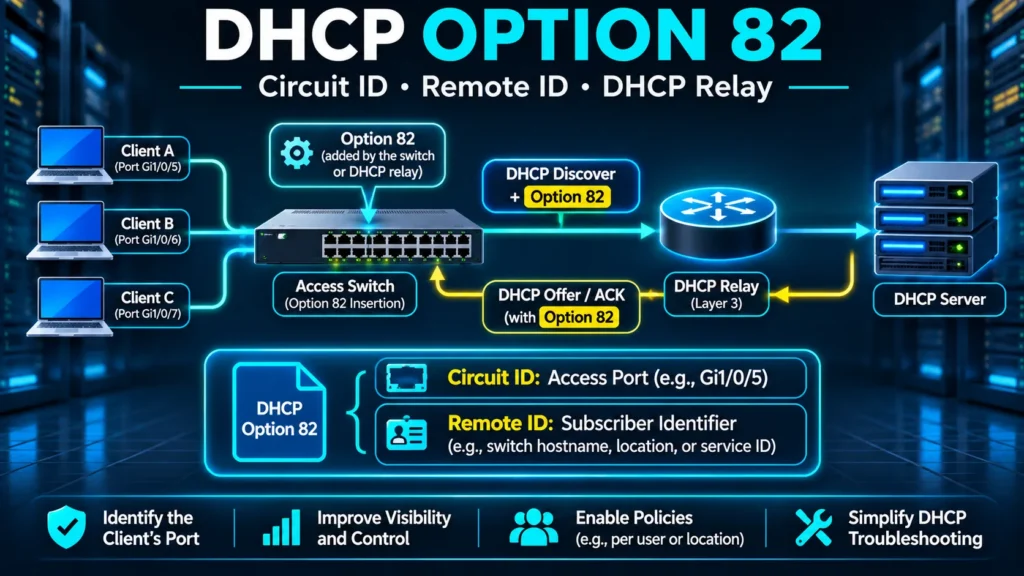
DHCP Option 82, also known as the Relay Agent Information Option, allows network infrastructure devices to add information about a DHCP client’s connection to a DHCP request. The additional information helps DHCP servers identify the access circuit or relay involved in the request and, where supported, apply more granular address-assignment policies.
In enterprise and service-provider networks, Option 82 can improve visibility into where DHCP requests originate. It can also become a source of connectivity problems when access switches, aggregation switches, DHCP relay agents, and DHCP servers do not handle the option consistently.
For example, a Cisco access switch may insert Option 82 into a client’s DHCP Discover packet. An upstream device may then reject that packet because it already contains relay information, or a DHCP server may not support the expected handling.
This guide explains what DHCP Option 82 does, how Circuit ID and Remote ID work, how it interacts with DHCP Snooping, and how to configure and troubleshoot it on supported Cisco devices.
What Is DHCP Option 82?
DHCP Option 82 is an extension to DHCPv4 defined by RFC 3046: DHCP Relay Agent Information Option.
It enables a relay agent or a supporting access device to include information identifying the network attachment point associated with a DHCP client.
Instead of relying solely on the information provided by an endpoint, the DHCP infrastructure can receive additional data supplied by a network device.
The most commonly discussed Option 82 sub-options are:
- Agent Circuit ID (Sub-option 1): Identifies the access circuit or network attachment point as defined by the inserting device.
- Agent Remote ID (Sub-option 2): Identifies a remote endpoint, subscriber, or other device-associated entity according to the deployment’s identification scheme.
The actual values and their encoding are implementation-dependent. Do not assume that Circuit ID always contains a readable interface name or that Remote ID always contains the client’s MAC address.
Why Was DHCP Option 82 Introduced?
Traditional DHCP is designed to deliver IP configuration automatically.
In large networks, however, an operator may need to know which physical or logical access circuit is associated with a request.
Consider a service provider with thousands of customers connected through access switches. The DHCP server may need to apply address or service policies according to the subscriber’s network attachment point.
Option 82 provides a standardized container for that relay-supplied information.
Potential uses include:
- Per-circuit IP address assignment policies
- Subscriber identification
- Access-network troubleshooting
- DHCP lease auditing and correlation
- Location-aware policy selection in supported environments
- Identification of network attachment points
Option 82 does not encrypt DHCP traffic, authenticate an endpoint by itself, or replace network access control.
How DHCP Option 82 Works
To understand Option 82, it helps to revisit the standard DHCP address-assignment process.
A typical DHCPv4 exchange follows the DORA sequence:
- Discover
- Offer
- Request
- Acknowledgment
For more information about DHCP security and the binding database, read our DHCP Snooping configuration and troubleshooting guide.
When relay-agent information is used, an infrastructure device can insert Option 82 while forwarding a client-originated DHCP packet.
A simplified relay workflow is:
- The client sends a DHCP Discover message.
- A supporting access device or DHCP relay agent receives the message.
- The infrastructure device adds Option 82 information.
- The DHCP request is forwarded toward the server.
- The DHCP server processes the request and, in the RFC 3046 relay model, echoes the supplied information in its response.
- The inserting relay agent removes Option 82 before forwarding the reply to the client.
The exact processing path can differ when an access switch inserts Option 82 without functioning as the Layer 3 DHCP relay.
In that situation, upstream relay and server behavior must be compatible with the information inserted by the switch.
Example Network Topology
Consider the following lab:
| Device | Role | Example |
|---|---|---|
| PC-A | DHCP client | Connected to Gi1/0/5 |
| Access switch | Inserts Option 82 with DHCP Snooping | Cisco Catalyst |
| Distribution switch/router | Carries or relays DHCP | Layer 3 gateway |
| DHCP server | Assigns addresses | 192.0.2.10 |
| Client VLAN | Endpoint network | VLAN 10 |
| Gateway | Layer 3 interface | 192.168.10.1 |
The DHCP server address 192.0.2.10 is a documentation example, not a reachable production server.
If the access switch adds relay-agent information, the receiving infrastructure must be configured to handle it appropriately.
Otherwise, the client may fail to obtain a DHCP lease even if the basic VLAN and IP routing configuration appears correct.
DHCP Option 82 Circuit ID Explained
The Circuit ID is Sub-option 1 within Option 82.
Its purpose is to identify the circuit or access point associated with the DHCP request.
Depending on the implementation, it may represent:
- A switch interface
- A VLAN and switchport combination
- A logical subscriber circuit
- A cable or access-network circuit identifier
- Another implementation-specific access identifier
For example, an access switch could encode information associated with VLAN 10 and interface GigabitEthernet1/0/5.
However, the resulting Circuit ID might be binary data rather than the human-readable text Gi1/0/5.
How Is Circuit ID Used?
A compatible DHCP server may use Circuit ID as a policy input.
For instance, a network operator may have separate address-assignment rules for different access circuits.
The server can use the relay-supplied identifier together with other DHCP context to select the appropriate policy.
According to RFC 3046, Circuit ID is treated as an opaque identifier. Its internal format should not be assumed to be standardized across equipment vendors.
This is important during troubleshooting: a captured Circuit ID may not be directly comparable to an interface name without understanding the vendor’s encoding.
DHCP Option 82 Remote ID Explained
Remote ID is Sub-option 2.
It provides another identifier associated with the client-facing side of the access infrastructure.
The meaning of the field depends on the network implementation.
Possible examples include:
- A subscriber identifier
- A modem or remote-device identifier
- A switch-related identifier
- An identifier derived from an access system’s provisioning records
Remote ID and Circuit ID serve complementary roles.
Circuit ID typically identifies the access circuit, while Remote ID can identify the remote entity associated with that circuit.
Circuit ID vs Remote ID
| Feature | Circuit ID | Remote ID |
|---|---|---|
| Sub-option number | 1 | 2 |
| Main purpose | Identify an access circuit | Identify a remote entity or subscriber |
| Typical scope | Local to the inserting relay/access device | Intended to uniquely identify the remote entity |
| Format | Vendor/deployment-dependent | Vendor/deployment-dependent |
| Possible policy use | Circuit-based address assignment | Subscriber/device-based assignment |
A common mistake is assuming the two values are interchangeable.
The DHCP server’s policy must match the identifiers actually inserted by the network equipment.
DHCP Option 82 vs DHCP Relay vs DHCP Snooping
These technologies are related but have different responsibilities.
DHCP Relay
A DHCP relay forwards DHCP traffic between clients and servers that are not on the same local broadcast domain.
On a supported Layer 3 Cisco interface, DHCP forwarding is commonly configured with an ip helper-address pointing to the DHCP server.
A DHCP relay may also insert relay-agent information.
DHCP Snooping
DHCP Snooping is a switch security feature that distinguishes trusted DHCP-server-facing paths from untrusted client-facing paths.
It can block unauthorized DHCP server messages and maintain DHCP binding information.
On supported Cisco Catalyst platforms, DHCP Snooping can also insert Option 82 into forwarded DHCP packets.
DHCP Option 82
Option 82 carries additional information about the request’s network attachment point.
It is not a standalone rogue-DHCP-server protection feature.
| Technology | Primary function |
|---|---|
| DHCP Relay | Forward DHCP between network segments |
| DHCP Snooping | Control DHCP message trust and maintain bindings |
| Option 82 | Carry relay/access-circuit identification information |
These components can be used together, but the commands and default behavior vary between Cisco switch and router platforms.
Cisco DHCP Snooping Option 82 Configuration
The following lab uses a supported Cisco Catalyst switch with IOS or IOS XE.
It illustrates an access-switch scenario in which DHCP Snooping is enabled and Option 82 insertion is desired.
Important: Verify support, defaults, and exact command syntax for your switch model and software release. Some platforms have Option 82 insertion enabled by default when DHCP Snooping is active; others expose different configuration behavior.
Step 1: Verify Existing DHCP Settings
Start by inspecting the switch:
show version
show vlan brief
show interfaces trunk
show ip dhcp snooping
show running-config
Confirm that VLAN 10 exists, DHCP Snooping is supported, and the intended server-facing connection is identified.
Step 2: Enable DHCP Snooping
On supported Catalyst platforms:
enable
configure terminal

ip dhcp snooping
ip dhcp snooping vlan 10
This activates DHCP Snooping globally and on VLAN 10.
Step 3: Configure the Authorized DHCP Uplink
Suppose GigabitEthernet1/0/48 leads toward the authorized DHCP infrastructure.
interface GigabitEthernet1/0/48
 description AUTHORIZED-DHCP-UPLINK
 ip dhcp snooping trust
 exit
Trust the interface only after validating the actual DHCP topology.
Do not trust every trunk or uplink automatically.
Step 4: Keep Client Ports Untrusted
For the workstation:
interface GigabitEthernet1/0/5
 description DHCP-CLIENT
 switchport mode access
 switchport access vlan 10
 no ip dhcp snooping trust
 exit
The client-facing interface remains untrusted.
Step 5: Configure Option 82 Insertion
Where the switch supports the relevant command:
ip dhcp snooping information option
end
This enables insertion of DHCP relay-agent information by the DHCP Snooping implementation.
On some Catalyst releases, this may already be the default when DHCP Snooping is active.
Check the actual operational configuration before assuming a change is necessary.
Step 6: Verify DHCP Snooping and Option 82
Run:
show ip dhcp snooping
show ip dhcp snooping binding
show ip dhcp snooping statistics
Confirm that:
- DHCP Snooping is enabled.
- VLAN 10 is protected.
- The authorized uplink is trusted.
- The client-facing interface is untrusted.
- Option 82 insertion is enabled where intended.
- DHCP clients can obtain leases.
- The expected binding entries appear.
A successful DHCP lease does not by itself prove that the server has processed Circuit ID or Remote ID for policy purposes.
For that, inspect the DHCP server logs or an authorized packet capture.
Cisco’s Catalyst DHCP Snooping configuration documentation describes insertion and related operational considerations for a specific software family. Use equivalent documentation for your actual hardware.
Cisco DHCP Relay Agent Option 82 Configuration
A router or Layer 3 device implementing DHCP relay may use a different set of commands from the access switch.
On supported Cisco IOS XE routing platforms, a typical interface might forward DHCP traffic with:
configure terminal

interface GigabitEthernet0/0
 description CLIENT-VLAN-GATEWAY
 ip address 192.168.10.1 255.255.255.0
 ip helper-address 192.0.2.10
 exit
If the platform supports Cisco’s DHCP relay-agent information feature, the following global command can enable relay insertion:
ip dhcp relay information optionThis command is not interchangeable with the Catalyst DHCP Snooping insertion command.
The router-side feature has its own relay-information policies and trust behavior.
For an example of the supported Cisco IOS XE implementation, consult Cisco: Configuring the DHCP Relay Agent.
What Happens When a DHCP Packet Already Contains Option 82?
An important deployment issue arises when more than one network device processes relay-agent information.
For example:
- An access switch inserts Option 82.
- The upstream router receives the packet.
- The router’s relay policy evaluates a request that already contains Option 82.
Some Cisco relay implementations may reject packets containing relay-agent information, depending on their gateway-address (giaddr) state, configured trust settings, and relay-information policy.
This can result in a DHCP Discover that never reaches the server as expected.
Cisco DHCP Relay Information Policies
Supported Cisco IOS XE routing platforms can provide policies such as:
ip dhcp relay information policy dropip dhcp relay information policy keepip dhcp relay information policy replaceTheir broad meanings are:
| Policy | General behavior |
|---|---|
| Drop | Reject a request already carrying relay-agent information under the relevant policy conditions |
| Keep | Retain the existing information |
| Replace | Replace the existing relay-agent information |
These commands represent alternative choices, not a configuration block to apply sequentially.
Security consideration: Do not change an upstream relay to accept or preserve inserted information from arbitrary devices. Otherwise, untrusted endpoints or access networks may be able to introduce misleading relay-agent identifiers.
The correct choice depends on the end-to-end DHCP design.
Understanding ip dhcp snooping information option allow-untrusted
In some access/aggregation designs, a downstream trusted access switch inserts Option 82 before passing the DHCP request toward an upstream aggregation switch.
The upstream switch may receive the packet on an interface that is untrusted for DHCP Snooping.
On certain Catalyst platforms, a command is available:
ip dhcp snooping information option allow-untrustedThis permits the relevant class of Option 82-bearing packets on untrusted snooping interfaces.
Do not enable this setting as a general solution for DHCP failures.
Cisco warns that enabling it where truly untrusted devices are connected can allow spoofed Option 82 information.
Use it only when the upstream network design explicitly requires the behavior, the downstream device is controlled, and the exact platform supports the command.
The Cisco Catalyst DHCP configuration guide discusses this use case and the associated security concern.
DHCP Option 82 Troubleshooting: Common Problems
Problem 1: DHCP Clients Stop Receiving IP Addresses After Enabling Option 82
Symptoms:
- Clients remain without valid leases.
- DHCP Discover packets are sent but no usable lease is received.
- Connectivity returns when Option 82 insertion is disabled.
- Upstream DHCP relay or server logs show dropped requests.
Possible causes:
- An upstream relay rejects packets containing Option 82.
- The server does not handle the supplied information as expected.
- The access switch inserts data that conflicts with upstream policy.
- Trust boundaries are inconsistent.
- DHCP Snooping is dropping traffic independently of Option 82.
Troubleshooting sequence:
show ip dhcp snooping
show ip dhcp snooping statistics
show ip dhcp snooping binding
Compare switch observations with the DHCP server logs.
If authorized packet captures are available, inspect whether Option 82 is present in Discover/Request messages and whether a reply is returned.
Do not immediately disable DHCP Snooping: doing so may remove an important security control without addressing the actual compatibility issue.
Problem 2: DHCP Discover Reaches the Relay but Not the Server
Check whether the upstream router accepts DHCP packets that already contain relay-agent information.
Verify the actual giaddr value, relay configuration, and ingress trust policy.
On supported IOS XE routers, inspect the configured relay-information policy and trusted sources.
A router that does not accept the incoming Option 82 context may discard the request.
Correct the trusted-path design rather than globally trusting all sources.
Problem 3: DHCP Server Receives Option 82 but Uses the Wrong Address Pool
The server may be configured to assign addresses based on Circuit ID, Remote ID, relay address, or another policy input.
Possible causes include:
- An unexpected Circuit ID encoding.
- A mismatch between the received identifier and server policy.
- An incorrect Remote ID assumption.
- A changed access-switch identifier after migration.
- Confusion between VLAN information and the actual encoded circuit identity.
Inspect the Option 82 sub-options in a DHCP packet capture and compare their exact values with server policy rules.
Remember that RFC 3046 treats these identifiers as opaque values.
Do not assume every platform uses the same hexadecimal or textual representation.
Problem 4: Option 82 Works on One Switch but Fails on Another
Compare:
show version
show ip dhcp snooping
show running-config
Check differences in:
- Hardware and software release
- DHCP Snooping defaults
- VLAN scope
- Uplink trust settings
- Option 82 insertion support
- Relay-agent processing policies
- DHCP server handling
A command copied from an older Catalyst switch may not behave identically on a newer IOS XE platform.
Use platform-specific documentation to validate the expected behavior.
Problem 5: DHCP Snooping Bindings Remain Empty
If bindings do not appear, investigate the entire DHCP exchange.
Possible causes include:
- DHCP Snooping is not active on the correct VLAN.
- No complete DHCP lease exchange occurred.
- The DHCP server response arrived through an unexpected untrusted path.
- An upstream device rejected the Option 82-bearing request.
- The client is statically configured.
- The switch’s binding database was cleared or not restored.
Use:
show ip dhcp snooping
show ip dhcp snooping binding
show ip dhcp snooping statistics
Do not assume the empty binding database is directly caused by Circuit ID or Remote ID. The failure might occur earlier in the DHCP process.
Problem 6: DHCP Server Replies Are Rejected
Under the RFC 3046 relay model, a server processing Option 82 should echo the information to the relay agent, which then removes it before delivering the response to the client.
Some Cisco relays verify that the returned information is valid.
If a server omits or changes data unexpectedly, the relay may reject the reply depending on the implementation and configured checks.
Inspect both directions of the DHCP exchange and compare the Option 82 values.
Relevant Cisco IOS XE relay configurations may include:
ip dhcp relay information checkDo not disable validation as a permanent workaround without understanding the security implications.
DHCP Option 82 Packet Capture Analysis
A packet capture can reveal which DHCP stage is failing.
Use Wireshark or another authorized packet-analysis tool at a suitable monitoring point.
Look for:
- DHCP Discover and Request messages
- DHCP Offer and ACK messages
- Option 82 presence
- Agent Circuit ID
- Agent Remote ID
giaddrvalue- DHCP transaction ID
- Ingress and egress device behavior
The exact Wireshark display names can vary by version, but Option 82 is generally identified as Relay Agent Information Option.
Example Diagnostic Workflow
- Capture the client’s DHCP Discover near the access switch.
- Capture the forwarded request upstream if possible.
- Determine where Option 82 is inserted.
- Inspect the Circuit ID and Remote ID values.
- Determine whether the upstream relay forwards or rejects the packet.
- Verify server receipt and policy processing.
- Check whether the reply returns through the expected path.
- Confirm that the appropriate infrastructure device removes relay-agent information before delivery to the client.
This layered capture approach is more reliable than changing multiple DHCP settings at once.
DHCP Option 82 Security Considerations
Option 82 is useful only when its information comes from an appropriate trust boundary.
Potential risks include:
Spoofed relay information: If untrusted devices can submit arbitrary Option 82 values that are accepted upstream, those values may influence server policy.
Overly broad relay trust: Trusting all incoming relay-agent information may defeat the purpose of using infrastructure-generated identifiers.
Incorrect policy matching: DHCP policies based on poorly documented Circuit ID or Remote ID formats may assign unintended addresses.
Visibility and privacy: Depending on the implementation, relay identifiers can reveal subscriber or access-network information. Logging and retention should follow the organization’s requirements.
DHCP Option 82 should be treated as a network-provided policy signal, not as independent cryptographic proof of endpoint identity.
For related switch protections, read our BPDU Guard vs Root Guard troubleshooting guide and VLAN configuration guide.
DHCP Option 82 Deployment Best Practices
Document the Full DHCP Path
Identify the client access switch, aggregation layer, relay interface, server, and all trust boundaries.
Knowing which device inserts and which device removes Option 82 prevents misconfiguration.
Verify Vendor Defaults
Do not assume Option 82 insertion is universally enabled or disabled.
Review the specific platform’s DHCP Snooping and relay-agent documentation.
Confirm Server Compatibility
Ensure the server understands the required Option 82 workflow and can apply the intended policy.
If no Option 82-based policy is needed, evaluate whether insertion provides operational value in that environment.
Validate Circuit ID and Remote ID Values
Capture the real values and record their formats before writing server-side matching rules.
Avoid basing production policies on assumptions about interface naming conventions.
Limit Trust to Approved Infrastructure
Do not use allow-untrusted or broad relay trust settings simply because DHCP requests are failing.
Identify the legitimate downstream insertion point first.
Test One VLAN Before Expanding
Validate DHCP Discover, Offer, Request, and ACK across a pilot VLAN, including client lease renewal and recovery after switch reloads.
Keep a Rollback Plan
For a supported Catalyst platform, disabling snooping-related Option 82 insertion may use:
configure terminal
no ip dhcp snooping information option
end
This is a platform-specific change to insertion behavior, not a universal fix for all DHCP problems.
Only use it through an authorized maintenance process after reviewing the effect on upstream DHCP policies.
Frequently Asked Questions
What is DHCP Option 82?
DHCP Option 82 is the Relay Agent Information Option defined by RFC 3046. It carries information about the network access circuit or remote entity associated with a DHCP request.
What are Circuit ID and Remote ID?
Circuit ID identifies an access circuit according to the relay’s implementation. Remote ID identifies a remote entity or subscriber. Their exact formats depend on the network equipment and deployment.
Is DHCP Option 82 the same as DHCP Snooping?
No. DHCP Snooping controls DHCP message trust and maintains bindings. Option 82 carries relay or access-identification information. Some Cisco switches insert Option 82 as part of DHCP Snooping operation.
Is DHCP Option 82 enabled by default on Cisco switches?
It depends on the Cisco platform and software release. Some Catalyst DHCP Snooping implementations enable Option 82 insertion by default; other products have different behavior.
Why does DHCP stop working when Option 82 is enabled?
Common causes include upstream relay rejection, incompatible server policies, unexpected Circuit ID or Remote ID values, and incorrect trust boundaries.
Does DHCP Option 82 prevent rogue DHCP servers?
No. Option 82 is not itself a rogue DHCP server prevention feature. DHCP Snooping is the relevant protection for controlling unauthorized DHCP server responses on supported switches.
What is the difference between ip dhcp snooping information option and ip dhcp relay information option?
The first is used in supported Catalyst DHCP Snooping implementations to control relay-agent information insertion. The second is used in supported Cisco DHCP relay implementations. They are not universally interchangeable commands.
Should I enable allow-untrusted to fix DHCP Option 82 errors?
Not without reviewing the topology. Accepting Option 82 from untrusted paths can permit spoofed relay information. Use it only in an appropriate, documented access/aggregation design.
Conclusion
DHCP Option 82 gives DHCP infrastructure additional context about the network access point associated with a client request.
Its Circuit ID and Remote ID sub-options can help administrators build circuit-aware address policies and troubleshoot complex access networks.
Successful deployment depends on three things: understanding where Option 82 is inserted, ensuring upstream relays and servers handle it correctly, and preserving a trusted path for the information.
Start with a small DHCP test environment, verify the actual option values in packet captures, and expand only after the full Discover-to-ACK exchange works reliably.
For the broader access-layer security workflow, continue with our DHCP Snooping configuration guide and the relevant Cisco and RFC documentation linked throughout this article.